b. Select Config ➙ Storage ➙ Intel (R) Rapid Storage Technology ➙ Intel Optane ➙ Disable.
c. Select to preserve user data and select Yes to confirm your operation.
d. Select Disable and wait for the process to complete.
Note: It might take a couple of minutes or even hours to complete the disabling process. Do not
restart the computer until the process is completed.
e. Press F10 to save changes and exit.
2. Disable the built-in battery. See “Disable Fast Startup and the built-in battery” on page 35.
3. Turn off the computer and disconnect the computer from ac power and all connected cables.
4. Close the computer display and turn the computer over.
5. Remove the base cover assembly. See “Base cover assembly” on page 36.
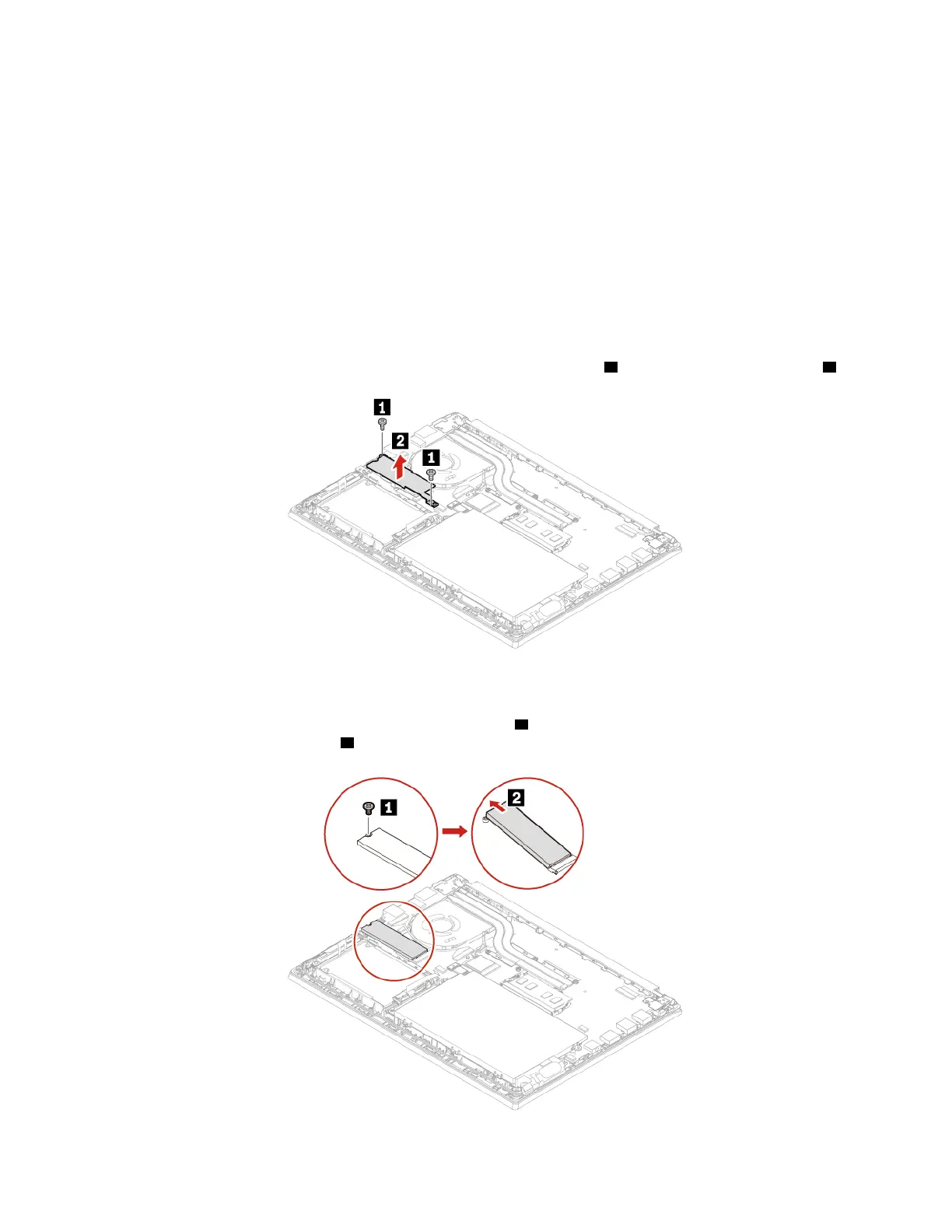
6. Remove the screws that secure the long M.2 solid-state drive bracket
1 and then remove the bracket 2 .
Note: Two thermal pads are attached underneath the long bracket to prevent possible overheating.
Ensure that the thermal pads are not removed or damaged.
7. Remove the screw that secures the M.2 solid-state drive
1 and then the drive pivots upward. Carefully
remove the drive out of the slot
2 .
46 E14/R14/E15/S3 Gen 2 User Guide















 To Next Page