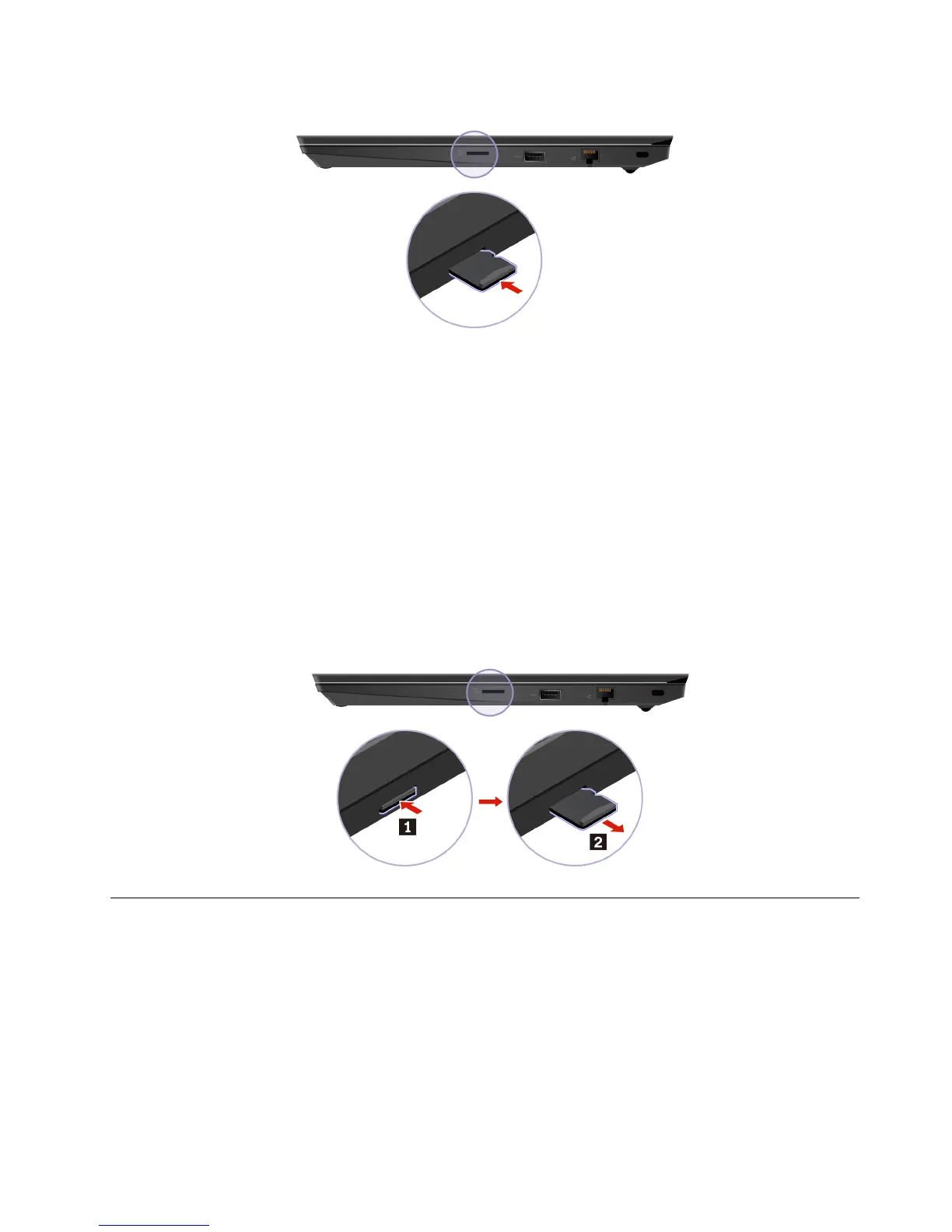
Install a microSD card
1. Locate the card slot on the right side of the computer.
2. With the metal contacts of the card facing down and pointing toward the card slot, press the microSD
card into the card slot until it is secured in place.
Attention: While transferring data to or from a microSD card, do not put your computer into sleep or
hibernation mode before the data transfer is completed. Otherwise, your data could get damaged.
Remove a microSD card
Attention: Before removing a card, eject the card from the Windows operating system first. Otherwise, data
on the card might get corrupted or lost.
1. Click the triangular icon in the Windows notification area to show hidden icons. Then, right-click the
Safely Remove Hardware and Eject Media icon.
2. Select the corresponding item to eject the card from the Windows operating system.
3. Press the card and remove it from your computer. Store the card safely for future use.
Airplane mode
When the Airplane mode is enabled, all wireless features are disabled.
To enable or disable the Airplane mode:
1. Open the Start menu.
2. Click Settings ➙ Network & Internet ➙ Airplane mode.
3. Turn on or turn off the Airplane mode switch.
Chapter 3. Explore your computer 27












 To Next Page