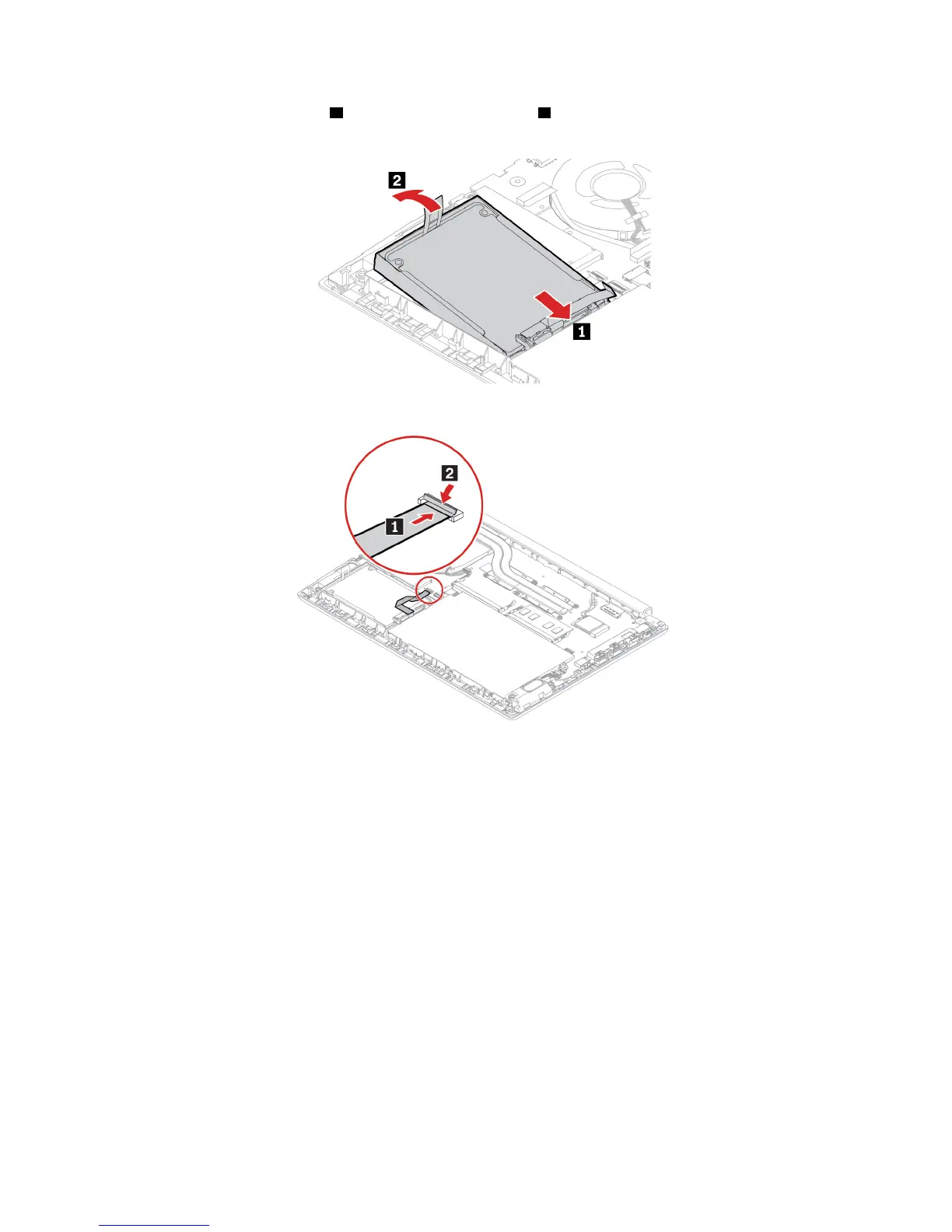
11. Insert the new hard disk drive 1 and then pivot it downward 2 . Ensure that the new hard disk drive is
seated in place.
12. Connect the cable to the system board.
13. Reinstall the base cover assembly.
14. Turn the computer over. Connect the ac power adapter and all disconnected cables.
Keyboard (for E490/R490)
Prerequisite
Before you start, read Appendix A “Important safety information” on page 73 and print the following
instructions.
Replacement procedure
Note: You might be instructed to slide the keyboard frame forward or backward in some of the following
steps. In this case, ensure that you do not press or hold the keys while sliding the keyboard frame.
Otherwise, the keyboard frame cannot be moved.
1. Disable the built-in battery. See “Disable Fast Startup and the built-in battery” on page 40.
2. Turn off the computer and disconnect the computer from ac power and all connected cables.
54
E490/E490s/R490 User Guide












 To Next Page