1. Disable the built-in battery. See “Disable Fast Startup and the built-in battery” on page 40.
2. Turn off the computer and disconnect the computer from ac power and all connected cables.
3. Close the computer display and turn the computer over.
4. Remove the base cover assembly.
• For E490/R490, see “Base cover assembly (for E490/R490)” on page 42.
• For E490s, see “Base cover assembly (for E490s)” on page 40.
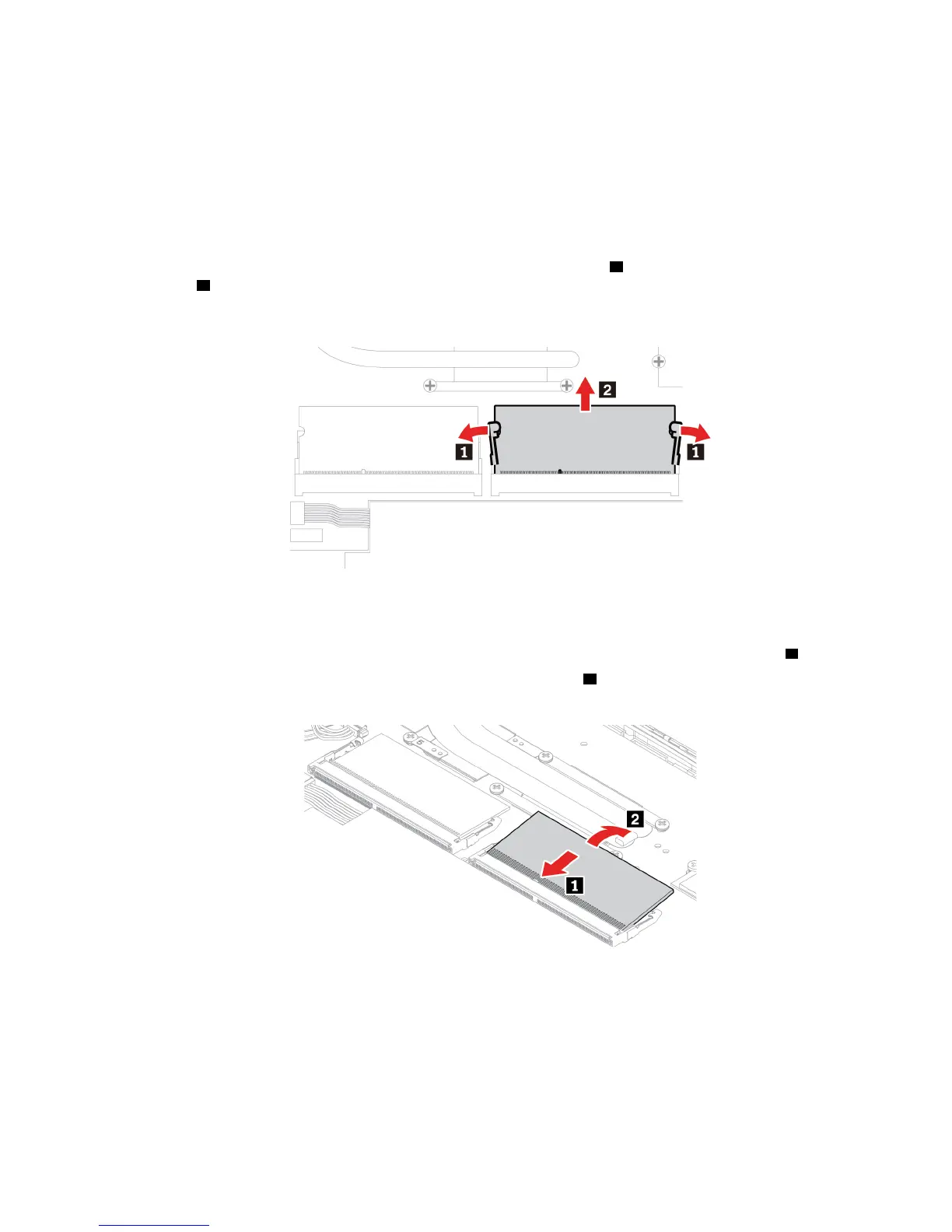
5. Open the latches on both sides of the memory slot at the same time
1 , and then remove the memory
module
2 .
Note: A Mylar film might cover the memory module. To access the memory module, open the film first.
6. Install the memory module by doing the following:
a. Place the notched end of the new memory module toward the contact edge side of the memory slot.
Then insert the new memory module into the memory slot at an angle of about 20 degrees
1 .
b. Pivot the memory module downward until it snaps into place
2 . Ensure that the memory module is
firmly installed in the memory slot and cannot be moved easily.
Note: If your computer is installed with only one memory module, ensure that the memory module is
installed in the memory slot next to the thermal fan assembly.
7. Reinstall the base cover assembly.
8. Turn the computer over. Connect the ac power adapter and all disconnected cables to the computer.
Chapter 6. CRU replacement 49












 To Next Page