Home
Lenovo
Laptop
ThinkPad Edge E540
Page 107
Lenovo ThinkPad Edge E540 - Page 107
186 pages
Manual
Save Page as PDF
To Next Page
To Next Page
To Previous Page
To Previous Page
Loading...
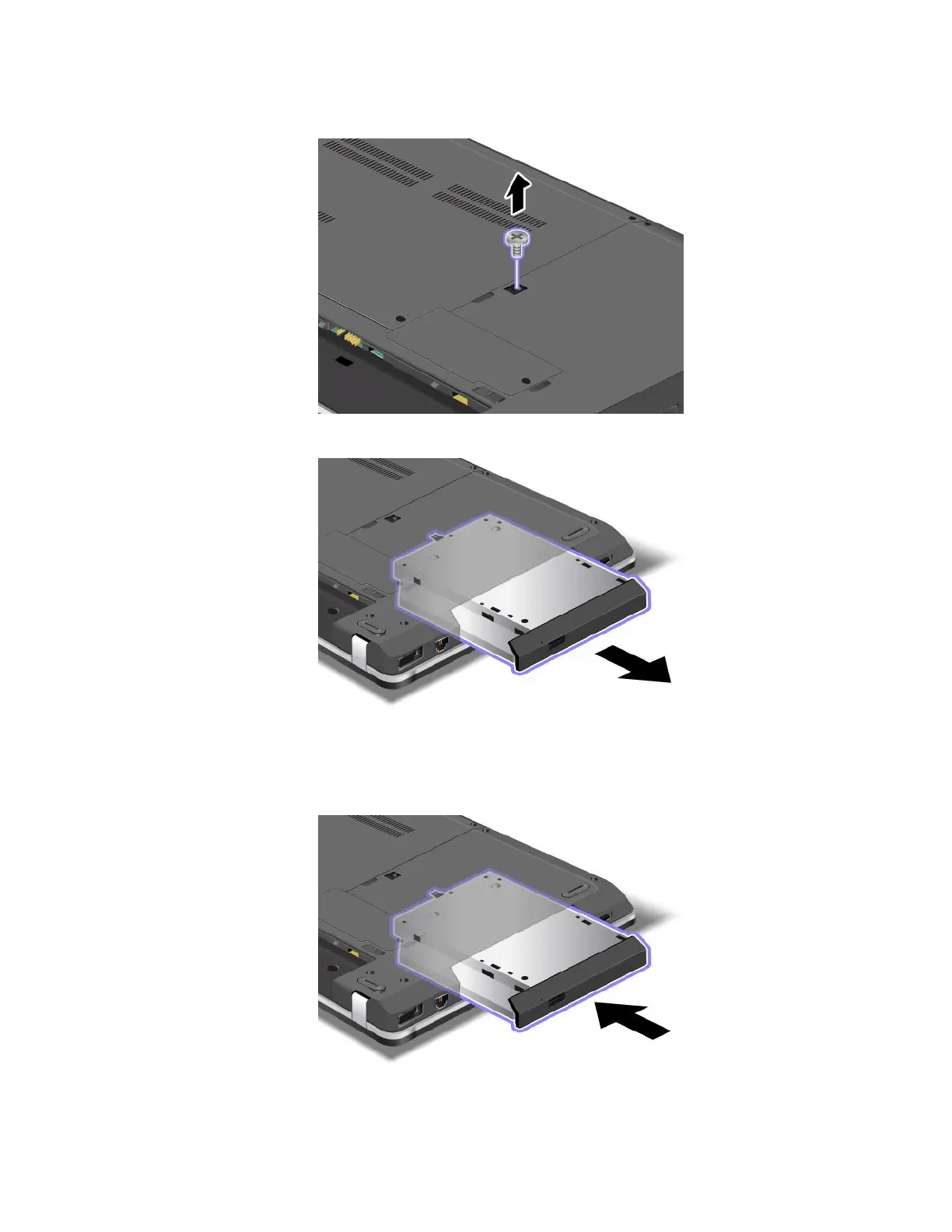
4.
Loosen
the
screw
that
secures
the
optical
drive
and
remove
it.
5.
Pull
out
the
optical
drive.
T
o
install
a
repair
ed
optical
drive
or
a
new
one,
do
the
following:
1.
Insert
the
optical
drive
int
o
the
optical
drive
bay,
and
then
pr
ess
it
rmly
into
the
connector
.
Chapter
6
.
Replacing
devices
91
106
108
Table of Contents
Main Page
Default Chapter
1
User Guide
1
Table of Contents
3
Read this First
7
Important Safety Information
8
Conditions that Require Immediate Action
9
Safety Guidelines
9
Service and Upgrades
9
Power Cords and Power Adapters
10
Extension Cords and Related Devices
11
Plugs and Outlets
11
Power Supply Statement
11
External Devices
12
Rechargeable Battery Notice
12
Lithium Coin Cell Battery Notice
13
Heat and Product Ventilation
13
Electrical Current Safety Information
14
Laser Compliance Statement
15
Using Headphones or Earphones
15
Additional Safety Information
16
Chapter 1. Product Overview
17
Locating Computer Controls, Connectors, and Indicators
17
Front View
17
Right-Side View
21
Left-Side View
22
Bottom View
25
Rear View
26
Status Indicators
26
Locating Important Product Information
28
Machine Type and Model Label
28
FCC ID and IC Certification Number Label
28
Certificate of Authenticity Label
29
Genuine Microsoft Label
30
Features
30
Specifications
31
Microphones
31
Camera 6 Fingerprint Reader
31
Operating Environment
32
Lenovo Programs
33
Accessing Lenovo Programs on the Windows 7 Operating System
33
Accessing Lenovo Programs on the Windows 8 Operating System
34
Lenovo Programs Overview
35
Chapter 2. Using Your Computer
39
Registering Your Computer
39
Frequently Asked Questions
39
Using the Multi-Touch Screen
41
Special Keys
43
Thinkpad Edge E440 Special Keys
43
Thinkpad Edge E540 Special Keys
45
Using the Thinkpad Pointing Device
47
Power Management
48
Checking the Battery Status
49
Using the Ac Power Adapter
49
Charging the Battery
50
Maximizing the Battery Life
50
Managing the Power Plans
50
Power-Saving Modes
50
Handling the Battery
52
Connecting to the Network
53
Ethernet Connections
53
Wireless Connections
53
Using the Wireless Lan Connection
54
Presentations and Multimedia
56
Changing Display Settings
57
Using an External Monitor
57
Using a Projector
58
Using Dual Displays
58
Using Audio Features
59
Using the Camera
60
Using the Optical Drive
60
Using a Flash Media Card
60
Inserting a Flash Media Card
61
Removing a Flash Media Card
61
Chapter 3. You and Your Computer
63
Accessibility and Comfort
63
Ergonomic Information
63
Comfort
64
Accessibility Information
64
Traveling with Your Computer
65
Travel Tips
65
Travel Accessories
65
Chapter 4. Security
67
Attaching a Mechanical Lock
67
Using Passwords
67
Typing Passwords
67
Power-On Password
67
Supervisor Password
68
Hard Disk Passwords
70
Hard Disk Security
71
Using the Fingerprint Reader
72
Notice on Deleting Data from Your Hard Disk Drive or Solid-State Drive
74
Using Firewalls
75
Protecting Data against Viruses
75
Chapter 5. Recovery Overview
77
Recovery Overview for the Windows 7 Operating System
77
Creating and Using a Recovery Media
77
Performing Backup and Recovery Operations
78
Using the Rescue and Recovery Workspace
79
Creating and Using a Rescue Medium
80
Reinstalling Preinstalled Programs and Device Drivers
81
Solving Recovery Problems
81
Recovery Overview for the Windows 8 Operating System
82
Refreshing Your Computer
82
Resetting Your Computer to the Factory Default Settings
82
Using the Advanced Startup Options
83
Recovering Your Operating System if Windows 8 Fails to Start
83
Creating and Using Recovery Media
83
Chapter 6. Replacing Devices
85
Static Electricity Prevention
85
Replacing the Battery
85
Replacing the SIM Card
87
Replacing the Keyboard
88
Thinkpad Edge E440
88
Removing the Keyboard
89
Thinkpad Edge E540
95
Replacing the Hard Disk Drive or Solid-State Drive
101
Replacing the Optical Drive
104
Thinkpad Edge E440
104
Thinkpad Edge E540
106
Replacing a Wireless LAN Card
108
Replacing a Wireless WAN Card
111
Replacing a Memory Module
113
Replacing the Backup Battery
116
Chapter 7. Enhancing Your Computer
119
Finding Thinkpad Options
119
Thinkpad Onelink Dock
119
Chapter 8. Advanced Configuration
121
Installing a New Operating System
121
Installing the Windows 7 Operating System
121
Installing the Windows 8 Operating System
122
Installing Device Drivers
123
Using the Thinkpad Setup Program
123
Main Menu
124
Config Menu
124
Date and Time Menu
128
Security Menu
128
Startup Menu
133
Restart Menu
135
Updating Your System UEFI BIOS
135
Chapter 9. Preventing Problems
137
General Tips for Preventing Problems
137
Making Sure Device Drivers Are Current
138
Taking Care of Your Computer
139
Cleaning the Cover of Your Computer
140
Chapter 10. Troubleshooting Computer Problems
143
Diagnosing Problems
143
Troubleshooting
143
Computer Stops Responding
143
Spills on the Keyboard
144
Error Messages
144
Errors Without Messages
146
Beep Errors
147
Memory Module Problems
148
Networking Problems
148
A Wireless Lan Problem
149
Bluetooth Problems
149
Problems with the Keyboard and Other Pointing Devices
150
Problems with the Display and Multimedia Devices
151
External Monitor Problems
152
Audio Problems
154
Fingerprint Reader Problems
156
Battery and Power Problems
156
Power Problems
157
A Power Button Problem
157
Sleep and Hibernation Problems
158
Problems with Drives and Other Storage Devices
159
A Software Problem
160
Problems with Ports and Connectors
161
Chapter 11. Getting Support
163
Before You Contact Lenovo
163
Getting Help and Service
164
Using Diagnostic Programs
164
Lenovo Support Web Site
164
Calling Lenovo
164
Purchasing Additional Services
165
Appendix A. Regulatory Information
167
Wireless Related Information
167
Location of the Ultraconnect Wireless Antennas
168
Locating Wireless Regulatory Notices
169
Export Classification Notice
169
Electronic Emission Notices
169
Federal Communications Commission Declaration of Conformity
169
Industry Canada Class B Emission Compliance Statement
170
European Union - Compliance to the Electromagnetic Compatibility Directive
170
German Class B Compliance Statement
170
Korea Class B Compliance Statement
171
Japan VCCI Class B Compliance Statement
171
Japan Compliance Statement for Products Which Connect to the Power Mains with Rated Current Less than or Equal to 20 a Per Phase
171
Lenovo Product Service Information for Taiwan
171
Appendix B. WEEE and Recycling Statements
173
Important WEEE Information
173
Japan Recycling Statements
173
Recycling Information for Brazil
174
Battery Recycling Information for the European Union
174
Battery Recycling Information for Taiwan
175
Battery Recycling Information for the United States and Canada
175
Recycling Information for China
175
Appendix C. ENERGY STAR Model Information
177
Copyright Lenovo
179
Appendix D. Notices
179
Trademarks
180
Appendix E. Restriction of Hazardous Substances Directive (Rohs)
181
European Union Rohs
181
China Rohs
181
India Rohs
181
Turkish Rohs
181
Ukraine Rohs
182
Appendix F. Eurasian Compliance Mark
183
Other manuals for Lenovo ThinkPad Edge E540
Safety, Warranty, And Setup Guide
2 pages
Related product manuals
Lenovo ThinkPad Edge E545
116 pages
Lenovo ThinkPad Edge E520
194 pages
Lenovo ThinkPad Edge E530
158 pages
Lenovo ThinkPad Edge E531
182 pages
Lenovo ThinkPad Edge E525
168 pages
Lenovo ThinkPad Edge E535
180 pages
Lenovo ThinkPad Edge 15
158 pages
Lenovo ThinkPad Edge E435
180 pages
Lenovo ThinkPad Edge E130
164 pages
Lenovo ThinkPad Edge E430
180 pages
Lenovo ThinkPad Edge E440
186 pages
Lenovo ThinkPad Edge E425
168 pages













 To Next Page