Tasks
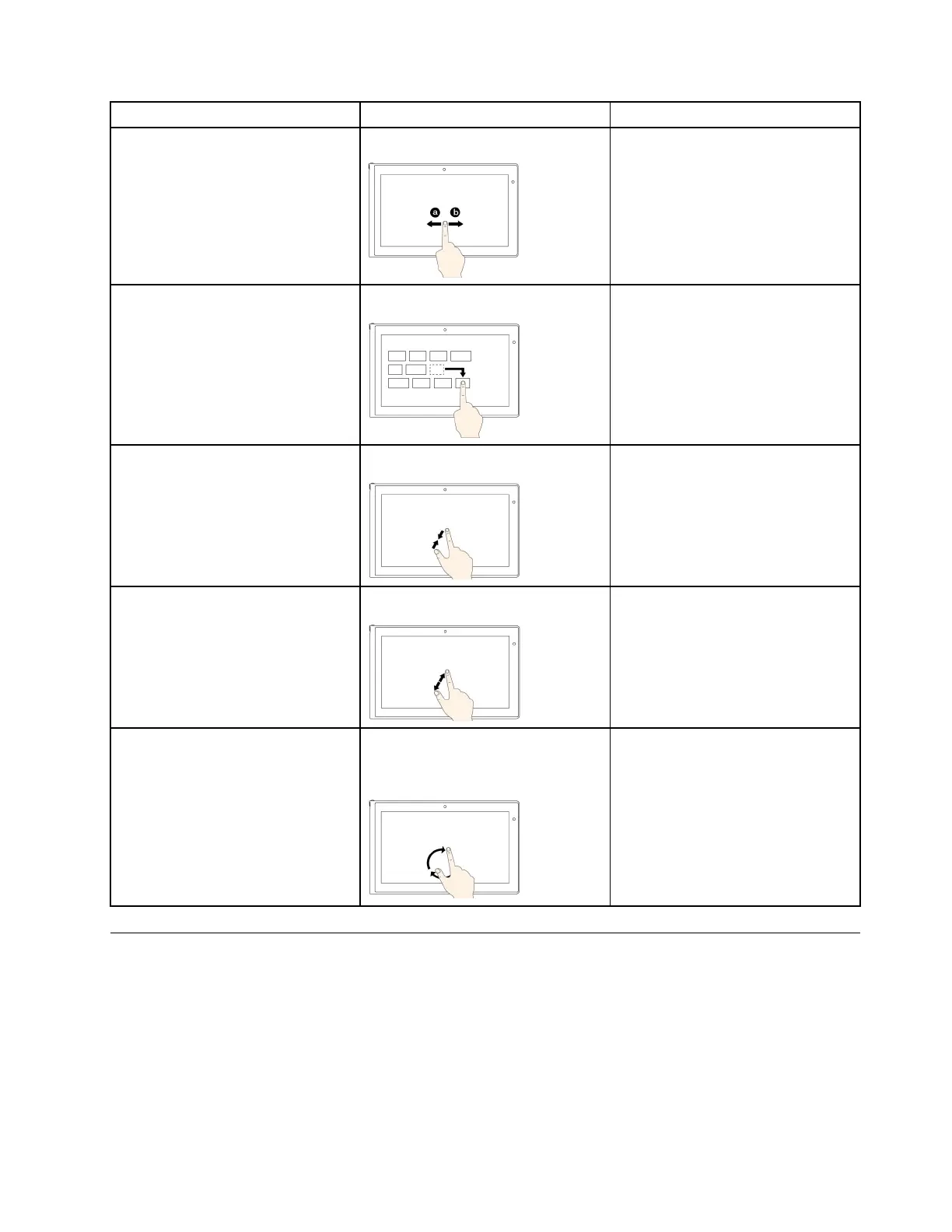
Touchgestures(touchmodelsonly)
Mouseactions
Toscrollthroughitems,suchaslists,
pages,andphotos
Slide.Scrollthemousewheel,movethe
scrollbar,orclickthescrollarrow.
TomoveanobjectDraganitemtothedesiredlocation.
Click,hold,anddraganitem.
Tozoomout
Movetwongersclosertogether.
PresstheCtrlkeywhilescrollingthe
mousewheelbackward.
Tozoomin
Movetwongersfartherapart.
PresstheCtrlkeywhilescrollingthe
mousewheelforward.
Torotateanitem
Puttwoormorengersonan
item,andthenrotateyourngers
(supportedonlyonsomemodels).
Iftheapplicationsupportsrotation,
clicktherotationicon.
Specialkeys
Yourcomputerhasseveralspecialkeystohelpyouworkmoreeasilyandeffectively.
ThinkPadEdgeE440specialkeys
ThefollowinggureshowsthelocationsofmainspecialkeysforThinkPadEdgeE440.
Chapter2.Usingyourcomputer27













 To Next Page