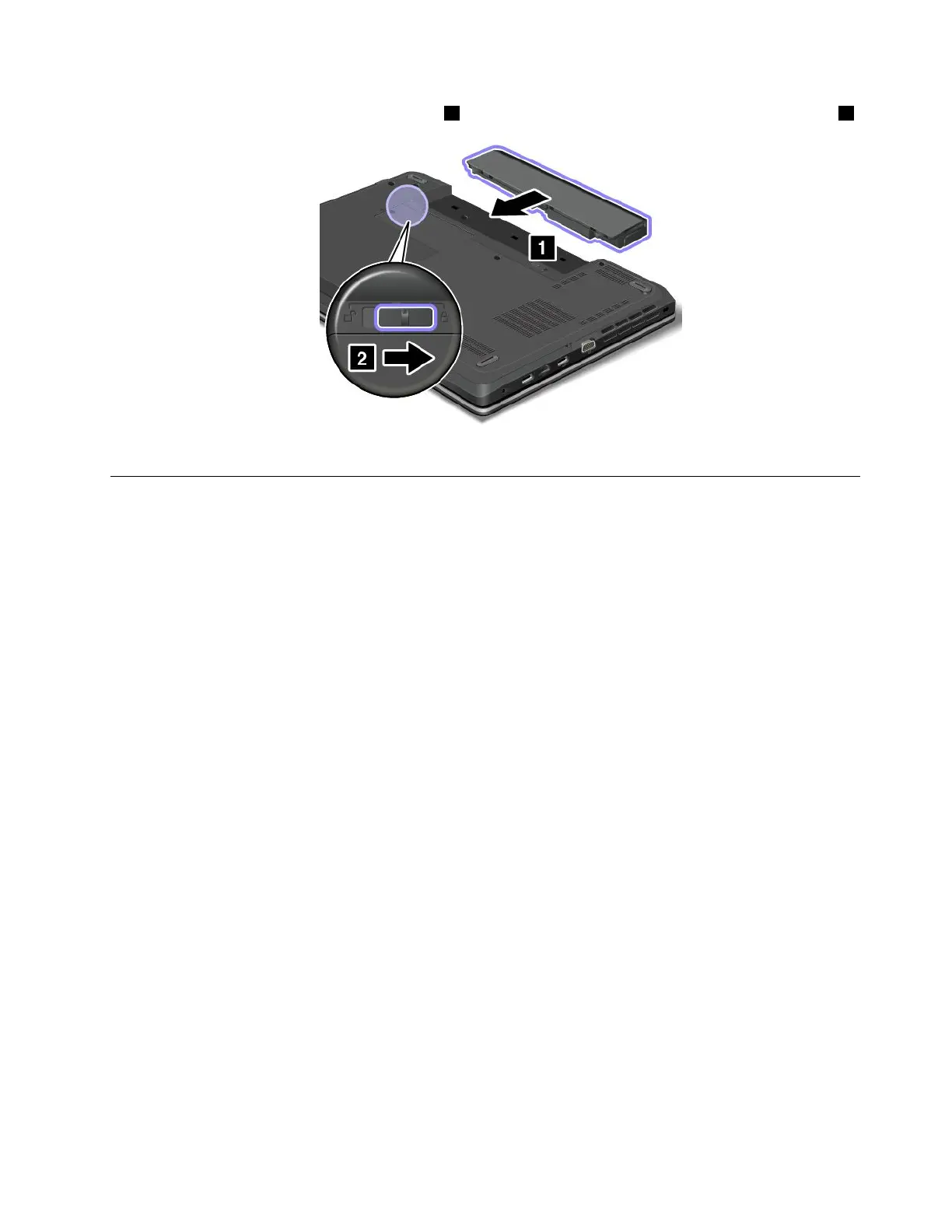
4.Insertanewbatteryuntilitclicksintoplace1,andthenslidethebatterylatchtothelockedposition2.
5.Turnthecomputeroveragain.Connecttheacpoweradapterandallcables.
ReplacingtheSIMcard
Beforeyoustart,printtheseinstructions.
IfyourcomputerisequippedwithaSIMcardslot,yourcomputermightrequireaSIMcardtoestablish
wirelessWANconnections.Dependingonthecountryofdelivery,youmightneedtopurchaseaSIM
cardoraSIMcardmightalreadybeinstalledinyourcomputerorispartoftheshippingcontentsthat
comewithyourcomputer.
IfyoundaSIMcardincludedintheshippingcontents,adummycardisinstalledintheSIMcardslot.
Note:TheSIMcardisidentiedbytheICchipmountedononesideofthecard.
ToreplacetheSIMcard,dothefollowing:
1.Turnoffthecomputer;thendisconnecttheacpoweradapterandallcablesfromthecomputer.Wait
threetoveminutestoletthecomputercool.
2.Closethecomputerdisplay,andturnitover.
3.Removethebattery.See“Replacingthebattery”onpage69.
Chapter6.Replacingdevices71













 To Next Page