•FortheMicrosoftWindows8operatingsystem:ClickthebatterystatusiconintheWindowsnotication
areaandclickMorepoweroptions.ThenclickChoosewhatthepowerbuttonsdo.
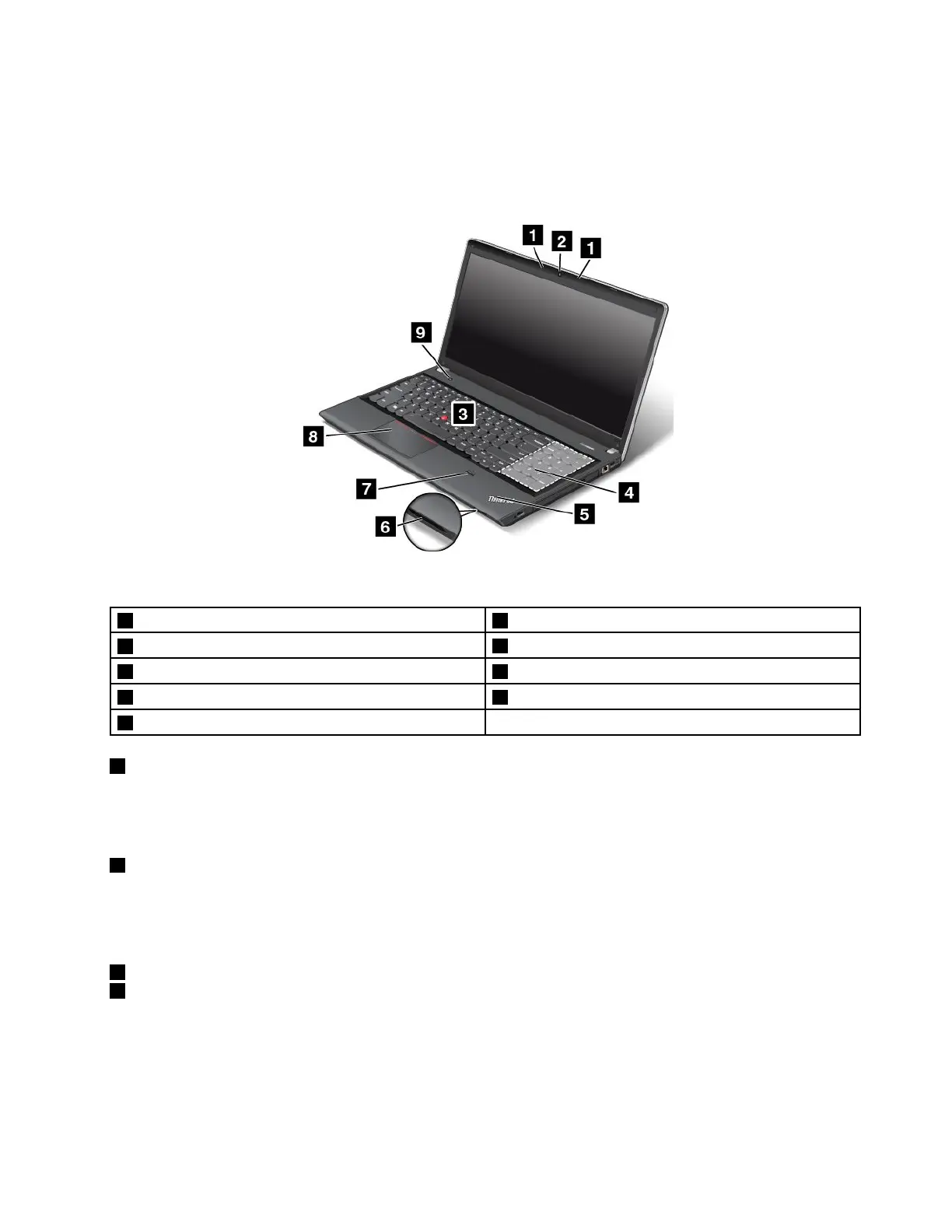
ThinkPadEdgeE540frontview
Figure2.ThinkPadEdgeE540frontview
1Microphones6Mediacardreaderslot
2Camera
7Fingerprintreader
3TrackPointpointingstick8ThinkPadtrackpad
4Numerickeypad9Powerbutton
5Systemstatusindicator
1Microphones
Thebuilt-inmicrophonescapturesoundandvoicewhenusedwithaprogramcapableofhandlingaudio.
Dependingonyourmodel,yourcomputermightcomewithonemicrophone.
2Camera
Somemodelshaveanintegratedcamera.Usethecameratotakepicturesorholdavideoconference.
Fordetails,see“Usingthecamera”onpage44.
ThinkPadpointingdevice
3TrackPointpointingstick
8ThinkPadtrackpad
ThekeyboardcontainstheThinkPadpointingdevice.Pointing,selecting,anddraggingareallpartofasingle
processthatyoucanperformwithoutmovingyourngersfromatypingposition.Formoreinformation,see
“UsingtheThinkPadpointingdevice”onpage31
.
Chapter1.Productoverview3













 To Next Page