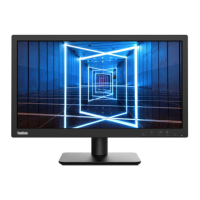
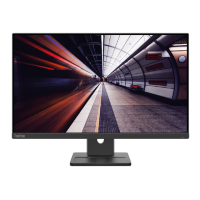
The Lenovo ThinkVision E24-30 (Machine Type: 63ED) is a flat panel monitor designed for general office and home use, offering a balance of comfort, accessibility, and environmental responsibility. This user guide provides comprehensive information on its setup, adjustment, and maintenance, ensuring optimal performance and user experience.
Function Description
The ThinkVision E24-30 serves as a visual display unit for computers, providing a clear and adjustable interface for various tasks. It supports multiple input signals, including HDMI, DisplayPort, and VGA, making it compatible with a wide range of devices. The monitor is designed to enhance productivity and user well-being through ergonomic adjustments and user-friendly controls.
Important Technical Specifications
- Model Type: 63ED-MAR2-WW
- Dimensions:
- Depth: 178.6 mm (7.03 inch)
- Height: 497.2 mm (19.57 inch)
- Width: 539.4 mm (21.24 inch)
- Stand:
- Tilt: -5° to 22°
- Swivel: -360° to 360°
- Pivot: -90° to 90°
- Height Adjustment: 155 mm
- Weight:
- With stand assembly: 4.7 kg (10.4 lbs)
- Without stand assembly (For wall mount or VESA mount considerations - no cables): 3.1 kg (6.9 lbs)
- VESA Mount: Supported (100 mm x 100 mm, 3.94 in. x 3.94 in.)
- Image:
- Viewable image size: 604.7 mm (23.8 inch)
- Maximum height: 296.5 mm (11.67 inch)
- Maximum width: 527.0 mm (20.75 inch)
- Pixel pitch: 0.2745 mm (0.011 inch)
- Power Input:
- Supply voltage: 100-240V AC
- Supply current: 1.3A
- Power Consumption:
- Normal operation: <29.0 W (max), <12.0 W (typical)
- Standby/Suspend: <0.5 W
- Off: <0.3 W
- Energy Star (P_ON): 11.01 W
- Energy Star (E_TEC): 35.35 kWh
- Video Input (Analog):
- Interface: VGA
- Input signal: Analog Direct Drive, 75 ohm 0.7V
- Horizontal addressability: 1920 pixels (max)
- Vertical addressability: 1080 lines (max)
- Clock frequency: 170 MHz
- Video Input (DP):
- Interface: DP
- Horizontal addressability: 1920 pixels (max)
- Vertical addressability: 1080 lines (max)
- Clock frequency: 240 MHz
- Video Input (HDMI):
- Interface: HDMI
- Horizontal addressability: 1920 pixels (max)
- Vertical addressability: 1080 lines (max)
- Clock frequency: 240 MHz
- Communications: VESA DDC, CI
- Supported Display Modes:
- Horizontal frequency: 30 kHz - 115 kHz
- Vertical frequency: 48 Hz - 100 Hz
- Native Resolution: 1920 x 1080 at 60 Hz
- Environmental Conditions:
- Temperature:
- Operating: 0° to 40° C (32° to 104° F)
- Storage: -20° to 60° C (-4° to 140° F)
- Shipping: -20° to 60° C (-4° to 140° F)
- Humidity:
- Operating: 8% to 80% non-condensing
- Storage: 5% to 95% non-condensing
- Shipping: 5% to 95% non-condensing
Usage Features
- Ergonomic Adjustments: The ThinkVision E24-30 offers extensive ergonomic adjustments to ensure user comfort and reduce strain during prolonged use. These include:
- Tilt: The screen can be tilted from -5° to 22° to find the optimal viewing angle.
- Swivel: The monitor can swivel 360° in either direction on its pedestal, allowing for easy screen sharing and flexible positioning.
- Height Adjustment: The screen height can be adjusted by 155 mm, enabling users to set the monitor at eye level.
- Pivot: The monitor can be pivoted 90° clockwise or counter-clockwise, supporting both landscape and portrait orientations, which is beneficial for tasks like document editing or programming.
- On-Screen Display (OSD) Controls: The monitor features intuitive OSD controls for adjusting various display settings. These controls are typically located on the back or bottom of the monitor. Key OSD functions include:
- Brightness and Contrast: Adjust the overall luminance and contrast of the display.
- Color Mode: Select from various color modes (e.g., Warm, Neutral, Cool, sRGB, Custom) to suit different viewing preferences or tasks.
- Input Signal Selection: Manually select the input source (VGA, HDMI, DisplayPort).
- Volume and Mute: Control audio output if the monitor has built-in speakers or an audio jack.
- Image Setup: Fine-tune image parameters like clock, phase, and position for analog signals.
- Advanced Settings: Access features like Button Repeat Rate, Aspect Ratio, LED Indicator, and Power button lock.
- Information: View monitor model name, firmware, serial number, and current resolution/refresh rate.
- Menu Settings: Adjust OSD time out, position, and transparency.
- Quick Tips for Healthy Work Habits: The guide emphasizes the importance of good posture, regular breaks, and proper equipment setup to prevent discomfort and promote long-term health. It recommends adjusting the monitor to eye level, using adequate lighting, and taking short, periodic breaks to stretch and move.
- Accessibility Information: Lenovo is committed to providing greater access to information and technology for people with disabilities. The monitor's design and documentation aim to be accessible.
- Energy Star Compliance: The ThinkVision E24-30 is an Energy Star certified product, indicating its energy efficiency and reduced environmental impact. It incorporates power management features that automatically reduce power consumption when the computer is idle or in standby mode.
- Flicker-Free Technology: The monitor adopts Flicker-Free technology, which helps reduce eye strain and fatigue by eliminating screen flicker.
- Cable Lock Slot: The monitor is equipped with a cable lock slot, allowing users to secure the monitor with a compatible cable lock to prevent theft.
- VESA Mounting: The monitor supports VESA mounting, enabling users to attach it to a wall-mounted bracket or an alternative stand for flexible placement.
Maintenance Features
- Cleaning:
- Do not: Apply water or liquid directly to the monitor, use solvents or abrasives, use flammable cleaning materials, or touch the screen area with sharp or abrasive items.
- Do: Lightly dampen a soft cloth with water and use it to gently wipe the covers and the screen. Remove grease or finger marks with a damp cloth and a mild detergent.
- Detaching the Monitor Base and Stand: The guide provides clear instructions for removing the monitor base and stand, which is necessary for VESA mounting or transportation.
- Installing the Monitor Driver: The user guide details the steps for installing the monitor driver in Windows 10 and Windows 11. This process ensures optimal display performance and compatibility. It involves navigating through the Device Manager to update the driver, selecting the appropriate driver file (E24-30.inf), and completing the installation.
- Troubleshooting: A comprehensive troubleshooting section helps users diagnose and resolve common issues such as:
- "Input not supported" message.
- Image quality issues (unacceptable, incorrect colors).
- Power indicator not lit or amber.
- Screen blank or power indicator amber.
- Fuzzy lines or blurry image.
- One or more pixels appearing discolored.
- Horizontal or vertical lines through the image.
For each problem, possible causes, suggested actions, and references to relevant sections in the guide are provided.
- Service Information: The guide outlines customer responsibilities regarding warranty and provides information on service parts. It also lists telephone technical support numbers for various countries/regions, ensuring users can access assistance when needed.
- Recycling Information: Lenovo encourages responsible recycling of its IT equipment. Information on recycling programs and processes is provided, emphasizing the company's commitment to environmental sustainability.
- Power Cords and Power Adapters: The manual specifies that only power cords and adapters supplied by the product manufacturer should be used, and they should not be used for other devices.

 Need help?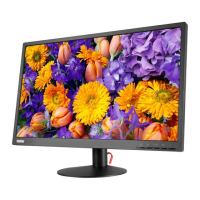





 To Next Page
 General