mylevana.com
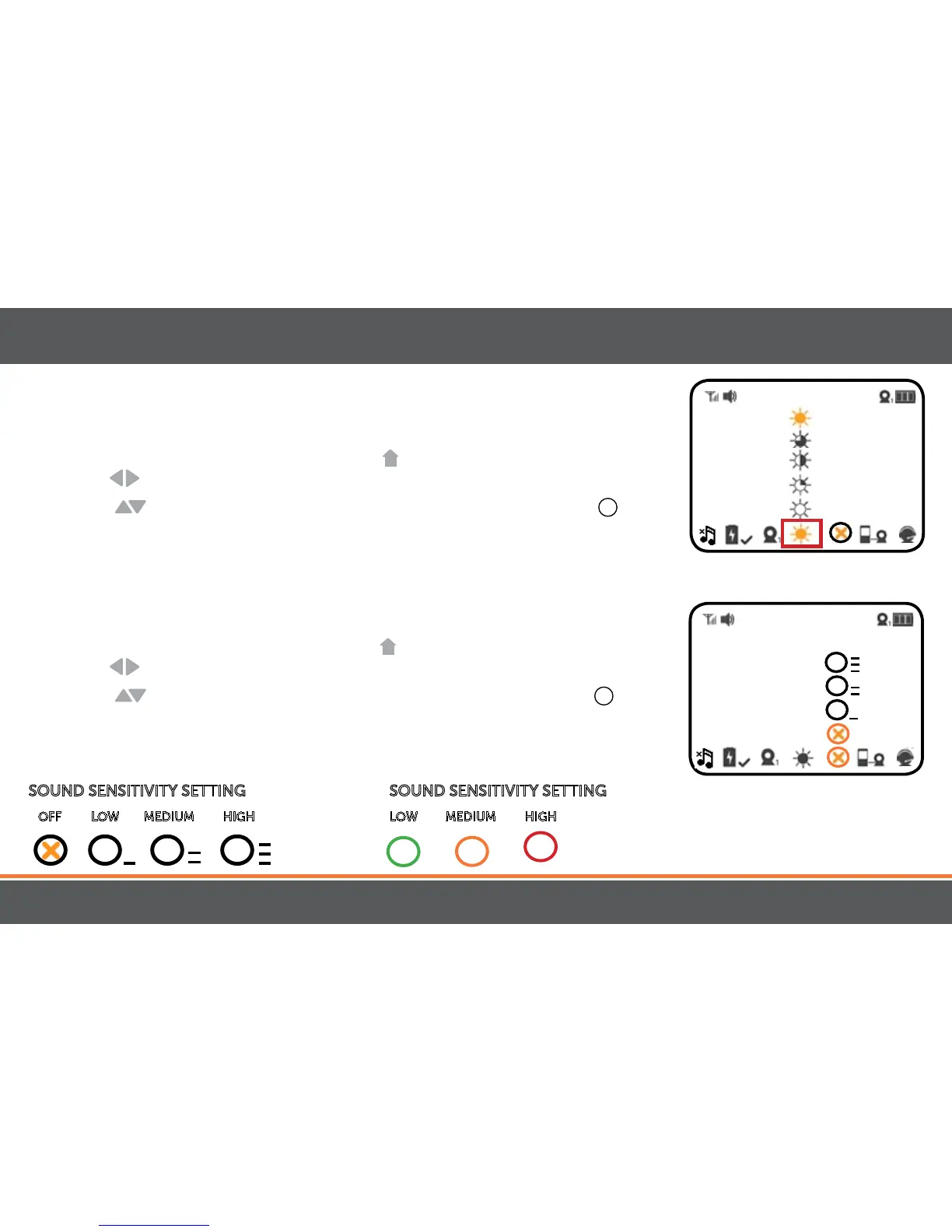
SettingtheBrightness
BrightnessMode sets the brightness of the the screen. BrightnessModealso extends the
battery life.
1. To set the BrightnessMode, press the MENU
button. Using the navigational
arrows
on the front of the monitor, highlight the BRIGHTNESS icon.
2. Use the
to toggle to the your desired brightness and press the SELECT
+
button
once to select.
SoundSensitivitySettings
Sensitivity Mode allows you to adjust the sensitivity of the sound the that the camera
picks up.
1. To set the Sensitivity Mode, press the MENU
button. Using the navigational
arrows
on the front of the monitor, highlight the SENSITIVITY icon.
2. Use the
to toggle to the your desired sensiticity and press the SELECT
+
button
once to select.
3. The LEDRingon the front of the monitor also indicates how loud the sound in the
room is.
18
OPERATION
SOUND SENSITIVITY SETTING
OFF LOW MEDIUM HIGH
—
—
—
—
—
—
—
—
—
—
—
—
SOUND SENSITIVITY SETTING
LOW MEDIUM HIGH



 To Next Page