39
(b)7.1.2 Network Interface
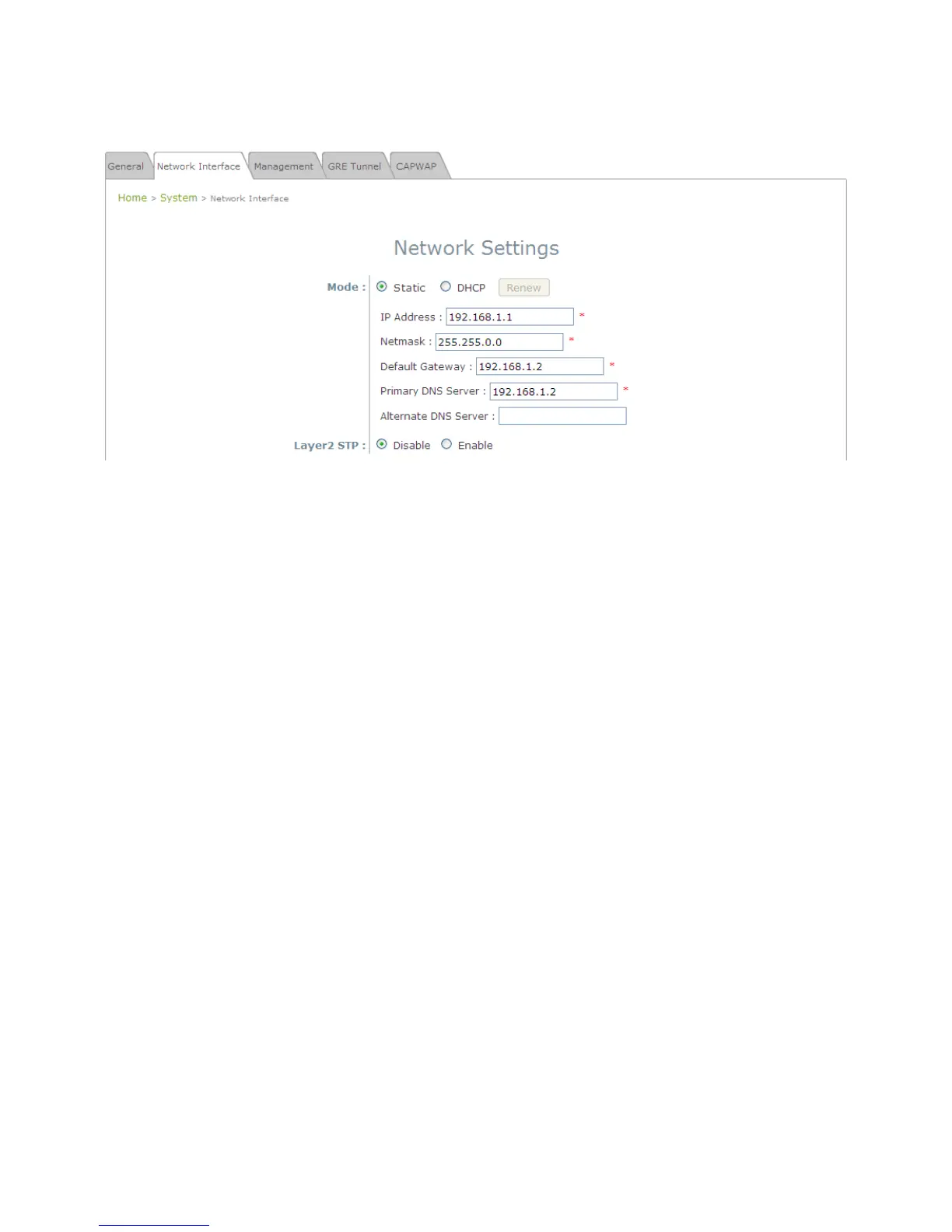
On this page, the network settings of the device can be configured; fields with a red asterisk (i.e. IP
Address, Netmask, Default Gateway, and Primary DNS Server) are mandatory.
Network Settings Page
• Mode: Determine the way to obtain the IP address, by DHCP or Static.
Static: The administrator can manually set up the static LAN IP address. All required fields are
marked with a red asterisk.
o IP Address: The IP address of the LAN port.
o Netmask: The Subnet mask of the LAN port.
o Default Gateway: The Gateway IP address of the LAN port.
o Primary DNS Server: The IP address of the primary DNS (Domain Name System) server.
o Alternate DNS Server: The IP address of the substitute DNS server.
DHCP: This configuration type is applicable when the system is connected to a network with the
presence of a DHCP server; all related IP information required will be provided by the DHCP server
automatically.
• Layer 2 STP: If the EAP-200 is set up to bridge other network components, this option can be enabled to
prevent undesired loops because broadcasting storm may occur in a multi-switch environment where
broadcast packets are forwarded in an endless loop between switches. Moreover, a broadcast storm may
consume most of available system resources in addition to available bandwidth. Thus, enabling the Layer
2 STP can lower such undesired occurrence and derive the best available data path for network
communication.















 To Next Page