Home
LevelOne
Network Router
FBR-1161
Page 24 (3.7. Configuring with Web Browser)
LevelOne FBR-1161 - 3.7. Configuring with Web Browser
60 pages
Manual
Save Page as PDF
To Next Page
To Next Page
To Previous Page
To Previous Page
Loading...
21
3.7.
Configuring
with y
our Web Bro
wser
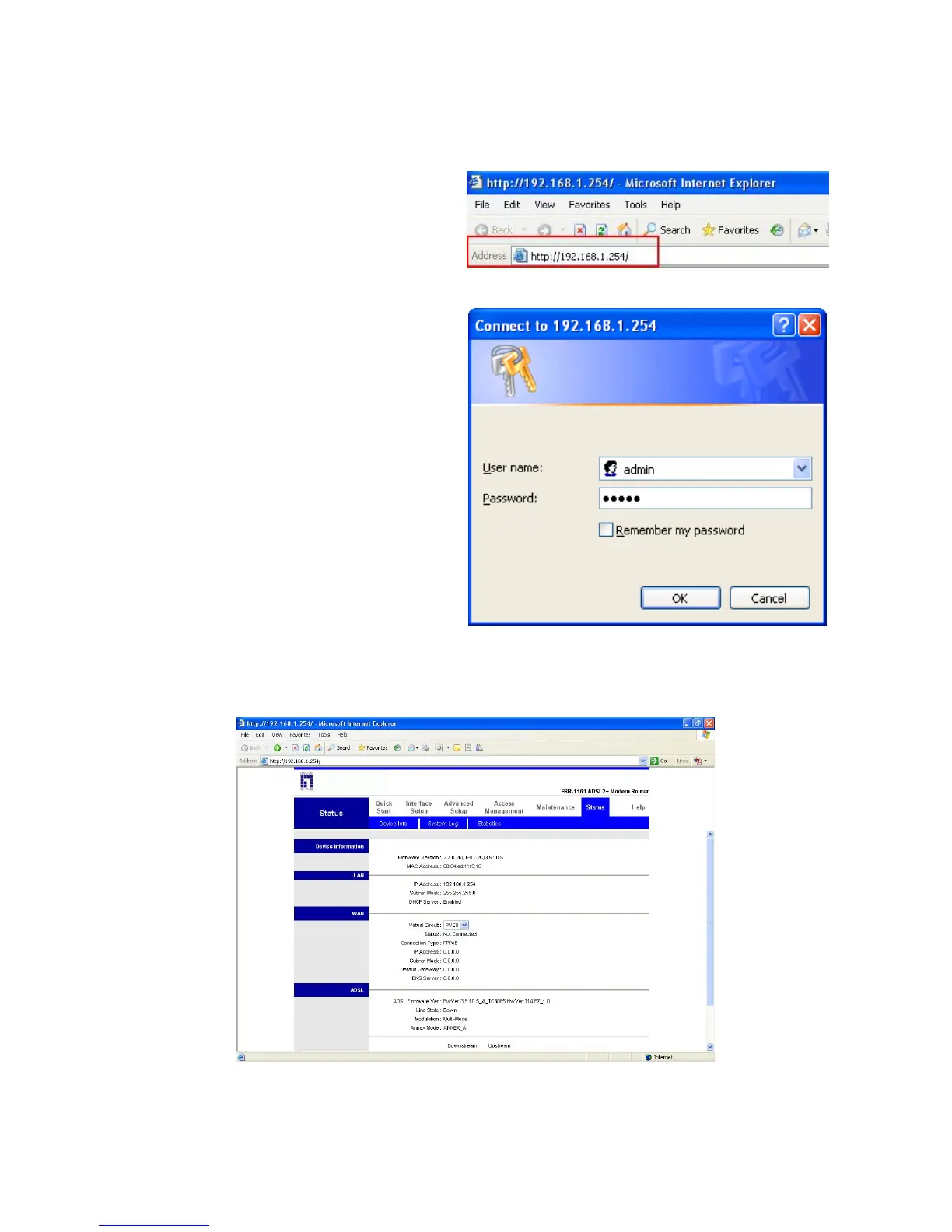
Open your web browser
, enter the I
P
address of your router
, which by default is
192.168.1.254, and click “Go”, a user
name and passw
ord window prompt will
appear
. The default username and
password are “admin”
and “admin”.
Congratulation! Y
ou are now successfully logon to the
A
DSL
2+
Modem/Router!
23
25
Table of Contents
Main Page
Default Chapter
2
Table of Contents
2
1 Introduction
4
Overview
4
Features
6
2 Installation
9
Important Note
9
Package Contents
9
Front Panel
10
Rear Panel
11
Cabling
12
3 Basic Installation
13
Before Configuration
13
Factory Default Settings
13
Installing the Usb Driver
14
For Windows XP & 2000
14
For Windows 98SE & Me
17
Configuring Your Pc Network Properties
19
Windows XP
19
Windows 2000
20
Windows 98Se/Me
21
Configuring PC in Windows NT4.0
22
Lan and Wan Port Addresses
23
Isp Information
23
Configuring with Your Web Browser
24
4 Configuration
25
Quick Start
25
Interface Setup
28
Internet
28
Lan
34
Advanced Setup
36
Firewall
36
Routing
36
Nat
38
Adsl
43
Access Management
44
Acl
44
IP Filter
45
Snmp
47
Upnp
48
Ddns
49
Maintenance
50
Administrator
50
Time Zone
51
Firmware
52
Sysrestart
53
Diagnostics
53
Status
54
Device Info
54
System Log
56
Statistics
57
5 Troubleshooting
59
Related product manuals
LevelOne FSW-0511
6 pages
LevelOne FSW-0508TX
3 pages
LevelOne GSW-0807
2 pages
LevelOne WBR-6802
40 pages
LevelOne WBR-6013
252 pages
LevelOne WGR-8031
331 pages
LevelOne GEU-0822
9 pages
LevelOne GSW-0507
8 pages
LevelOne WAC-2003
21 pages
LevelOne WAC-2000
34 pages
LevelOne GBR-4001
191 pages
LevelOne WBR-3405TX
56 pages















 To Next Page