1.2.4 Mounting on the Ceiling / Wall
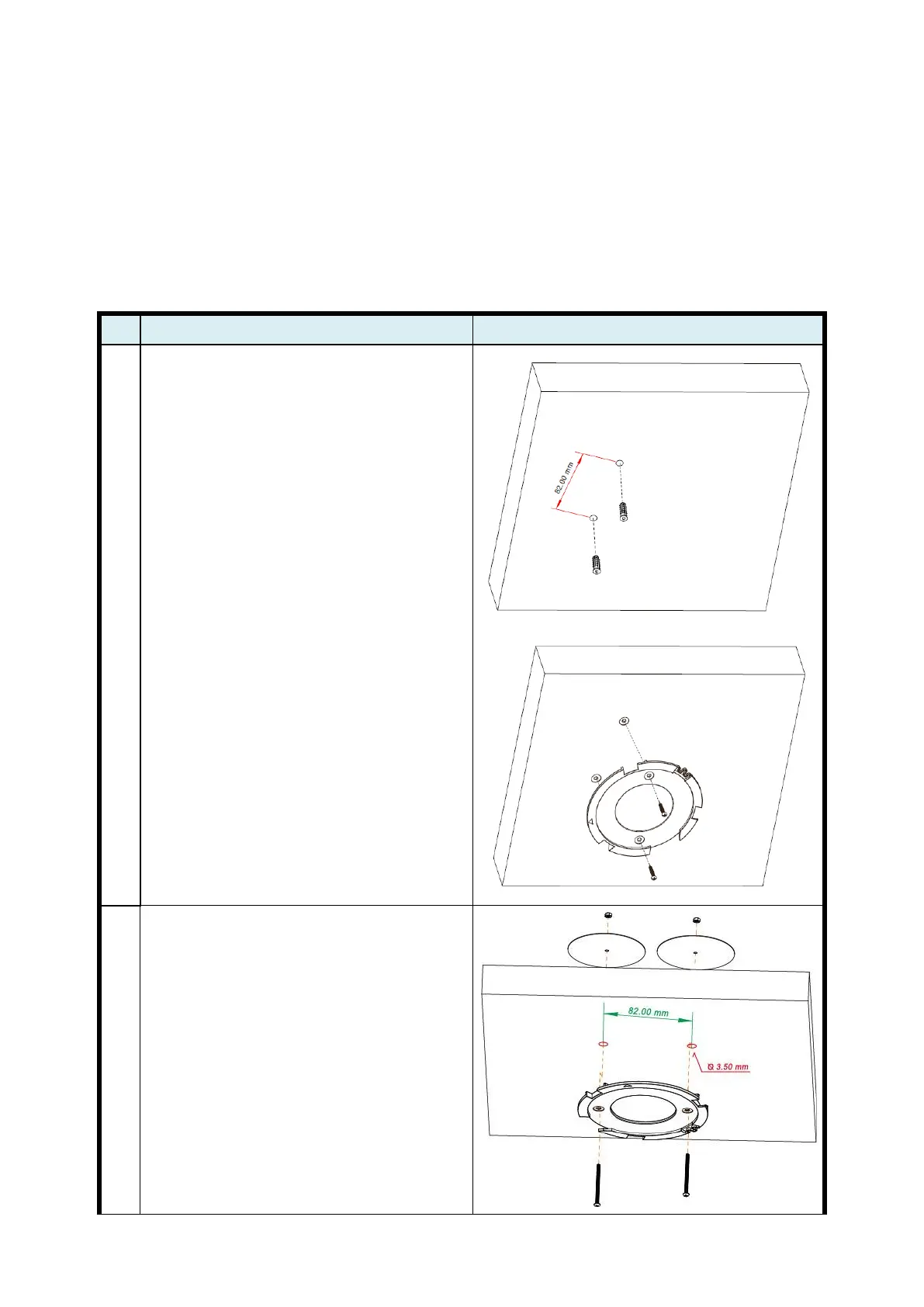
This device is designed for easily mounted on the ceiling or wall with a simple mount
bracket. Before mounting it to the expected location, please make proper configuration for
the device setting and run the PoE Ethernet cable to the location in advance.
The following illustrations show you how to mount this device on the ceiling / wall.
1. Drill 2 holes for wall plugs.
Self-tapping screws (Diameter : 3mm)
If you run the cable above the ceiling
(invisible cabling), you have to drill
another big hole (about 10~20 mm
diameter) to pull out the cable for
connecting to the device.
2. Screw the mounting bracket on the
ceiling / wall.
1. Drill 2 holes for wall plugs.
Self-tapping screws (Diameter : 3.5
mm)
If you run the cable above the ceiling
(invisible cabling), you have to drill
another big hole (about 10~20 mm
diameter) to pull out the cable for
connecting to the device.
2. Screw the mounting bracket on the
ceiling / wall.















 To Next Page