3.4 Wireless
In Client mode, the Wireless interface default support universal repeater (one wlan interface
used as AP and client concurrently) function; you can set wireless client mode connect Access
Point, and then the Virtual AP mode can sharing IP to Wireless Clients.
3.4.1 Basic Settings
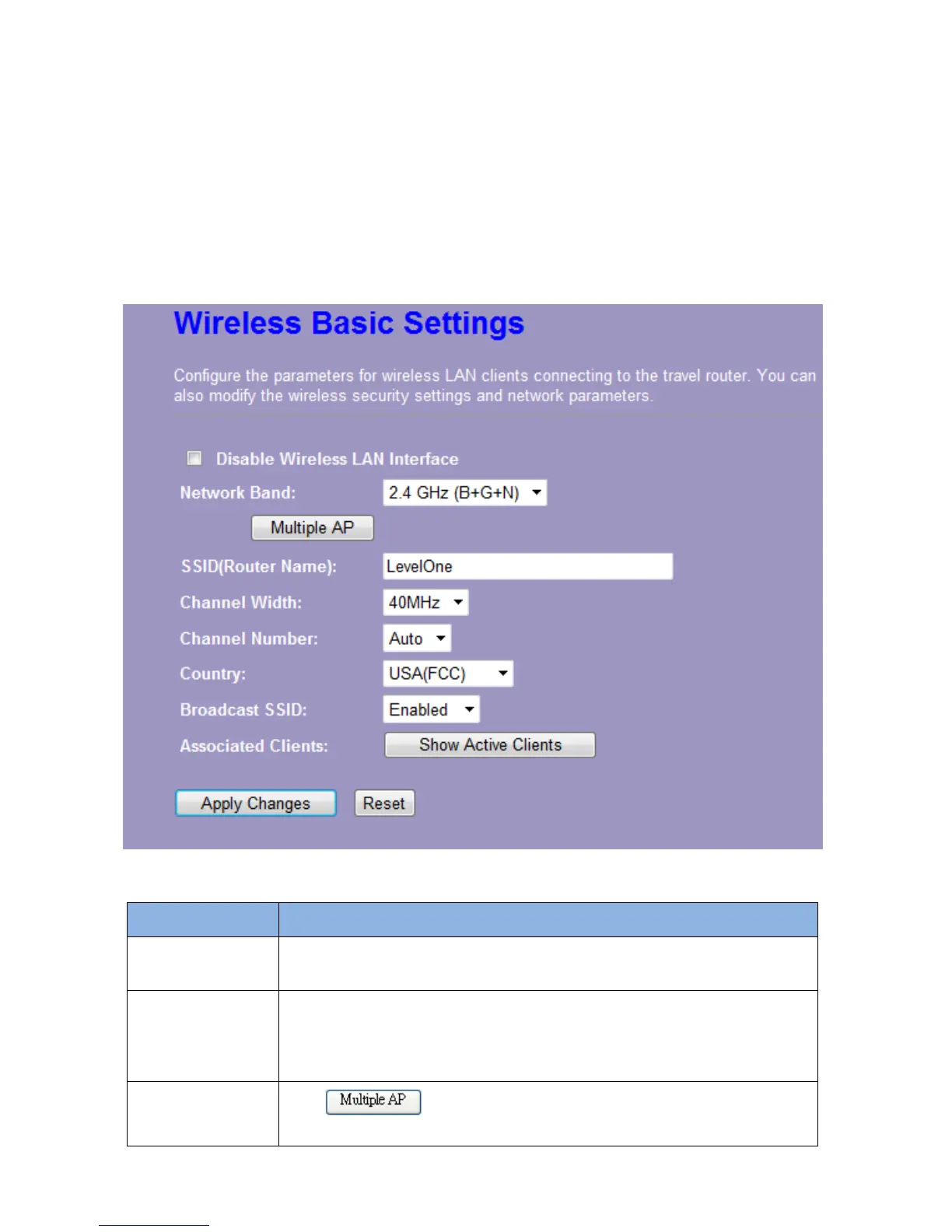
You can set up the configuration of your Wireless basic settings and monitor the Wireless
Clients associate with your router.
Items Information
Disable Wireless
Network
Mark the checkbox to disable the Wireless Network.
Network Band
We provide six modes for your selection: 2.4GHz (B), 2.4 GHz (G), 2.4
GHz (N), 2.4GHz (B+G), 2.4 GHz (G+N), 2.4 GHz (B+G+N).
Click the drop list, you may select one type of network band.
Multiple AP
The
button is to show and update the wireless settings
for Multiple APs. Click this button to do more configurations.














 To Next Page