3.5 TCP/IP Settings
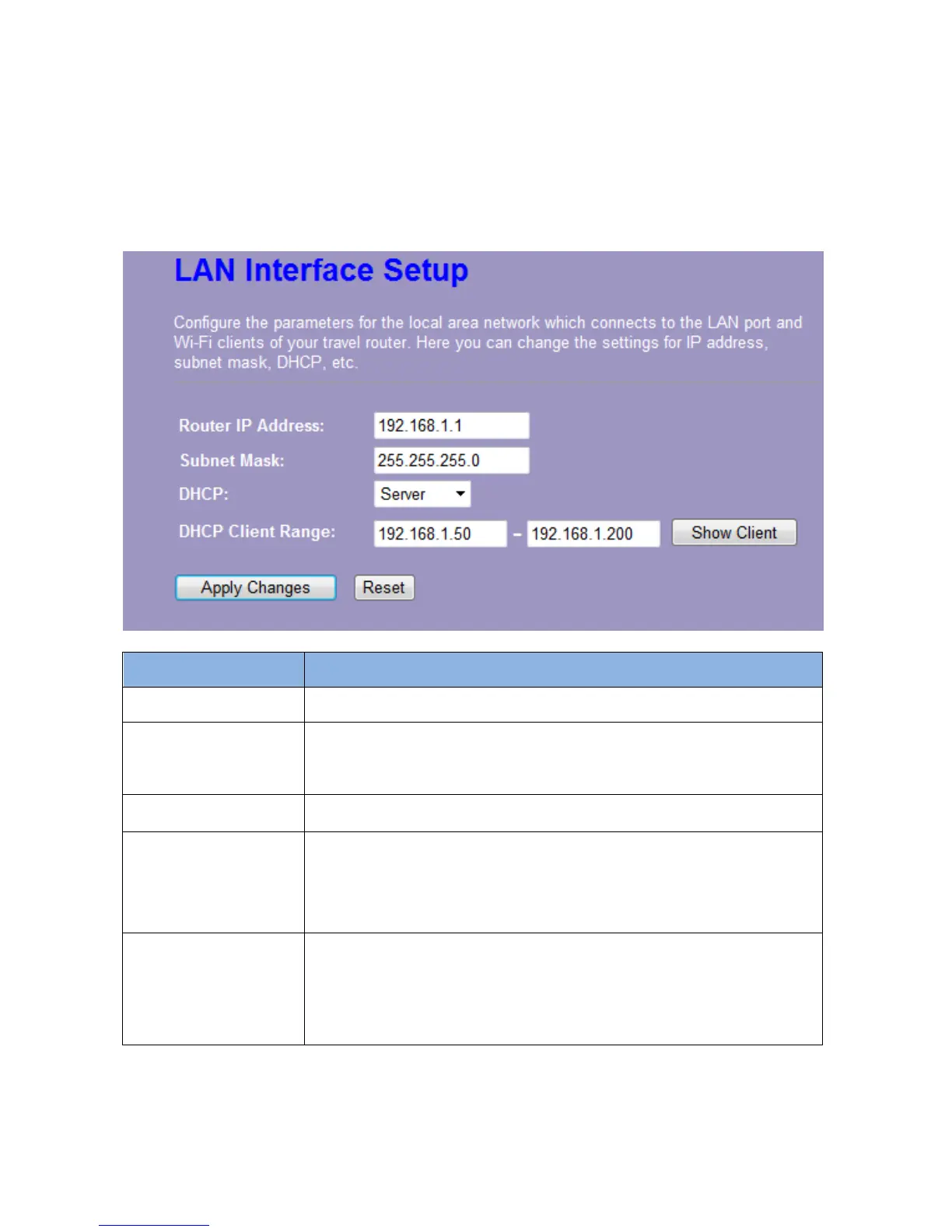
3.5.1 LAN Interface Setup
To set up the configuration of LAN interface, private IP of your router LAN port and subnet mask
for your LAN segment.
Items Information
Router IP Address
The IP of your Router LAN port (default 192.168.1.1).
Subnet Mask
Subnet Mask of you LAN (default 255.255.255.0). All devices on the
network must have the same subnet mask to communicate on the
network.
DHCP
DHCP stands for Dynamic Host Configuration Protocol. It is a
protocol for assigning dynamic IP addresses “automatically”.
This field asks you to specify the DHCP Client IP address range
(default 100~200). You can also click the “Show Client” button to list
those connected DHCP clients.
Note: In Router/Client mode, DHCP Server default setting is enabled,
however in AP mode, DHCP Server default setting is disabled.
Auto IP Address
Diversion
Click the drop list, you may select “Enabled” to divert the IP Address
automatically or select “Disabled” to ban it. Besides, click “Enabled”
this feature, the system will auto judge whether the WAN and LAN IP
is conflict or not. If there are conflicts, the LAN IP and LAN DHCP
Range will auto jump to next subnet for avoiding conflicts.
Note: The feature supports in Router and Client modes
* Please click on the Apply Changes button or the Reset button at the bottom to save/reset the configurations.














 To Next Page