45
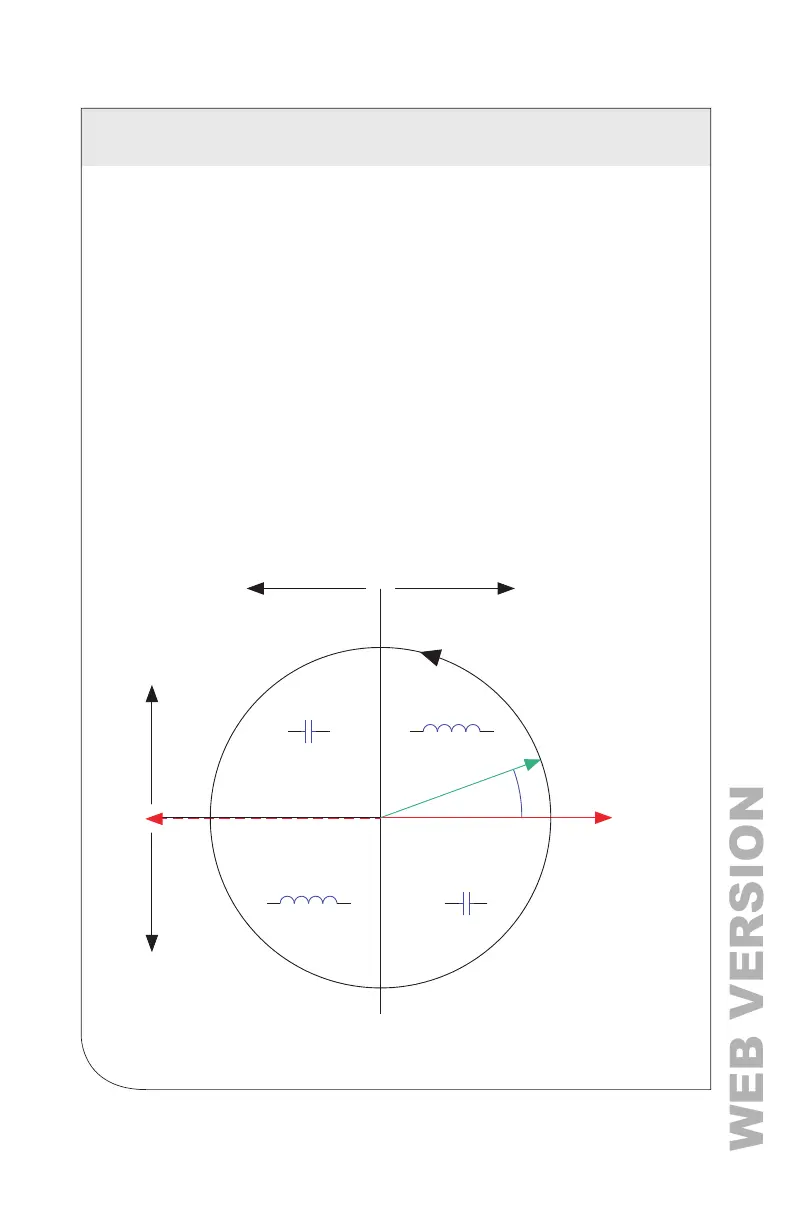
6.12.3 CT Orientation Check
The VerifEye
®
meter reports power and energy in each electrical quadrant
under a different register. When CTs are installed backwards, the indicated
current vector is oriented 180 degrees away from the true displacement
angle. According to standard denitions, the wattage and VARs of the
effected channel, report with a sign opposite from what is expected.
This
means that the import registers read zero, while the export registers show a value.
NOTE: Backward CTs have no impact on the amplitude of the power factor.
A moderate power factor (>0.7) with a negative power shows that the CT is
on backwards, but is on the correct phase. If a CT is on backwards after the
installation is complete, you can reverse the direction of the CT via a user
conguration register called the Flipper (located at 2226, 2234, and 2235), or
use the meter setup feature in the Power Meter Viewer Utilities software.
Check that the wattage has the correct sign (designated + for loads)
• Power Meter Viewer Utilities software: Real Time Values > (Conrm Sign
of Power for All Elements)
• VerifEye
®
Web App:
Real Time Values > (Conrm Sign of Power for All Elements)
• LCD: Real Time Values > (Conrm Sign of Power for All Elements)
Electrical Power Quadrants with Reversed CT Phase
Export Active Power
I Ref (Indicated)
Quadrant II Quadrant I
V Ref
dPF
1 Ref
Quadrant IV
Quadrant III
-
-
+
+
+
Import Active Power
Import Reactive PowerExport Reactive Power
+
6 COMMUNICATION AND VERIFICATION



 To Next Page