44
6.12.2 Phase Checking by Phasor Plot
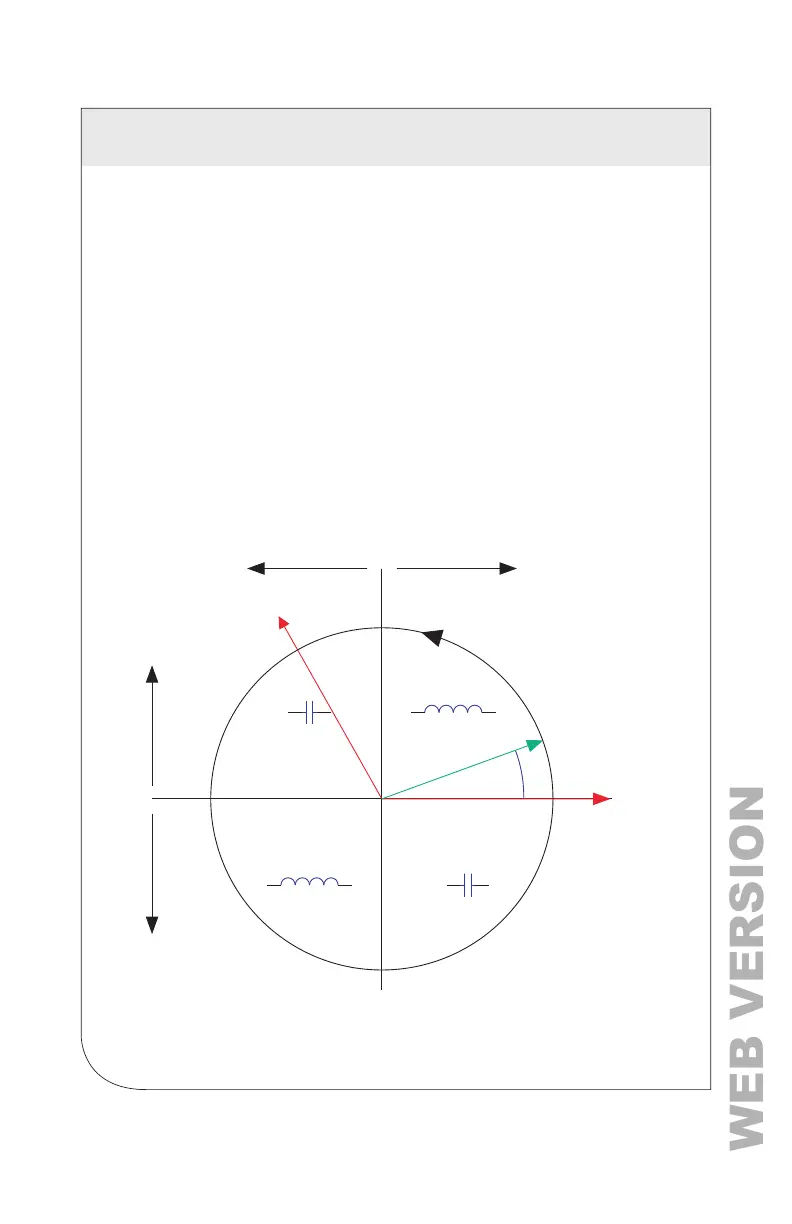
When a CT is installed on an incorrect phase, the indicated current vector
points either 180 degrees away (a split-phase system) or 120 degrees away
(a three-phase system) from the true displacement angle. In the latter case,
this usually causes a signicant decrease in the reported power factor, even
if the CT is also on backwards. When the absolute displacement power
factor of a load is below 0.55 (an angle greater than 57 degrees between
voltage and current), the VerifEye
®
meter ags it as a phasing error. The
Power Meter Viewer Utilities software has a Phasor Plot feature that can be
used to study the voltage and current vectors of a meter element.
Check for Low-Power Factor
• Power Meter Viewer Utilities Software: Real Time Values > (All power
factors < 0.55 are shown in Red).
• VerifEye
®
Web App: Real Time Values > (All power factors < 0.55 are
shown in Red).
• LCD: Verify Installation > (LCD lists all elements that have a PF < 0.55).
Export Active Power
I Ref (Indicated)
Quadrant II Quadrant I
V Ref
dPF
1 Ref
Quadrant IV
Quadrant III
-
-
+
+
+
Import Active Power
Import Reactive PowerExport Reactive Power
+
Electrical Power Quadrants with Incorrect CT Phase
6 COMMUNICATION AND VERIFICATION



 To Next Page