10
Remote Control Guide
Programming
Operating Mode
This procedure will set the operating mode on all blinds
and shades assigned to a specific channel.
All blind and shade motors can be set to two different
operating modes.
Continuous Mode (Default setting)
Recommended for cellular, natural, roller and
roman shades.
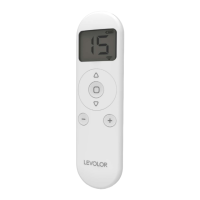
Motor continues to move after a short press of the
up or
down arrow buttons until the
stop button is pressed
or until the limit is reached.
Press and hold (about 5 seconds) the
up and
down buttons simultaneously until the motor jogs x 1.
Press and hold (about 2 seconds) the
stop button
until the motor jogs x 2 and/or beeps x 3.
Intermittent Mode
Recommended for banded shades, sheer shades and
wood blinds.
Motor moves a small amount after a short press of the
up or
down buttons and continues to move after a
long press of the
up or
down buttons until the
stop
button is pressed or the limit is reached.
Press and hold (about 5 seconds) the
up and
down buttons simultaneously until the motor jogs x 1.
Press and hold (about 2 seconds) the
stop button
until the motor jogs x 1 and/or beeps x 1.
1
1
2
2


 To Next Page