11
Remote Control Guide
Programming
Motor Speed
This procedure will set the motor speed on all blinds and
shades assigned to a channel.
All motors have 3 speeds available and are set to the
slowest speed by default.
Set to Faster Speed
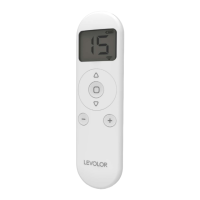
Press one P2 button in the battery compartment of
the remote until motor jogs x 1 and/or beeps x 1.
Press the
up button until the motor jogs x 1 and/or
beeps x 1.
Press the
up button again until the motor
jogs x 2 and/or beeps x 1.
Set to Slower Speed
Press one P2 button in the battery compartment of
the remote until motor jogs x 1 and/or beeps x 1.
Press the
down button until the motor jogs x 1
and/or beeps x 1.
Press the
down button again until the motor
jogs x 2 and/or beeps x 1.
NOTE: If the motor has no response, it is already on the fastest
or slowest speed.
1
1
2
2
3
3


 To Next Page