15
Remote Control Guide
Additional Information
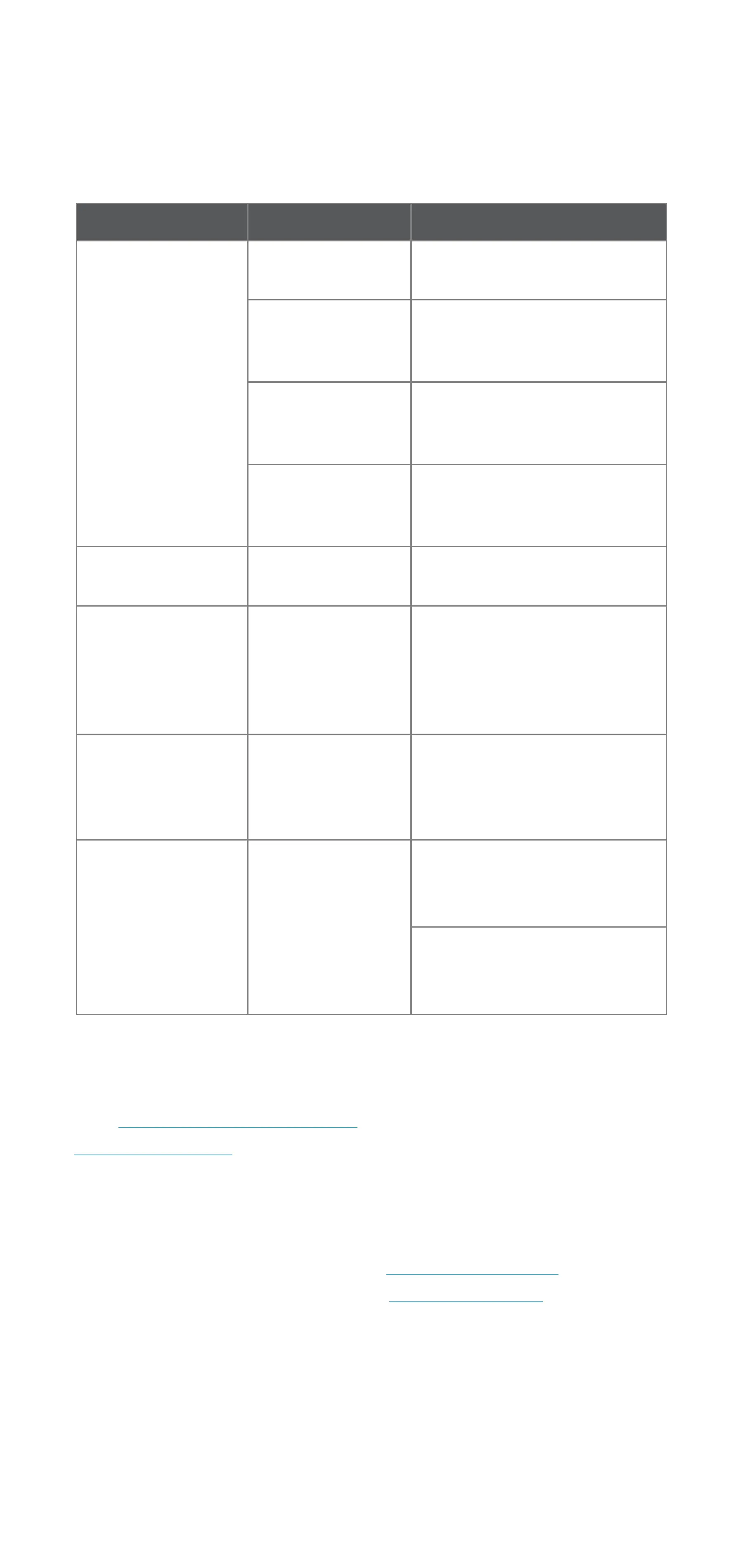
Issue Possible Cause Solution
Motor has
no response.
Battery in motor
is depleted.
Recharge with included
charger.
Battery is inserted
incorrectly into
remote control.
Check battery polarity.
Motor distance
is too far from
remote control.
Move remote control to a
closer position.
Blinds battery
is disconnected.
Check connection from motor
to battery is connected
and active.
Motor beeps 10
times when in use.
Battery is low.
Recharge with included
charger.
Motor operates
opposite the
remote direction.
N/A
Press and hold the
programming button on the
motor for about 10 seconds
until the motor jogs x 3
and/or beeps x 3.
Cannot make
changes to travel
limits or operating
mode.
Remote switch
is locked.
Unlock switch in remote
battery compartment. See
page 13 for more information.
Cannot program
a single motor
(multiple motors
respond).
Multiple motors
are paired to the
same channel.
Reserve each motor its own
channel for programming
functions.
Place all other motors to
sleep. See page 8 for more
information.
Troubleshooting
Warranty
Visit LEVOLOR.com/warranty or call customer service at
1-800-LEVOLOR for more information.
Customer Service
To contact customer service with an questions or
concerns, you may reach us at 1-800-LEVOLOR from
9:00 am - 6:00 PM EST or visit LEVOLOR.com anytime.


 To Next Page