2
Remote Control Guide
Product Overview
Banded, Roller and Sheer Shades
Programming
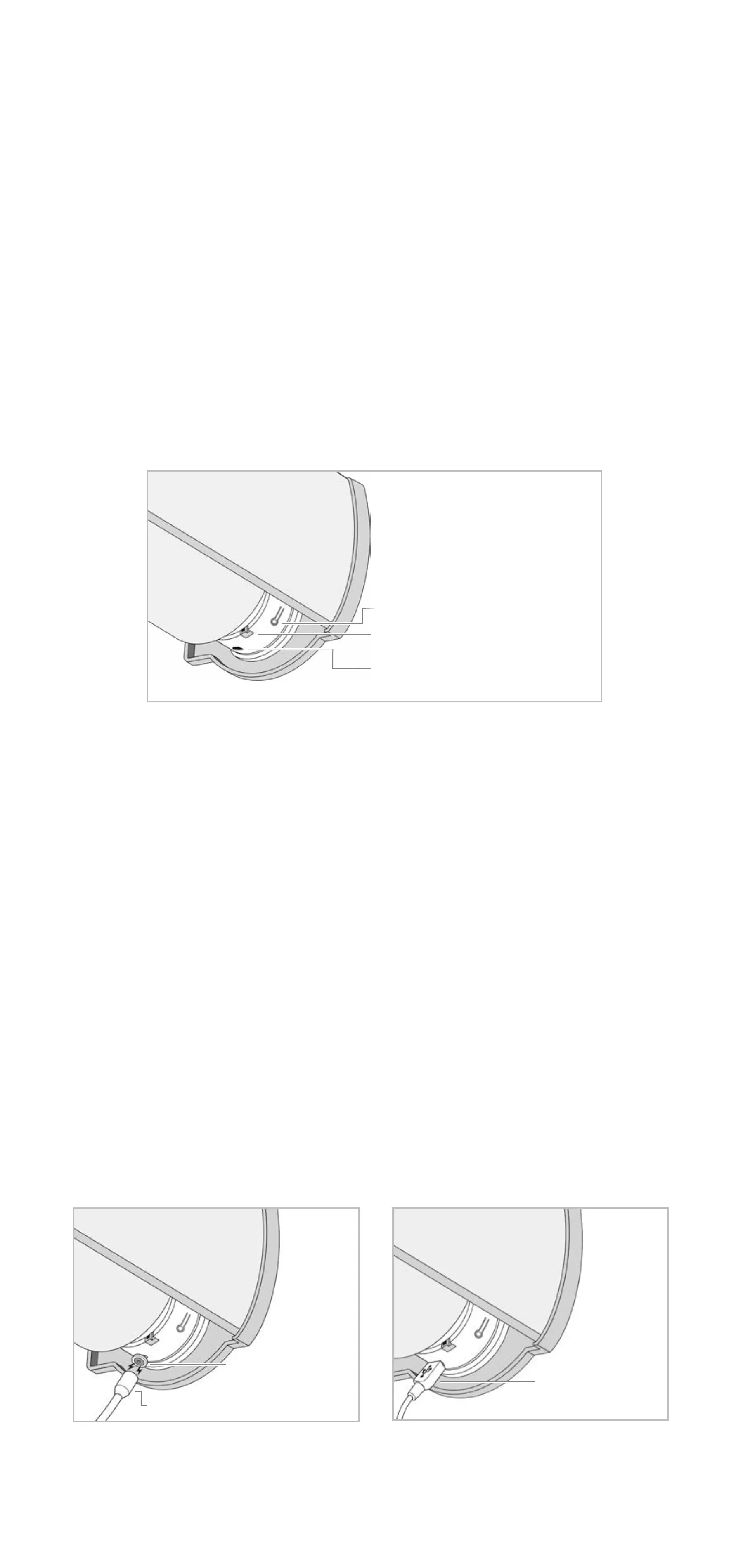
Programming button, charging port and indicator light
are located on the right-side of the shade headrail.
Programming button acts as a manual control and the
shade will move when the button is pressed.
During setup, the shade will confirm programming by
beeping and jogging, with a slight down and up movement.
Charging
Magnetic charging insert comes installed in shade. For easy
charging, attach the magnetic charging adapter to the
micro-USB charging cable and power adapter before
connecting to the headrail to charge. For standard
charging, remove the magnetic charging insert from
the headrail and use the micro-USB charging cable and
power adapter.
Indicator light will flash red when battery is low, flash green
during charging and remain green when fully charged.
Shade will also beep 10 times when in use to indicate a
low battery.
NOTE: Before installation, fully charge shade.
Programming Button
Micro-USB Charging Port
Indicator Light
Magnetic Charging Standard Charging
Magnetic
Charging Insert
Magnetic Charging Adapter
Micro-USB
Charging Cable


 To Next Page