14
Remote Control Guide
Operation
Operating Instructions
Cellular, Natural, Roller and Roman Shades
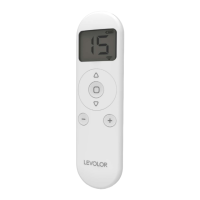
Once your shade has been paired with the remote, use the
up and
down buttons to raise and lower the shade.
Press and hold the
stop button to send to Favorite
Position. Use channel 0 to operate all channels
simultaneously.
Banded Shades
Once your shade has been paired with the remote, use the
up and
down buttons to raise and lower the shade.
Change to intermittent operating mode described on
page 10 to easily adjust vane openness.
Press and hold the
stop button to send to Favorite
Position. Use channel 0 to operate all channels
simultaneously.
Sheer Shades
Once your shade has been paired with the remote, use the
up and
down buttons to raise and lower the shade.
The vanes can be tilted once the shade has been fully
lowered, by using the
up and
down buttons. Change
to intermittent operating mode described on page 10 to
easily adjust vane openness.
Press and hold the
stop button to send to Favorite
Position. Use channel 0 to operate all channels
simultaneously.
Wood Blinds
Once your blind has been paired with the remote, use
the
up and
down buttons to tilt the slats. Change
to intermittent operating mode described on page 10 to
easily tilt slats.
Press and hold the
stop button to send to Favorite
Position. Use channel 0 to operate all channels
simultaneously.


 To Next Page