3
Remote Control Guide
Product Overview
Wood Blinds
Programming
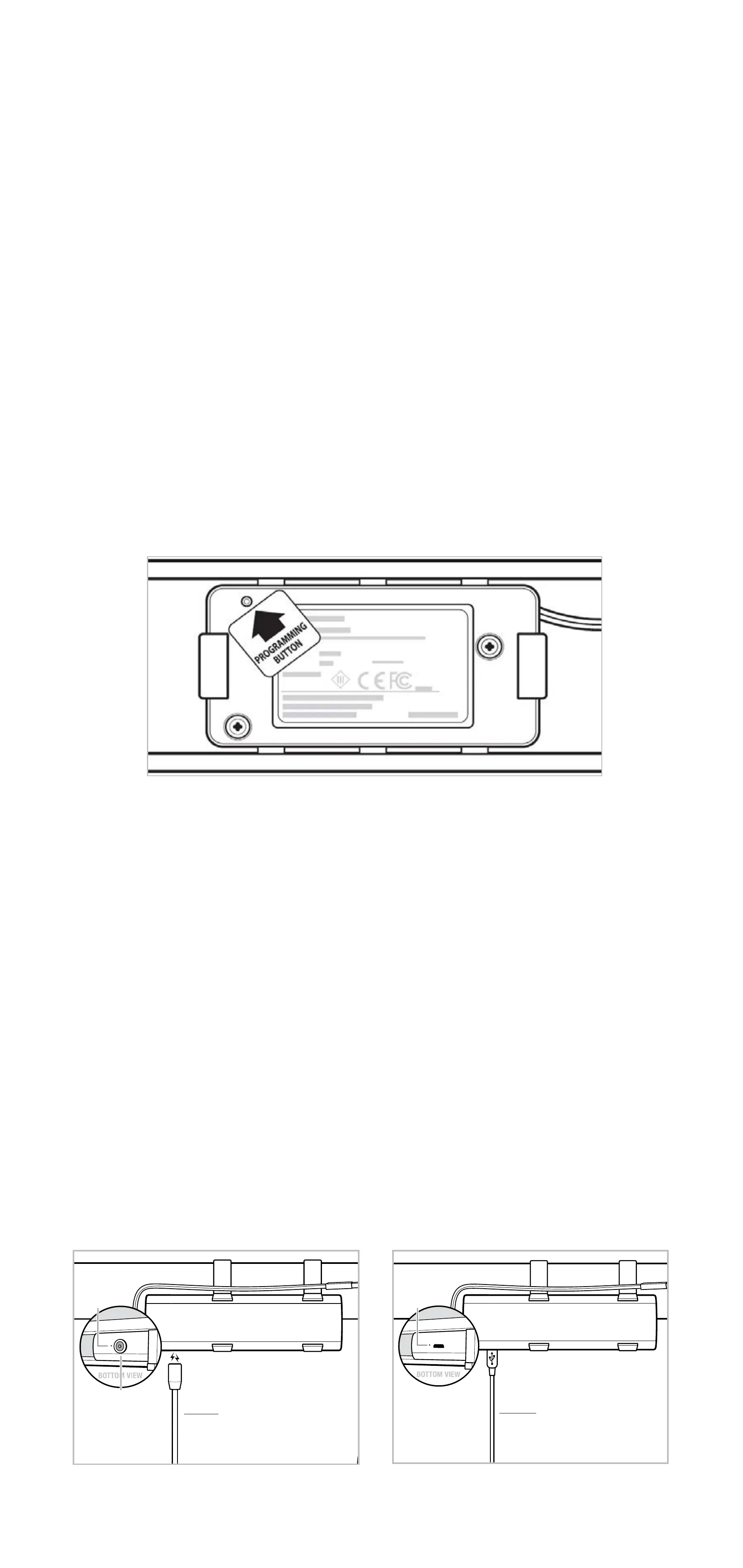
Programming button is located inside the headrail on the
left corner of the motor and a paperclip or similar tool
must be used to activate.
The programming button is not accessible when mounted.
Programming button acts as a manual control and the
blind will move when the button is activated.
During setup, the blind will confirm programming by
jogging, with a slight down and up movement.
Charging
The rechargeable battery mounts between the headrail and
valance. Indicator light and charging port are located on the
bottom of the battery. Magnetic charging insert comes installed
in battery. For easy charging, attach the magnetic charging
adapter to the micro-USB charging cable and power adapter
before connecting to the battery to charge. For standard
charging, remove the magnetic charging insert from the battery
and use the micro-USB charging cable and power adapter.
Indicator light turns red when battery is low. During charging,
the light will turn green when fully charged.
NOTE: Before installation, fully charge battery.
Magnetic Charging
Valance omitted for clarityValance omitted for clarity
Standard Charging
Magnetic
Charging
Insert
Magnetic
Charging Adapter
Micro-USB
Charging Cable
Indicator
Light
Indicator
Light


 To Next Page