8
Remote Control Guide
Programming
Operating Mode
This procedure will set the operating mode on all shades
assigned to a specific channel.
All shade motors can be set to two different operating modes.
Continuous Mode (Default setting)
Recommended for cellular shades.
Motor continues to move after a short press of the
up or
down buttons until the
stop button is pressed or until
the limit is reached.
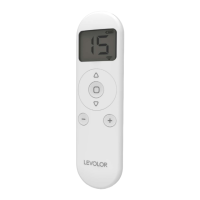
Press and hold (about 5 seconds) the left
up and
down buttons simultaneously until the motor jogs x 1.
Press and hold (about 2 seconds) the
stop button
until the motor jogs x 2.
Intermittent Mode
Motor moves a small amount after a short press of the
up or
down buttons and continues to move after a
long press of the
up or
down buttons until the
stop
button is pressed or the limit is reached.
Press and hold (about 5 seconds) the left
up and
down buttons simultaneously until the motor jogs x 1.
Press and hold (about 2 seconds) the
stop button
until the motor jogs x 1.
1
1
2
2


 To Next Page