11
Remote Control Guide
Programming
Disable Limit Setting
After all programming is complete, lock the remote to
prevent accidental or unintended changes to motor
direction, travel limits, and operating mode.
Remove cover from back of remote and locate the
lock switch between the P2 buttons above batteries.
Move the switch to the left to lock. Remote will
display “L” for lock.
Move the switch to the right to unlock and access all
remote functions. Remote will display”U” for unlock.
1
2
3
Add or Remove Additional Remote
Channels can be copied to an additional remote as an
exact duplicate of the current remote programming.
On the current remote, select the channel to
copy then press one P2 button in the battery
compartment of the remote until motor jogs x 1.
Once more, on the current remote, press one P2
button in the battery compartment of the remote
until motor jogs x 1.
On the new remote, select the channel to copy
to then press one P2 button in the battery
compartment of the remote until motor jogs x 2.
NOTE: Repeat steps 1-3 to remove additional remote control.
1
2
3
Operation
Operating Instructions
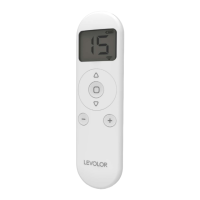
Once your shade has been paired with the remote, use
the left
up and
down buttons to raise and lower the
bottom rail and the right
up and
down buttons to
raise and lower the middle rail. Press and hold the left or
right
up button to fully raise both rails. Press and hold
the left or right
down button to fully lower both rails.
Press and hold the
stop button to send to Favorite
Position. Use channel 0 to operate all channels
simultaneously.


 To Next Page