6
Remote Control Guide
Programming
Getting Started
During programming, shades will jog by moving slightly
down and up.
Certain programming functions will affect all shades on
the selected channel such as – favorite position, travel
limits, operating mode, and motor speed. To program an
individual shade, pair to its own channel or put all other
shades into sleep mode. Put shades to sleep by pressing
the programming button for 6 seconds until the motor
jogs x 2. Wake shades by pressing the programming
button for less than 1 second.
Select a Channel
Use channel 0 to control all channels together.
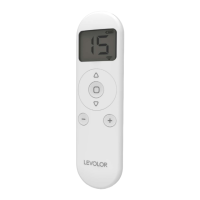
Press the
-
button on the remote to select a lower
channel.
Press the + button on the remote to select a higher
channel.
Hide Unused Channels
Select a channel other than 0, then press and hold
the
-
and + buttons simultaneously until remote
control displays “C” then “15”, then release buttons.
Press the
-
or + buttons until the number of visible
channels needed is shown (between 1 and 15).
Press the
stop button to confirm selection. The
screen will display “o” once to confirm selection.
NOTE: Repeat steps 1-3 to unhide channels.
1
1
2
2
3


 To Next Page