7
Remote Control Guide
Programming
Pair Remote to Shade
Use the
-
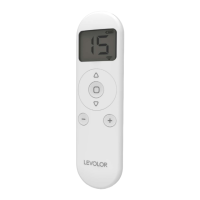
and + buttons to select the channel to pair.
Press and hold the programming button on the
motor (about 2 seconds) until the motor jogs x 1.
In the next 10 seconds, press and hold the
stop
button on the remote until the motor jogs x 2.
NOTE: Repeat steps 1-3 to unpair remote.
1
2
3
Favorite Position
To send to favorite position, press and hold the
stop button.
Favorite position is preset, but can be reset to fit your
needs. To create a new favorite position, you must first
delete the existing favorite position.
This procedure will set the favorite position on all shades
assigned to a channel.
Delete Favorite Position
Use the
-
and + buttons to select the channel to
delete the favorite from.
Press one P2 button in the battery compartment of
the remote until motor jogs x 1.
Press and hold the
stop button on the remote
until the motor jogs x 1.
Press and hold the
stop button on the remote
again, until the motor jogs x 1.
Set Favorite Position
Use the
up and
down buttons to move shade to
the desired position.
Press one P2 button in the battery compartment of
the remote until motor jogs x 1.
Press and hold the
stop button on the remote
until the motor jogs x 1.
Press and hold the
stop button on the remote
again, until the motor jogs x 2.
1
1
2
2
3
3
4
4


 To Next Page