10
Remote Control Guide
Programming
Travel Limits
This procedure will adjust the travel limits on all shades
assigned to a channel.
Upper and lower travel limits are set at the factory during
production to your order specification. Upon installation,
adjustment of these limits may be necessary to better suit
your needs.
Take care when adjusting limits to avoid damage to product.
NOTE: If you exit programming before you finish adjusting the
travel limits, the motor will take the previous limits..
Adjust the Upper Limit
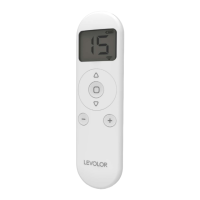
Use the
-
and + buttons to select the appropriate
channel.
Press and hold the left
up and
stop buttons
simultaneously for about 5 seconds until the motor
jogs x 1.
Use the right
up and
down buttons to raise the
middle rail to the desired highest position.
Use the left
up and
down buttons to move the
bottom rail to the desired highest position.
Press and hold the left
up and
stop buttons
simultaneously for about 5 seconds until the motor
jogs x 2.
Adjust the Lower Limit
Use the
-
and + buttons to select the appropriate
channel.
Press and hold the left
down and
stop buttons
simultaneously for about 5 seconds until the motor
jogs x 1.
Use the left
up and
down buttons to lower the
bottom rail to the desired lowest position.
Use the right
up and
down buttons to move the
middle rail to the desired lowest position.
Press and hold the left
down and
stop buttons
simultaneously for about 5 seconds until the motor
jogs x 2.
1
5
5
1
2
2
3
4
4
3


 To Next Page