8
Activating and Operating
Remote Control Guide
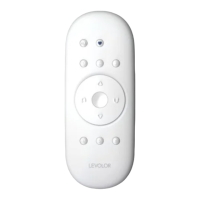
JOIN A SHUTTER TO A GROUP
NOTE: The LEVOLOR
®
remote will not operate a shutter until
the shutter has been added to a GROUP.
1. Press and hold STOP until the WHITE programming
light starts flashing, then release. This puts the remote
in program mode.
2. Press the desired GROUP number (1, 2, 3, 4, 5 or 6) on
the remote. The BLUE GROUP indicator light above
the GROUP button will flash to show it is selected.
3. With one hand press and continue to hold the
manual control button.
4. While continuing to hold down the manual control
button, use your other hand to press and hold
OPEN on the remote until the shutter moves slightly
to indicate it has been joined to the GROUP.
5. Release both buttons.
6. To exit program mode press and hold
STOP until
the lights stop flashing.
SET A FAVORITE POSITION
Each shutter has one FAVORITE position. Default setting is
louvers horizontal. Setting a new FAVORITE position over-
writes any previous setting.
1. Using the manual control button move the louvers to
the preferred FAVORITES position.
2. Press and hold
STOP until the WHITE programming
light starts flashing, then release. This puts the remote
in program mode.
3. With one hand press and continue to hold the
manual control button.
4. While continuing to hold down the manual control
button, use your other hand to press and hold
♥
FAVORITE on the remote until the louvers move slightly
to indicate it has set this position as your FAVORITE.
5. Release both buttons.
6. To exit program mode press and hold
STOP until
the lights stop flashing.
Note: It is recommended that only similar window
coverings be included in a GROUP because of
differences in product features and operation.


 To Next Page