13
12
Note: The small padlock symbol on the right side of each network indicates that
the Wi-Fi network is password-protected.
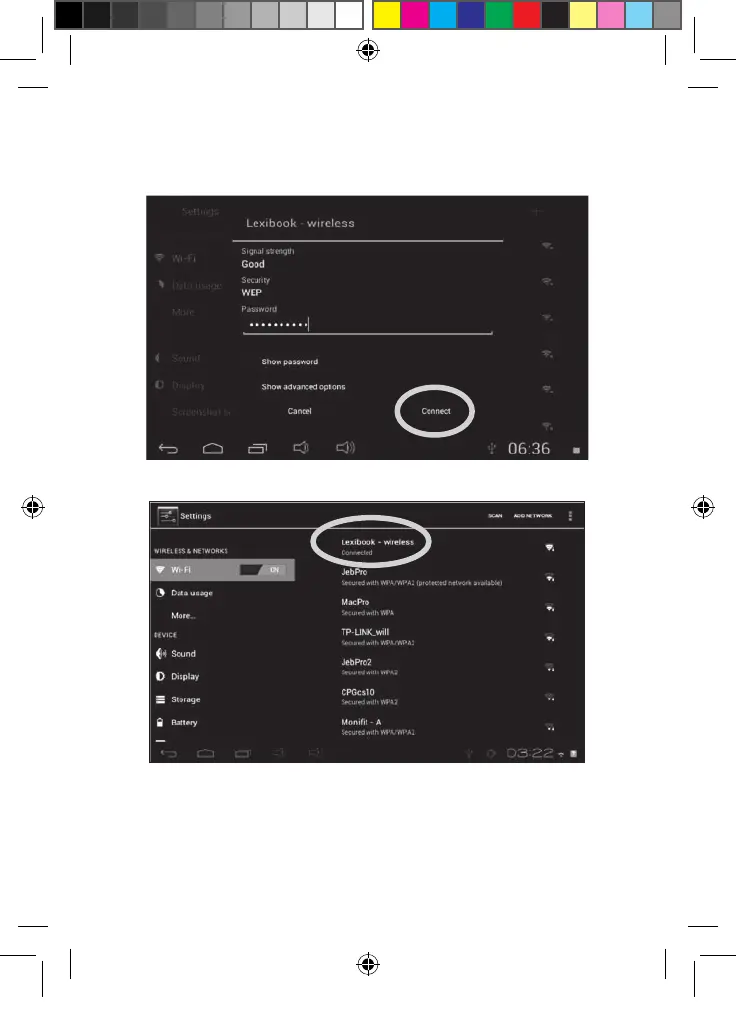
7. Enter the password of the Wi-Fi network. The password depends on your Wi-Fi
modem or router. If unsure, please check the relevant instruction manuals or contact
your network provider.
8. Click on the “Connect” button to connect to the Wi-Fi network. This operation may
require 5-20 seconds. If you cannot connect, please make sure that the password is
correct and that you are inside the range of the Wi-Fi network.
9. Once connected, the “Connected” message is displayed under the Wi-Fi network.
MFC142EN_09IM1373_11Sept_V12.indd 13 11/09/2013 5:31 PM



 To Next Page