17
16
Using a memory card
In order to store additional files or to have more storage space on your tablet, you
can buy a Micro SD/TransFlash card (sold separately), and then insert it in the tablet.
You may also delete the included files in your tablet such as videos, songs and
electronic books. Warning: once the files included with your tablet are erased, you
cannot recover them. Please make a backup copy before erasing them.
• Memory card compatibility
The device is compatible with Micro SD/TransFlash (TF) memory card with capacity
up to 32GB.
• Insert a memory card
1. Insert a memory card Micro SD/TransFlash (TF) in the Micro SD card slot (7)
on the right side of your tablet. Make sure the metal connectors of the card
are facing up.
2. Gently push the card into the card reader until it “clicks”.
• Remove the memory card
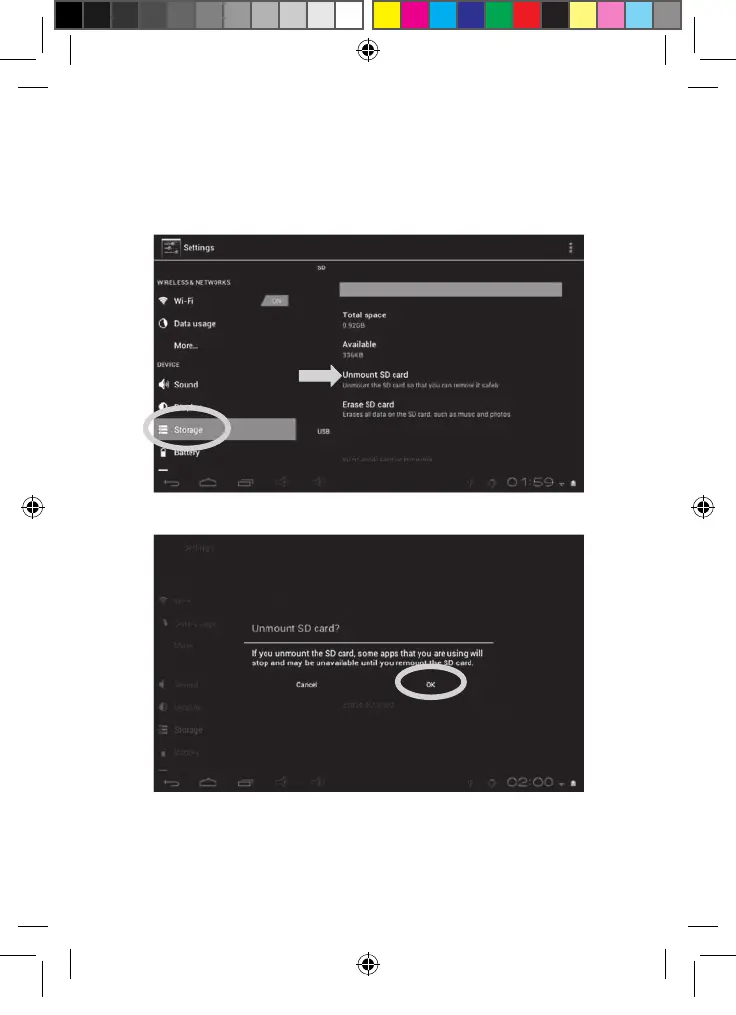
Note: BEFORE removing the memory card, you should always disable it.
1. From the Settings menu, select "Storage" and then click on "Unmount SD
card."
2. Press “OK” to confirm and wait for the card to be unmounted.
3. You can now remove the memory card. Press the card into the card slot to
release it.
Note: Never remove the memory card without first disabling it.
MFC142EN_09IM1373_11Sept_V12.indd 17 11/09/2013 5:31 PM



 To Next Page