Home
Lexmark
All in One Printer
CX931
Page 140
Lexmark CX931 - Page 140
448 pages
Manual
Save Page as PDF
To Next Page
To Next Page
To Previous Page
To Previous Page
Loading...
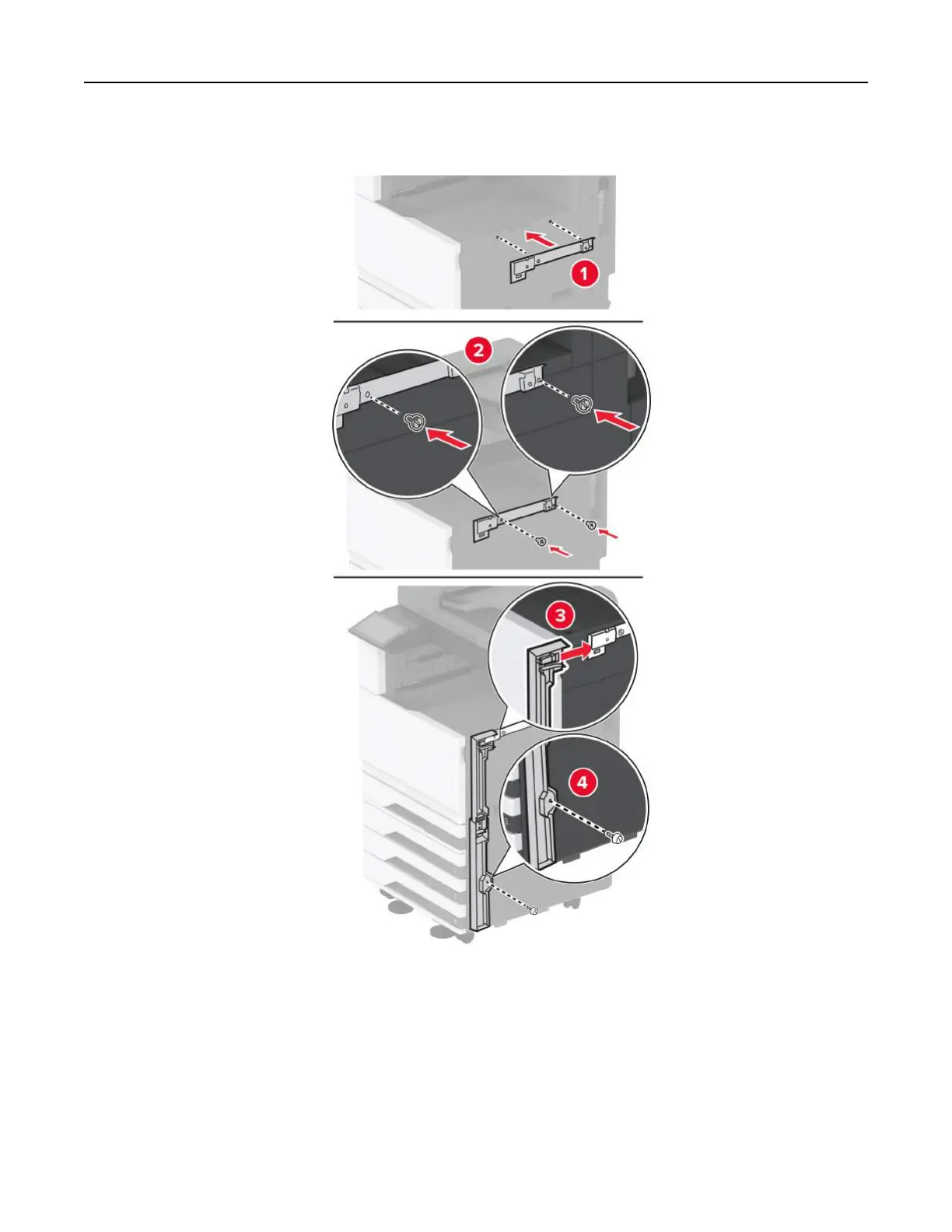
10
Us
ing a flat
‑
head screwdriver
, attach the brackets
to the
right side of the printer
.
11
Insert the paper transport, and
then secure it with screws.
Note:
Use the screws that came with the fi
nisher.
Set up, install, and configure
140
139
141
Table of Contents
Main Page
Table of Contents
2
Safety Information
6
Conventions
6
Product Statements
6
Learn about the Printer
9
Finding Information about the Printer
9
Finding the Printer Serial Number
10
Printer Configurations
11
Basic Model
11
Configured Model
12
Using the Control Panel
13
Understanding the Status of the Indicator Light
13
Selecting Paper
14
Paper Guidelines
14
Paper Characteristics
14
Grain Direction
15
Unacceptable Paper
15
Storing Paper
15
Selecting Preprinted Forms and Letterhead
16
Supported Paper Sizes
16
Supported Paper Types
25
Supported Paper Weights
28
Set Up, Install, and Configure
29
Selecting a Location for the Printer
29
Attaching Cables
30
Setting up and Using the Home Screen Applications
31
Customizing the Home Screen
32
Using Display Customization
34
Creating Folders
36
Managing Contacts
36
Setting up and Using the Accessibility Features
37
Activating Voice Guidance
37
Navigating the Screen Using Gestures
37
Using the Onscreen Keyboard
38
Enabling Magnification Mode
38
Setting up the Printer to Fax
39
Using the Embedded Web Server
40
Setting up Fax Using a Standard Telephone Line
42
Setting up Fax in Countries or Regions with Different Telephone Wall Jacks and Plugs
44
Connecting to a Distinctive Ring Service
46
Setting the Fax Date and Time
47
Configuring Daylight Saving Time
47
Configuring the Fax Speaker Settings
47
Configuring the E-Mail SMTP Settings
47
Yahoo! Mail
54
Loading Paper and Specialty Media
55
Loading the 2000-Sheet Tray
62
Loading the Envelope Tray
66
Loading the Multipurpose Feeder
69
Installing and Updating Software, Drivers, and Firmware
73
For Windows Users
74
For Macintosh Users
74
Updating Firmware
74
Exporting or Importing a Configuration File
75
Adding Available Options in the Print Driver
75
Installing Hardware Options
76
Installing the Envelope Tray
76
Installing a Fax Card
112
Installing a Printer Hard Disk
118
Installing the Staple Finisher
127
Networking
147
Connecting the Printer to a Wi-Fi Network
147
Connecting the Printer to a Wireless Network Using Wi-Fi Protected Setup (WPS)
148
Configuring Wi-Fi Direct
149
Connecting Using Wi-Fi
149
Deactivating the Wi-Fi Network
150
Checking the Printer Connectivity
150
Setting up Serial Printing (Windows Only)
150
Secure the Printer
152
Locating the Security Slot
152
Erasing Printer Memory
152
Erasing Printer Storage Drive
153
Restoring Factory Default Settings
153
Statement of Volatility
153
Print
155
Printing from a Computer
155
Printing from a Mobile Device
155
Printing from a Mobile Device Using Mopria Print Service
156
Printing from a Mobile Device Using Airprint
156
Printing from a Flash Drive
157
Supported Flash Drives and File Types
158
Configuring Confidential Jobs
158
Printing Confidential and Other Held Jobs
159
Printing a Font Sample List
159
Printing a Directory List
160
Placing Separator Sheets between Copies
160
Stapling Printed Sheets
160
Punching Holes in Printed Sheets
160
Using Offset Stacking in Printed Sheets
161
Canceling a Print Job
161
Adjusting Toner Darkness
161
Copy
162
Using the Automatic Document Feeder and Scanner Glass
162
Making Copies
162
Copying Photos
162
Copying on Letterhead
163
Copying on both Sides of the Paper
163
Reducing or Enlarging Copies
163
Collating Copies
163
Placing Separator Sheets between Copies
163
Copying Multiple Pages Onto a Single Sheet
164
Copying Cards
164
Stapling Copies
164
Punching Holes in Copies
164
Using Offset Stacking in Copies
165
Creating a Copy Shortcut
165
E-Mail
166
Using the Automatic Document Feeder and Scanner Glass
166
Sending an E-Mail
166
Creating an E-Mail Shortcut
166
Fax
167
Using the Automatic Document Feeder and Scanner Glass
167
Sending a Fax
167
Scheduling a Fax
168
Creating a Fax Destination Shortcut
168
Changing the Fax Resolution
168
Adjusting the Fax Darkness
169
Printing a Fax Log
169
Blocking Junk Faxes
169
Holding Faxes
169
Forwarding a Fax
169
Scan
171
Using the Automatic Document Feeder and Scanner Glass
171
Scanning to a Computer
171
Scanning to an FTP Server
172
Creating an FTP Shortcut
173
Scanning to a Network Folder
173
Creating a Network Folder Shortcut
173
Scanning to a Flash Drive
174
Use Printer Menus
175
Menu Map
175
Device
176
Remote Operator Panel
178
Power Management
182
Restore Factory Defaults
184
Maintenance
184
Configuration Menu
184
Out of Service Erase
189
Home Screen Customization
190
About this Printer
190
Print
191
Advanced Imaging
195
Job Accounting
196
Paper
200
Tray Configuration
200
Media Configuration
201
Universal Setup
201
Custom Scan Sizes
202
Media Types
202
Copy
203
Copy Defaults
203
Fax
207
Fax Send Settings
209
Fax Receive Settings
213
Fax Cover Page
216
Fax Log Settings
216
Speaker Settings
217
Voip Settings
218
SIP Settings
218
Fax Server Setup
219
Fax Server E-Mail Settings
220
Fax Server Scan Settings
221
E-Mail
223
E-Mail Setup
223
E-Mail Defaults
224
Advanced Imaging
226
Web Link Setup
229
Ftp
229
USB Drive
233
Flash Drive Scan
233
Flash Drive Print
236
Network/Ports
239
Network Overview
239
Mobile Services Management
243
LPD Configuration
249
Restrict External Network Access
251
Cloud Services
252
Security
253
Login Methods
253
Manage Permissions
253
Local Accounts
254
Schedule USB Devices
255
Security Audit Log
255
Login Restrictions
258
Confidential Print Setup
258
Disk Encryption
259
Erase Temporary Data Files
259
Solutions LDAP Settings
259
Reports
260
Menu Settings Page
260
Troubleshooting
262
Printing the Menu Settings Page
262
Maintain the Printer
263
Checking the Status of Parts and Supplies
263
Configuring Supply Notifications
263
Setting up E-Mail Alerts
263
Viewing Reports
264
Ordering Parts and Supplies
264
Ordering a Photoconductor Unit
265
Replacing Parts and Supplies
265
Replacing a Toner Cartridge
265
Replacing the Waste Toner Bottle
270
Replacing a Photoconductor Unit
274
Replacing the Fuser
285
Replacing the Transfer Roller
289
Replacing the Transfer Module
292
Resetting the Maintenance Counter
319
Resetting the Supply Usage Counters
320
Replacing the Staple Cartridge
320
Cleaning Printer Parts
327
Cleaning the Printer
327
Cleaning the Touch Screen
328
Cleaning the Scanner
328
Emptying the Hole Punch Box
344
Saving Energy and Paper
345
Conserving Supplies
346
Moving the Printer to Another Location
346
Shipping the Printer
346
Troubleshoot a Problem
347
Print Quality Problems
347
Printer Error Codes
348
Complex Page, some Data May Not Have Printed
351
Error Reading USB Drive
351
Format the Disk
352
Printing Problems
356
Print Quality Is Poor
356
Blank or White Pages
356
Dark Print
357
Ghost Images
358
Gray or Colored Background
359
Incorrect Margins
360
Light Print
361
Missing Colors
363
Mottled Print and Dots
364
Paper Curl
365
Print Crooked or Skewed
366
Solid Color or Black Images
367
Text or Images Cut off
367
Toner Easily Rubs off
368
Uneven Print Density
369
Horizontal Dark Lines
369
Horizontal White Lines
372
Vertical White Lines
373
Repeating Defects
375
Print Jobs Do Not Print
376
Confidential and Other Held Documents Do Not Print
377
Job Prints from the Wrong Tray or on the Wrong Paper
378
Slow Printing
379
The Printer Is Not Responding
381
Unable to Read Flash Drive
382
Enabling the USB Port
382
Clearing Jams
383
Avoiding Jams
383
Identifying Jam Locations
384
Paper Jam in the Multipurpose Feeder
391
Paper Jam in Door a
392
Paper Jam in the Standard bin
394
Paper Jam in the Automatic Document Feeder
396
Paper Jam in the Staple Finisher
396
Network Connection Problems
403
Cannot Open Embedded Web Server
403
Hardware Options Problems
405
Cannot Detect Internal Option
405
Defective Flash Detected
405
Not Enough Free Space in Flash Memory for Resources
406
Issues with Supplies
406
Non-Lexmark Supply
406
Paper Feed Problems
407
Envelope Seals When Printing
407
Collated Printing Does Not Work
407
Tray Linking Does Not Work
408
Paper Frequently Jams
409
Jammed Pages Are Not Reprinted
409
E-Mailing Problems
410
Faxing Problems
411
Caller ID Is Not Shown
411
Poor Fax Print Quality
415
Scanning Problems
416
Partial Copies of Document or Photo
418
Poor Copy Quality
419
Vertical Dark Streaks on Output When Scanning from the ADF
419
Scan Job was Not Successful
420
Scanner Does Not Close
421
Scanning Takes too Long or Freezes the Computer
421
Scanner Does Not Respond
422
Adjusting Scanner Registration
422
Adjusting ADF Registration
422
Color Quality Problems
423
Modifying the Colors in Printed Output
423
FAQ about Color Printing
424
The Print Appears Tinted
425
Contacting Customer Support
425
Recycle and Dispose
426
Recycling Lexmark Products
426
Recycling Lexmark Packaging
426
Notices
427
Product Information
427
Edition Notice
427
Government End Users
427
Licensing Notices
428
Noise Emission Levels
428
Waste from Electrical and Electronic Equipment (WEEE) Directive
429
India E-Waste Notice
429
Lithium-Ion Rechargeable Battery
429
Energy Star
430
Temperature Information
431
Product Power Consumption
431
Off Mode
432
Total Energy Usage
432
Regulatory Notices for Telecommunication Terminal Equipment
433
Notice to Users of the US Telephone Network: FCC Requirements
433
Notice to Users of the Canadian Telephone Network
434
Notice to Users of the New Zealand Telephone Network
434
Japanese Telecom Notice
435
Using this Product in Switzerland
435
Utilisation de Ce Produit en Suisse
435
Verwendung dieses Produkts in der Schweiz
436
Uso del Prodotto in Svizzera
436
Federal Communications Commission (FCC) Compliance Information Statement
436
Japanese VCCI Notice
437
Notice to Users of Class a Products in Brazil
437
European Community (EC) Directives Conformity
437
Radio Interference Notice
438
Limited Warranty
438
Limited Warranty Service
439
Extent of Limited Warranty
439
Limitation of Liability
440
Index
441
Related product manuals
Lexmark CX930
438 pages
Lexmark CX942
504 pages
Lexmark CX943
525 pages
Lexmark CX625
299 pages
Lexmark CX431
254 pages
Lexmark CX310
256 pages
Lexmark CX510
353 pages
Lexmark CX522
299 pages
Lexmark CX331
243 pages
Lexmark CX310n
394 pages
Lexmark CX510de
394 pages
Lexmark CX310 series
244 pages



 To Next Page