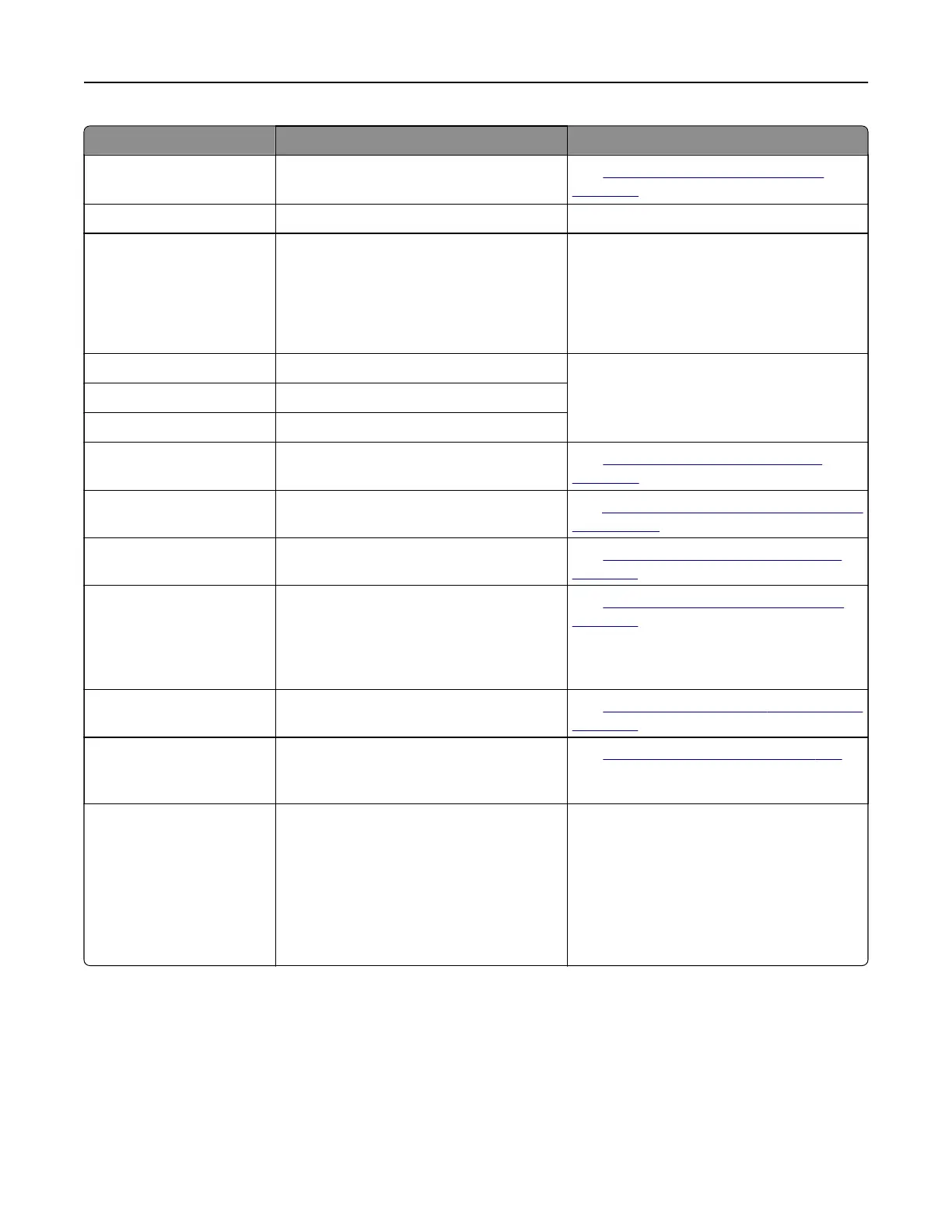
Error codes Error message Solution
86.33 Replace ADF kit, recommended
life exceeded.
See
“Replacing the ADF roller kit” on
page 325.
87.20 Hole punch box nearly full. Tou ch Continue to clear the message.
87.30 Empty the hole punch box.
1 Open the paper transport cover F.
2 Remove the hole punch box, and then
empty it.
3 Insert the hole punch box.
4 Close the cover.
88.00[x] [Color] cartridge nearly low. To uc h Continue to clear the message.
88.10[x] [Color] cartridge low.
88.20[x] [Color] cartridge very low.
88.30[x], 88.40[x] Replace [color] cartridge. See
“Replacing a toner cartridge” on
page 295.
200.03, 240.06 Paper jam [jam header]. See
“Paper jam in the multipurpose feeder”
on page 453.
200.16[x], 241.16a Paper jam [jam header]. See
“Paper jam in the standard tray” on
page 448.
200.26[x], 200.36[x],
200.46[x], 200.56a,
202.95[x], 242.26, 242.33,
242.43, 243.33, 243.36,
243,43, 244,43, 244,46
Paper jam [jam header]. See
“Paper jam in the optional trays” on
page 449.
200.56a, 245.53[x],
245,56
Paper jam [jam header]. See
“Paper jam in the 2000‑sheet tray” on
page 453.
200.95, 201.96, 202.93,
202.94, 221.93, 232.93,
240.25, 240.35, 240.55
Paper jam [jam header]. See
“Paper jam in door A” on page 454.
280.06 Please reload originals in ADF
and restart job.
Try one of the following:
• Remove, and then load paper back in
the ADF.
• Scan from the scanner glass.
• Finish job without scanning the
remaining the pages.
• Cancel the job.
Troubleshoot a problem 416



 To Next Page