EasyManua.ls Logo

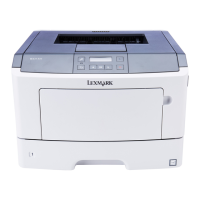
Lexmark M3150dn - User Manual

Lexmark M3150dn
196 pages
Print Icon
To Next Page IconTo Next Page
Loading...
M3150dn
User's Guide
December 2012 www.lexmark.com
Machine type(s):
4514
Model(s):
638

Table of Contents

Questions and Answers

  • S
    Savannah TuckerAug 29, 2025
    How to resolve 'Load [paper source] with [custom string] [orientation]' on Lexmark M3150dn Printer?
    • L
      Leslie RoblesAug 29, 2025
      To resolve the 'Load [paper source] with [custom string] [orientation]' message on your Lexmark printer: * Load the indicated tray or feeder with the correct size and type of paper. * Alternatively, cancel the current job.
  • J
    Jay GutierrezSep 4, 2025
    Why does my Lexmark M3150dn Printer display 'Complex page, some data may not have printed'?
    • D
      Dennis SmithSep 4, 2025
      The 'Complex page, some data may not have printed' message on your Lexmark printer indicates that the print job is too complex. Reduce the number and size of fonts, the number and complexity of images, and the number of pages in the print job.
  • A
    Amy LeeAug 28, 2025
    How to fix incorrect paper size error on Lexmark Printer [34]?
    • P
      Peter PetersAug 28, 2025
      To resolve the incorrect paper size error on your Lexmark printer, try these steps: * Load the correct size of paper in the tray. * From the printer control panel, press to clear the message and print using a different tray. * Check the tray length and width guides to ensure the paper is loaded properly. * Make sure the correct paper size and type are specified in Print Properties or the Print dialog. * Verify that the paper size and type settings are specified in the Paper menu on the printer control panel. * Ensure the paper size is correctly set. * If all else fails, cancel the print job.
  • J
    Jeffrey HernandezSep 22, 2025
    What does 'Insufficient memory to collate job [37]' mean on Lexmark M3150dn?
    • H
      Heather ThompsonSep 22, 2025
      If your Lexmark printer displays 'Insufficient memory to collate job [37]', you can: * From the printer control panel, press to print the portion of the job already stored and begin collating the rest of the print job. * Cancel the current print job.
  • J
    Julia TerrySep 23, 2025
    What does 'Weblink server not set up. Contact system administrator.' mean on Lexmark Printer?
    • A
      Andrea Brennan DDSSep 23, 2025
      If your Lexmark printer displays 'Weblink server not set up. Contact system administrator.', from the printer control panel, press to clear the message.
  • S
    Sandra WhiteSep 7, 2025
    What does 'Close front door' mean on Lexmark M3150dn Printer?
    • M
      Michelle PriceSep 8, 2025
      The 'Close front door' message on your Lexmark printer indicates that the front door of the printer is open. To resolve this, simply close the front door of the printer.
  • L
    Laurie LawrenceSep 12, 2025
    What does 'Cartridge very low, [x] estimated pages remain [88.xy]' mean for Lexmark M3150dn Printer?
    • J
      James LeeSep 12, 2025
      If your Lexmark printer displays 'Cartridge very low, [x] estimated pages remain [88.xy]', it means you may need to replace the toner cartridge very soon.
  • W
    william83Sep 18, 2025
    What does 'Error reading USB hub. Remove hub.' mean on Lexmark M3150dn Printer?
    • L
      Leah BrownSep 18, 2025
      If your Lexmark printer displays 'Error reading USB hub. Remove hub.', it means an unsupported USB hub has been inserted. Remove the USB hub, and then install a supported one.
  • E
    Eric AllenAug 26, 2025
    How to resolve 'Load Manual Feeder with [paper size] [orientation]' on Lexmark M3150dn Printer?
    • L
      Lori LyonsAug 26, 2025
      To resolve the 'Load Manual Feeder with [paper size] [orientation]' message on your Lexmark printer: * Load the feeder with the correct size of paper. * From the printer control panel, press to clear the message and continue printing.
  • R
    Ronald CobbAug 25, 2025
    How to resolve 'Load [paper source] with [custom type name] [orientation]' on Lexmark M3150dn?
    • S
      Samantha LambertAug 26, 2025
      To resolve the 'Load [paper source] with [custom type name] [orientation]' message on your Lexmark printer: * Load the tray or feeder with the correct size and type of paper. * From the printer control panel, press to clear the message and continue printing.

Summary

Safety Information

Laser Hazard Precautions

Warns about laser radiation exposure from controls or adjustments.

Printer Moving Safety Guidelines

Provides steps to avoid injury or damage when moving the printer.

Electrical Safety Warnings

Advises unplugging power and disconnecting cables for safety.

Learning About the Printer

Additional Printer Setup

Installing Printer Options

Covers internal options, controller board access, optional cards, memory, and hardware.

Network Setup and Verification

Guides on Ethernet/wireless setup and verifying network connection.

Loading Paper and Specialty Media

Paper Loading Procedures

Covers setting paper size/type, universal settings, standard bin, trays, and multipurpose feeder.

Printing

Printing Documents

Details the steps for printing a document from Windows and Macintosh.

Managing Held Print Jobs

Covers printing confidential, repeat, reserve, and verify jobs.

Understanding Printer Menus

Saving Money and the Environment

Saving Energy Features

Covers energy-saving features like Eco-mode, Sleep mode, Hibernate mode, and Quiet mode.

Securing the Printer

Maintaining the Printer

Replacing Printer Supplies

Details the steps for replacing the toner cartridge and imaging unit.

Managing the Printer

Printer Control Panel Security

Details creating a PIN to restrict access to printer control panel menus.

Clearing Jams

Preventing Paper Jams

Provides guidance on proper paper loading and handling to prevent jams.

Clearing Jams from Printer Areas

Provides specific instructions for clearing jams from various printer locations.

Troubleshooting

Printer Not Responding or Display Issues

Addresses common issues like the printer not responding or a blank display.

Printer Option and Tray Problems

Covers issues with internal options not being detected and tray malfunctions.

Paper Feed and Jam Issues

Discusses frequent paper jams, clearing jams, and persistent jam messages.

Notices

Lexmark M3150dn Specifications

General IconGeneral
BrandLexmark
ModelM3150dn
CategoryPrinter
LanguageEnglish

Related product manuals