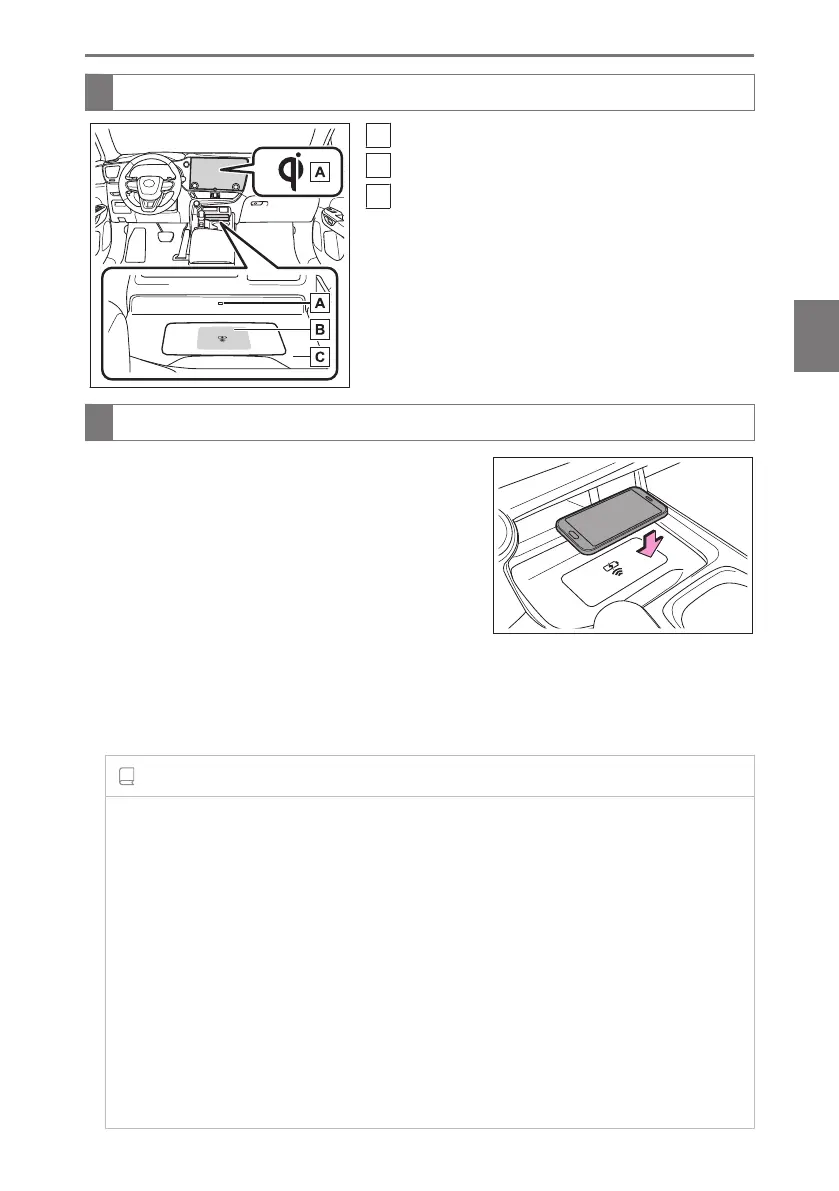
Names of the parts of the wireless charger
A
Operation indicator light
B
Charging area
C
Charging tray
Use the wireless charger
● Place a portable device on the charging tray.
Depending on the portable device, its charging coil
may not be in the center of the device. In this case,
place the portable device so that its charging coil is
centered in the charging area.
While charging, the operation indicator light on the
charging tray (orange) will be illuminated.
If charging does not begin, move the portable de-
vice as close to the center of the charging area as possible.
When charging is complete, the operation indicator light on the charging tray (green)
will illuminate.
INFORMATION
■ Recharging function
● If a certain amount of time has elapsed since charging completed and the portable
device has not been moved, the wireless charger will restart charging.
● If a portable device is moved significantly within the charging area, the charging coil
may disconnect and charging may temporarily be stopped. However, if a charging
coil is detected within the charging area, the charging coil inside the wireless
charger will move near the other coil and charging will resume.
■ Rapid charging function
Portable devices, such as the following, can be rapidly charged.
● Rapid charging capable devices which conform to WPC Ver1.2.4 EPP(Extended
Power profile)
4-5. Using the interior features
319
4
Interior features



 To Next Page