Lezyne Track is a way to share your ride information in real-time with friends, family,
or whoever you decide to include. They will be sent an email with a hyperlink that will
send them to a map showing your:
• Location
• Speed
• Distance
• And any sensor information that you are connected to
All you need is their email address to create a contact list and when you hit record on
the Lezyne GPS device a message will be sent letting them know you’re out on a ride.
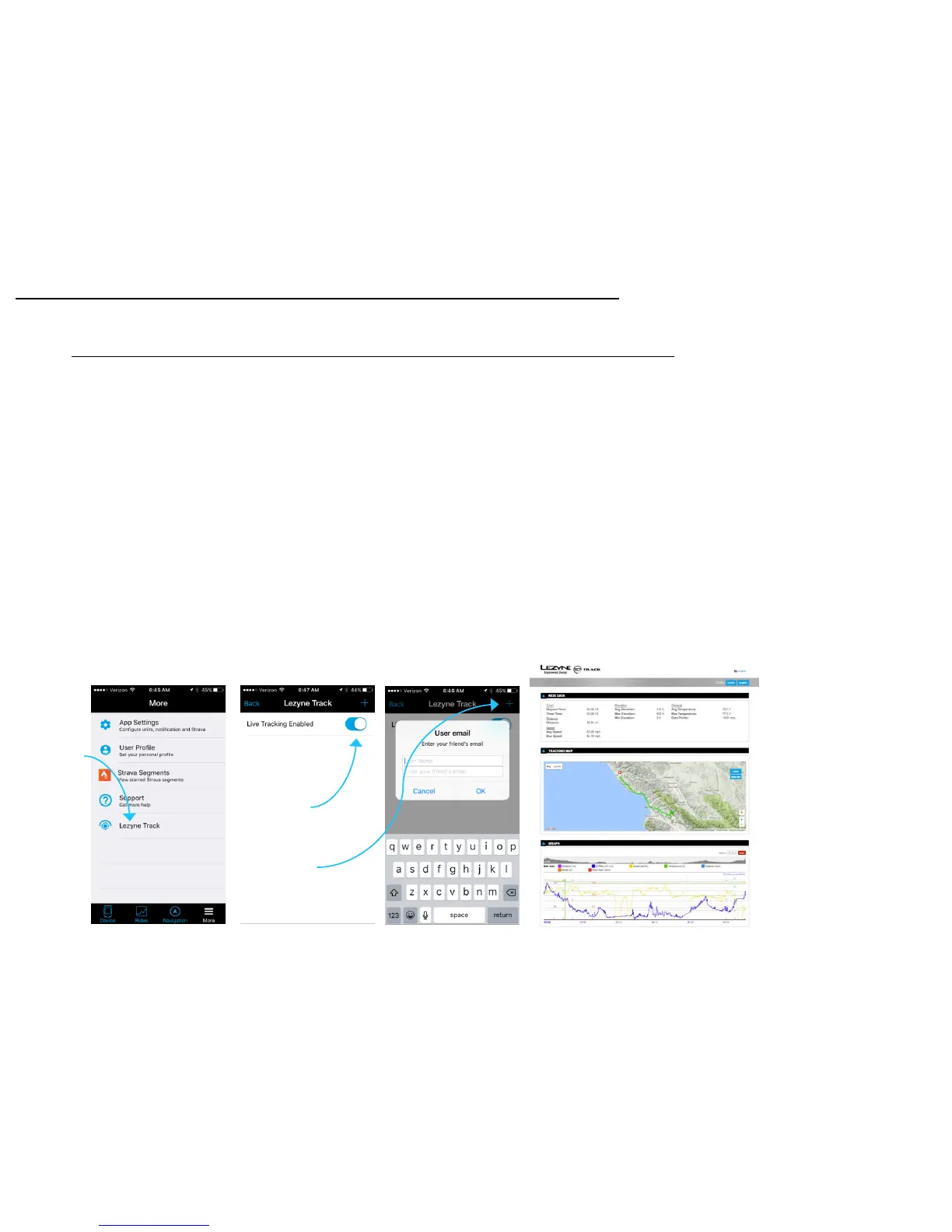
1. Download the Lezyne GPS Ally App v2.
2. Tap the More Tab in the Ally App to find Lezyne Track.
3. Turn on Lezyne Track.
4. Type in or search through your contacts to add people to your email contact list
5. Once you hit record on your Lezyne GPS a notice will be sent to the people in your
selected contact list.
Lezyne Track Set up
Lezyne Track
26
Tap to Enter
Feature
Tap to Turn
On and Enable
Create Email
Contact List



 To Next Page