36
ENG
ENGLISH
CUSTOMIZING SETTINGS
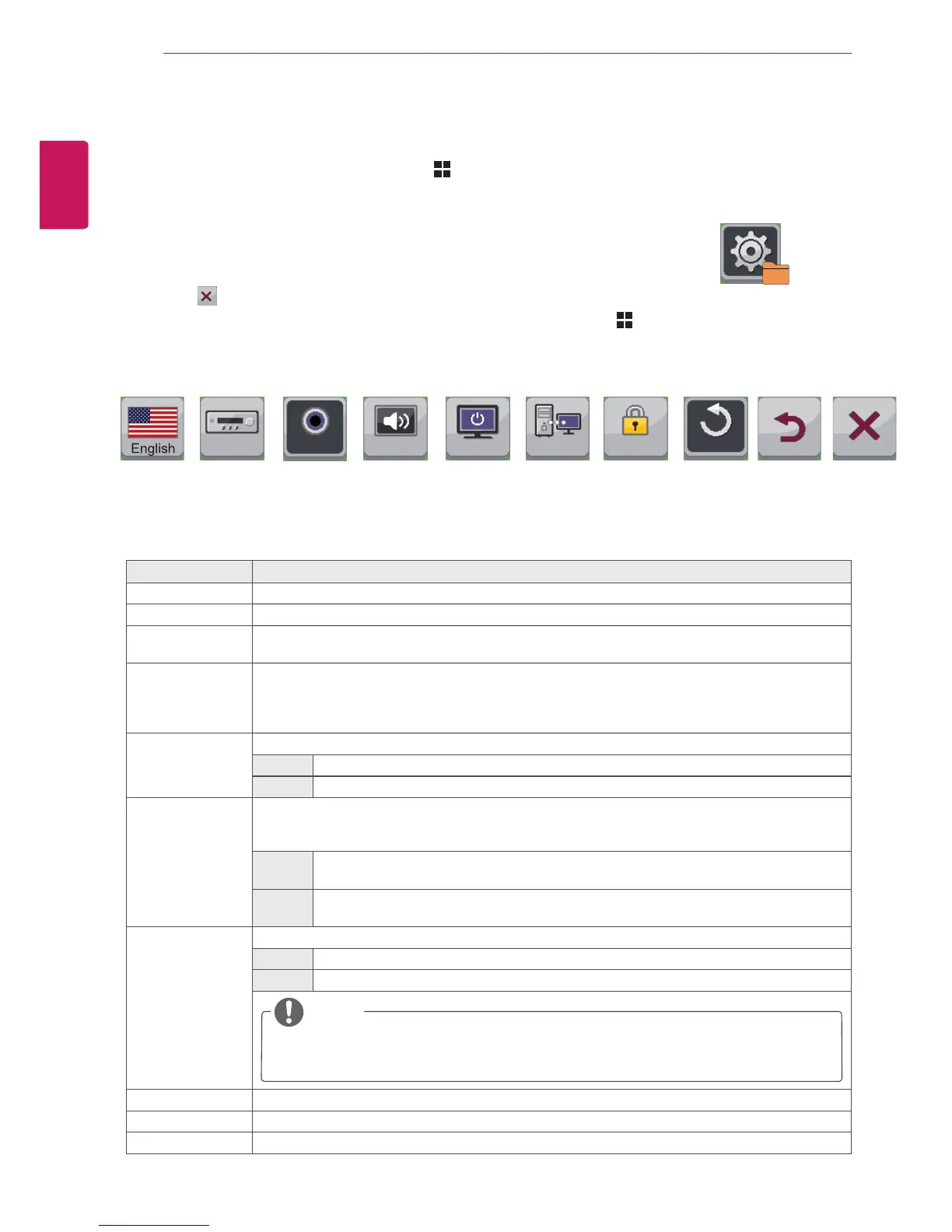
Settings
1
To view the Menu OSD, press the Menu ( ) button at the bottom of the monitor.
2
Press < or > to go to Settings.
3
Press OK to select Settings.
4
Use the < or > buttons to set the options.
5
Select to exit the OSD menu.
To return to the upper menu or set other menu items, use the Menu ( ) button.
Each option is described below.
Menu > Settings Description
Language Sets the menu screen to the desired language.
PC/AV Mode Enabled in HDMI mode only.
Main Audio The sound coming through the Audio In port of the digital input signal (HDMI, HDMI2/MHL, Display
Port) can be heard through the monitor's speakers.
Button Sound Controls the button tone.
The button tone is heard for the following actions.
DC Power On/Off
Menu OSD On/Off
Power LED Turns the power indicator on the front side of the monitor on/off.
On The power indicator is automatically turned on.
Off The power indicator is turned off.
DDC/CI This is the protocol for communications between the PC and the monitor. This allows the detailed
function adjustments and settings performed through the OSD menu on the monitor to be con-
trolled from the PC.
On Communication between the PC and the monitor allows you to adjust the monitor using
the PC.
Off The monitor cannot be controlled using the PC as the communication between the PC
and the monitor is disabled.
OSD Lock Prevents incorrect key input.
On Key input is disabled.
Off Key input is enabled.
Reset Resets the settings to default.
Back Moves to the previous OSD screen.
Exit Exits the OSD menu.
Settings
Sub Menu
Language
PC/AV
Mode
Button
Sound
Power LED
DDC/CI
OSD Lock
AV On On On Off
Settings
Reset Back Exit
NOTE
All functions except for the OSD Lock mode and the Exit button for Brightness, Contrast,
Volume, Input, and Settings are disabled.
Main Audio
Audio-In



 To Next Page