EasyManua.ls Logo

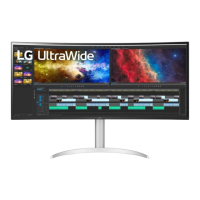
LG 38WR50MS - User Manual

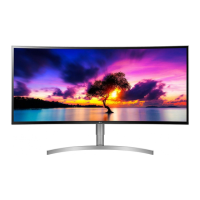
LG 38WR50MS
71 pages
Print Icon
To Next Page IconTo Next Page
Loading...
www.lg.com
OWNER’S MANUAL
MONITOR SIGNAGE
38WR50MS
Please read this manual carefully before operating your set and retain it
for future reference.
MONITOR SIGNAGE MODELS
ENG
ENGLISH

Table of Contents

Other manuals for LG 38WR50MS

Questions and Answers

  • G
    Gabriel JohnsonSep 14, 2025
    Why is the power indicator amber on my LG Digital Signage?
    • J
      Jacob RogersSep 14, 2025
      If the power indicator is amber on your LG Digital Signage, the product may be in power saving mode. Try moving the mouse or pressing any key. If that doesn't work, turn both the device and the connected device off and then back on.
  • M
    Megan OsbornAug 25, 2025
    How to fix the audio on my LG Monitor?
    • M
      martindiamondAug 25, 2025
      If the audio function on your LG Monitor isn't working, first check if the audio cable is connected properly. Then, adjust the volume settings and ensure the sound is set appropriately. You might also want to select the appropriate equalizer sound.
  • J
    Jerry BaxterAug 25, 2025
    Why is my LG 38WR50MS Monitor operation not working normally?
    • T
      Tammy BrownAug 26, 2025
      If your LG Monitor isn't operating normally, check if the sleep timer is set or review the power control settings. A power interruption could also be the cause.
  • A
    amydixonAug 26, 2025
    What to do if the screen image looks abnormal on my LG 38WR50MS?
    • Q
      qperezAug 27, 2025
      If the screen image looks abnormal on your LG Monitor when using a D-Sub analog signal, press the "AUTO" button in the remote control to automatically select the optimal screen status. If adjustment is not satisfactory, use the Position, Clock or Phase OSD menu. Ensure the proper input signal is connected to the signal port by connecting the signal cable that matches the source input signal.
  • J
    Jennifer PhillipsSep 14, 2025
    Why is the screen abnormally displayed on my LG Digital Signage?
    • Z
      zacharycollierSep 15, 2025
      If the screen is displayed abnormally, the proper input signal may not be connected to the signal port. Connect the signal cable that matches with the source input signal.
  • J
    John NicholsonSep 23, 2025
    How to fix poor color resolution on LG Digital Signage?
    • W
      Wendy JonesSep 23, 2025
      If the screen has poor color resolution (16 colors), set the number of colors to more than 24 bits (true color). In Windows, select Control Panel - Display - Settings - Color Table menu.
  • A
    Ann CampbellSep 7, 2025
    What to do if my LG Digital Signage displays 'No signal'?
    • J
      John SchultzSep 7, 2025
      If your LG Digital Signage displays a 'No signal' message, it could be due to a disconnected signal cable between your PC and the display. First, check the signal cable to ensure it is properly connected. If the cable is connected, press the 'INPUT' menu on the remote control to verify the input signal source.
  • J
    Jonathan FloydSep 8, 2025
    How to fix no sound on LG Digital Signage?
    • J
      jason02Sep 8, 2025
      If there is no sound on your LG Digital Signage, check the following: * Ensure the audio cable is properly connected. * Adjust the volume to an audible level. * Verify that the sound settings are configured correctly.
  • E
    Erik SmithSep 23, 2025
    Why do black spots appear on my LG Digital Signage screen?
    • B
      bmartinSep 23, 2025
      Several pixels (red, green, white or black color) may appear on the screen, which can be attributable to the unique characteristics of the LCD panel. It is not a malfunction of the LCD.
  • S
    Sandra WallerAug 31, 2025
    How to turn off key lock on LG Digital Signage?
    • C
      charlesgloverAug 31, 2025
      The 'Key Lock On' message on your LG Digital Signage indicates that the OSD settings are locked to prevent accidental changes. To unlock, go to Menu, then Option, and disable the Key Lock option.

Summary

ASSEMBLING AND PREPARING

USING THE MONITOR SET

PC Connectivity

Instructions for connecting a PC via RGB, DVI, HDMI, and Display Port cables, including notes and cautions.

Image and Sound Settings

How to select preset image modes, customize options, and select sound modes.

ENTERTAINMENT

USB Media Playback

How to connect USB devices, browse files, and lists supported file types for media playback. Includes cautions and tips.

Video Playback

Steps to play video files, control playback, adjust video options, and manage playback settings like subtitles and languages, including tips and notes.

Photo Viewing and Options

How to view image files, manage photos, use options like slideshows, music, rotation, and select transition effects for viewing.

Music Playback and Controls

Steps to play music files, control playback, adjust music options, and view the contents list with tips and notes.

CUSTOMIZING SETTINGS

Picture Settings

Detailed explanation of Picture settings including Aspect Ratio, Energy Saving, Picture Mode, PC display options, basic image adjustments, and advanced controls like Dynamic Contrast and Gamma.

Audio Settings

How to adjust Clear Voice II, Balance, Sound Mode, Infinite Sound, Treble, Bass, and Digital Audio Input.

Option Settings

How to set Language, Power Indicator, ISM Method, DPM Select, Fail Over, Factory Reset, Set IDs, PIP/PBP modes, Key Lock, and view Product/Service Info, including detailed PIP/PBP configurations.

MAKING CONNECTIONS

HDMI, DVI, and PC Connections

Instructions for connecting devices via HDMI, DVI, and PC (RGB, DP) cables, including notes.

LAN and USB Connections

How to connect to a network via LAN and connect USB storage devices for media playback.

TROUBLESHOOTING

Image and Operation Issues

Troubleshooting for no image, dark screen, invalid format, unknown product, key lock, abnormal screen color, and sudden power off.

SPECIFICATIONS

IR CODES

CONTROLLING THE MULTIPLE PRODUCT

SAFETY PRECAUTIONS

LG 38WR50MS Specifications

General IconGeneral
Screen Size38 inches
Resolution3840 x 1600
Panel TypeIPS
Aspect Ratio21:9
Brightness300 cd/m²
Color Gamut (Typ.)sRGB 99%
Contrast Ratio (Original)1000:1
HDRHDR10
VESA Wall Mount100 x 100 mm
ConnectivityHDMI, DisplayPort
Color Depth (Number of Colors)1.07 billion
SpeakerYes
Stand AdjustmentsTilt
Viewing Angle178° (horizontal) / 178° (vertical)
Response Time5ms (GTG)
Pixel Pitch0.229 mm

Related product manuals