Owner’s Manual 35
Operation
DVHS
DVHS
W
W How to play the DVHS
<TV>
<DVHS>
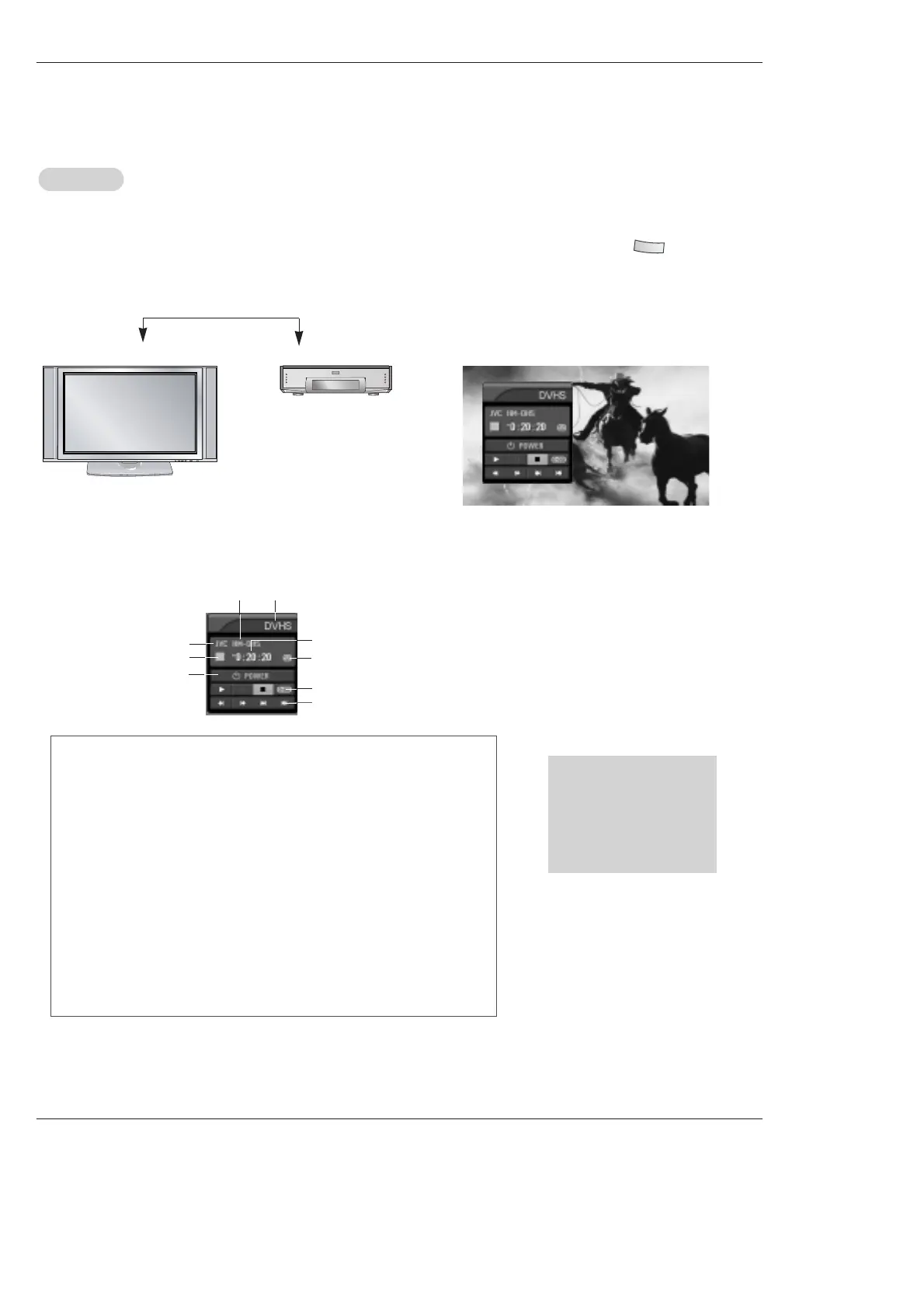
1. Connect the IEEE 1394 jack at the TV to the IEEE 1394
jack at the DVHS with IEEE 1394 Cable.
2. When watching the TV, press the button.
<Connect the IEEE1394 Cable>
• The control panel of DVHS
-Depending on the connected equipment, marked control panel may be different.
3
4
• Show the control panel of DVHS.
5
7
6
8
9
1
2
1. DVHS Model
2. Connected Equipment to the 1394
3. DVHS Company
4. DVHS Operating Status
5. Power On/Off
6. DVHS Play Time
7. Tape Status
• Tape shape Icon - Tape in or not
• Lock shape Icon - Writable or not
8. Initializing Play Time
9. DVHS Play, Pause, Stop, Search, Skip.
(Notes:
• Skip- This function is for a fast search. It searches the program’s start
Skip- point. On skipping, Search (
FF
,
GG
), Pause ( II ) and Play (
G
) are dis
Skip- played on the Control Panel. In some models, it’s not available to
Skip- operate the Skipping ( I
FF
,
GG
I ) function.
* Supported DVHS List
JVC(HM-DH40000K)
JVC(HM-DH40000U)
JVC(HM-DH5U)
MITSUBISHI(HV-HD1000)
PANASONIC(NV-DH2)
Notes:
• In case the DVHS have a incorrect recognition, the power cord of DVHS is completely pull out and then connect again.
• When searching the screen(
FF
,
GG
) , the DVHS may be strangely seen. And also the DVHS may late respond by devices.



 To Next Page