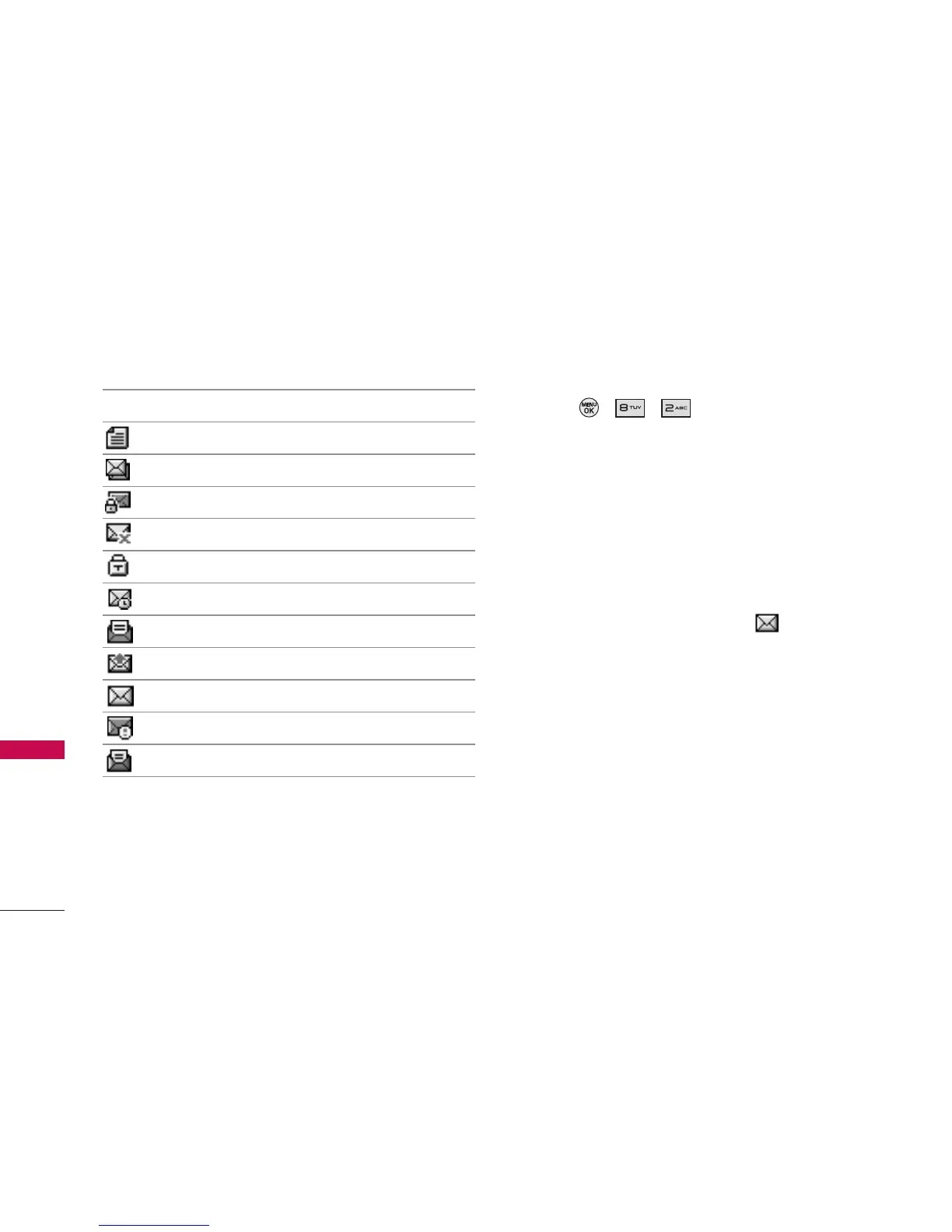
Message Icon Reference
Indicates a text message is saved as draft.
Indicates the text message is duplicated.
Indicates the text message is duplicated and locked.
Indicates a text message is failed in transmission.
Indicates the text message is locked.
Indicates the text message is pending.
Indicates a text message is read.
Indicates a text message is sent.
Indicates the text message is not read.
Indicates the text message is cancelled.
Indicates the read text message is urgent.
2. Text Messages
1. Press , , .
2.1 Inbox
The phone alerts you in 3 ways when you receive a
new message by:
Displaying a message notification on the
screen.
Sounding a beep, vibrating or sound, if set.
Displaying the message icon .
Received text messages, page messages, and e-mail
lists may be searched and the contents viewed.
Received messages are displayed from the newest
to the oldest.
Out of Memory Warning
If the memory is full, no more messages can be
received until enough memory space becomes
available. A disclaimer is displayed and new
messages are not accepted.
Messaging
36
Messaging



 To Next Page