6
Installing the Product
Installing on Wall
The electronic blackboard can be used in a wall-mounted format by securing it to a wall. To install it on a wall, first
attach a wall mount support (optional) to the back of the product body.
The wall mount support is a separate purchase and can be purchased from a nearby dealer. For more information
on installing a wall mount support, see the installation guide provided with your wall mount support purchase.
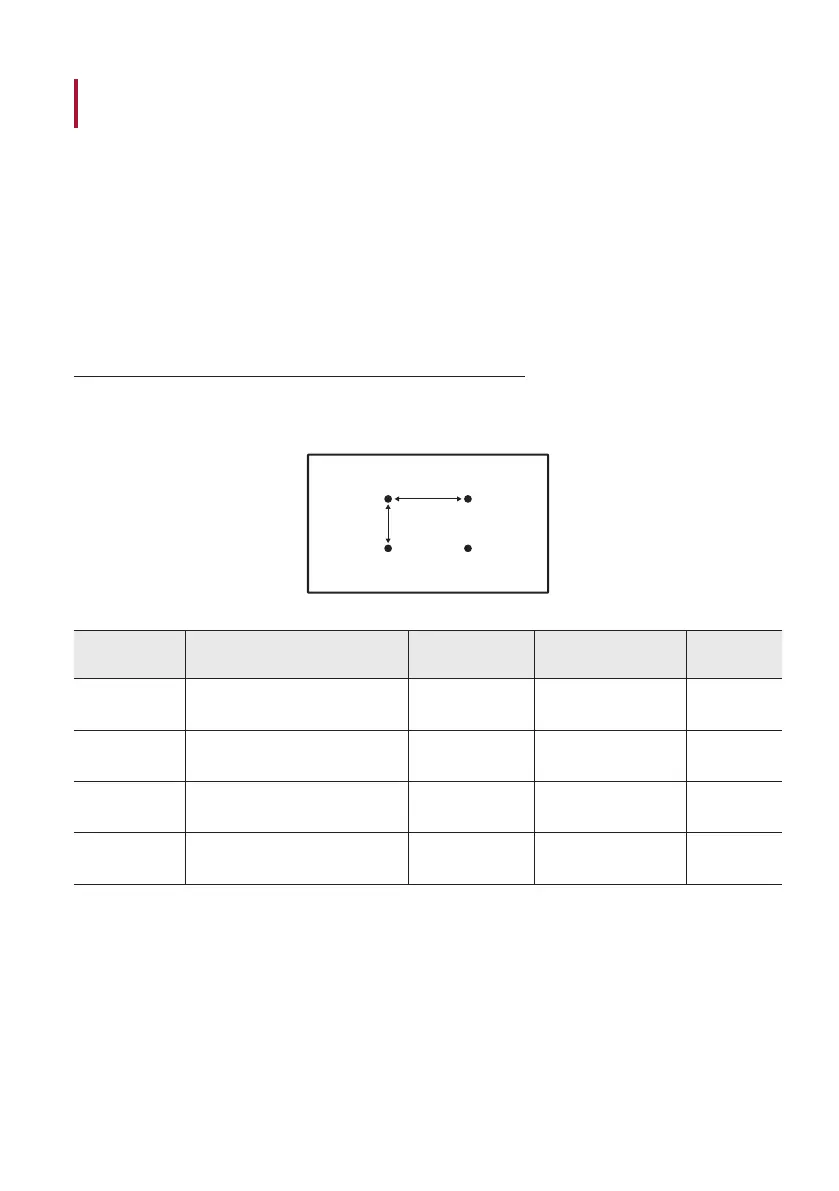
Checking Wall Mount Support Specifications
When installing a wall mount support, you must use screws and brackets that comply with VESA (Video
Electronics Standards Association) standard specifications.
A
B
Model Name VESA Dimensions (A x B) (mm)
Screw
Specifications
Maximum Length
(mm)
Quantity
55TR3DK-B
55TR3DK-I
400 x 200 M8 25 4
65TR3DK-B
65TR3DK-I
600 x 400 M8 25 4
75TR3DK-B
75TR3DK-I
800 x 400 M8 25 4
86TR3DK-B
86TR3DK-I
800 x 600 M8 25 4



 To Next Page