4 Operating
Operating32
Operating
4
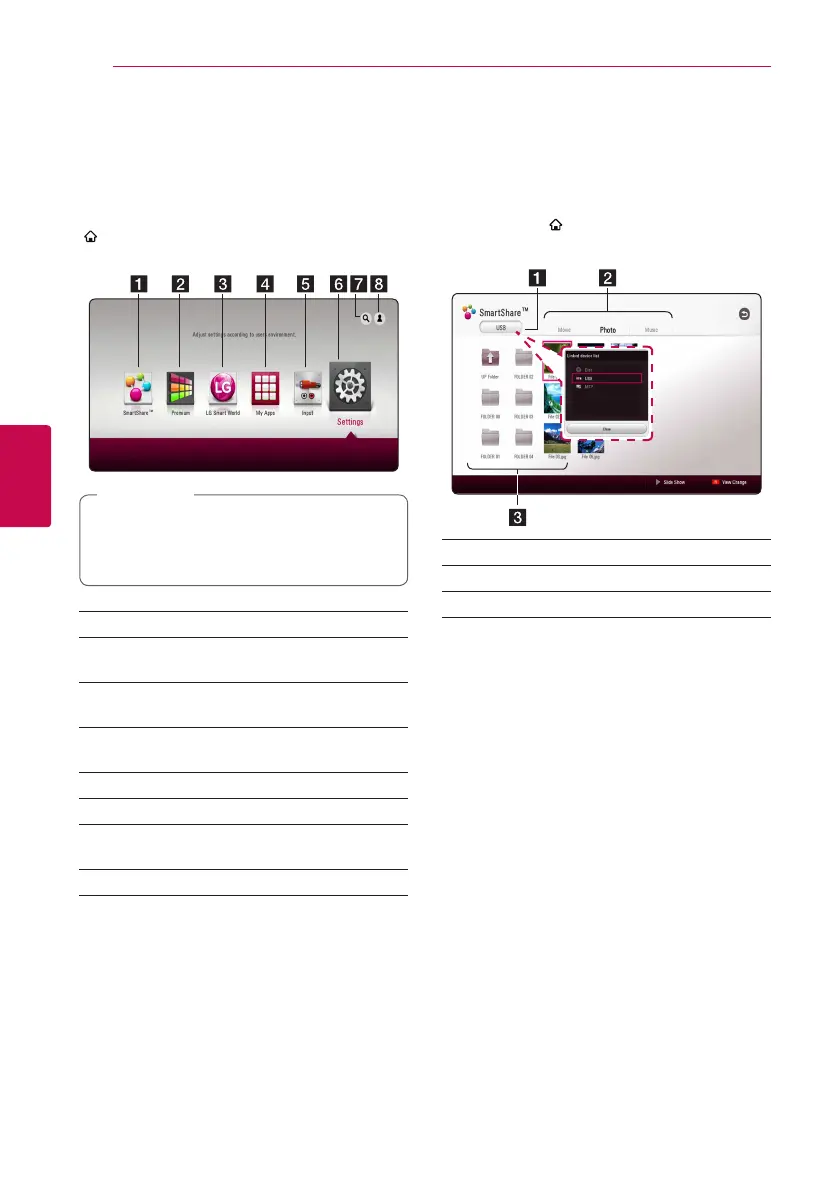
Home Menu Display
Using [HOME] menu
The home menu appears when you press HOME
( ). Use
W/S/A/D
to select a category and
press ENTER (
b
).
Depending on the region, the [LG Smart
World], [My Apps], [
4
] and [
3
] may not be
available.
,
Note
a
[SmartShare] - Displays SmartShare menu.
b
[Premium] - Displays the Premium home
screen. (page 51)
c
[LG Smart World] - Displays LG Apps titles
provided to the unit. (page 51)
d
[My Apps] - Displays the [My Apps] screen.
(page 53)
e
[Input] - Changes input mode.
f
[Settings] - Adjusts the system settings.
g
[
4
] - Searches for desired LG Apps and other
content.
h
[
3
] - Displays login menu.
Using the SmartShare
You can play video, photo and audio content on
the unit by inserting a disc, connecting an USB
device and Android device (MTP) or using home
network (DLNA).
1. Press HOME ( ) to display the home menu.
2. Select [SmartShare] and press ENTER (
b
).
a
Displays all linked devices.
b
Displays video, photo or audio content.
c
Displays the le or folder on linked device.


 To Next Page