Operating 35
Operating
4
Playing a file on android
device
yui
This player can play video, audio and photo les
contained in the Android device.
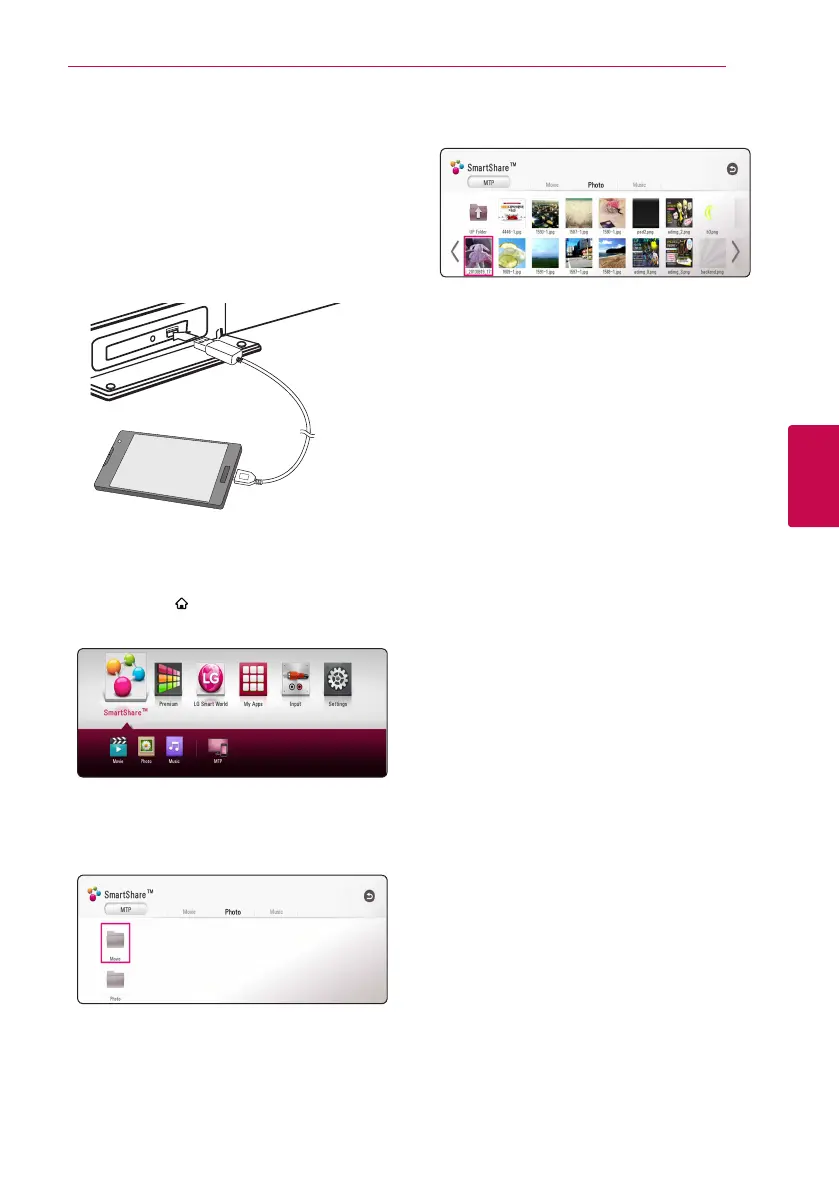
1. Connect the android device to the unit with
USB cable. Make sure that MTP is activated on
Android device.
2. Press HOME ( ).
3. Select [MTP] and press ENTER (
b
).
File loading may take few minutes depending
on the number of content stored in the Android
device.
4. Select [Movie], [Photo] or [Music].
5. Select a file using
W/S/A/D
, and press
d
(PLAY) or ENTER (
b
) to play the file.
Notes on Connecting android device
y
This unit can support only MTP (Media Transfer
Protocol) Android devices.
y
Do not extract the Android device during
operation (play, etc.).
y
Video, audio and photo les can be played. For
details of playing each le type, refer to the
relevant pages.
y
Regular back up is recommended to prevent
data loss.
y
If you use an USB extension cable, USB HUB or
USB Multi-reader, the Android device may not be
recognized.
y
Some Android devices may not work with this
unit.
y
When you use MTP, playing some music, photo,
movie, or subtitle les may not work depending
on the Android device.


 To Next Page