-34-
Copyright © LG Electronics Inc. All rights reserved.
Only training and service purposes
How to Disassemble, Reassemble and Repair Main Parts
※
Caution
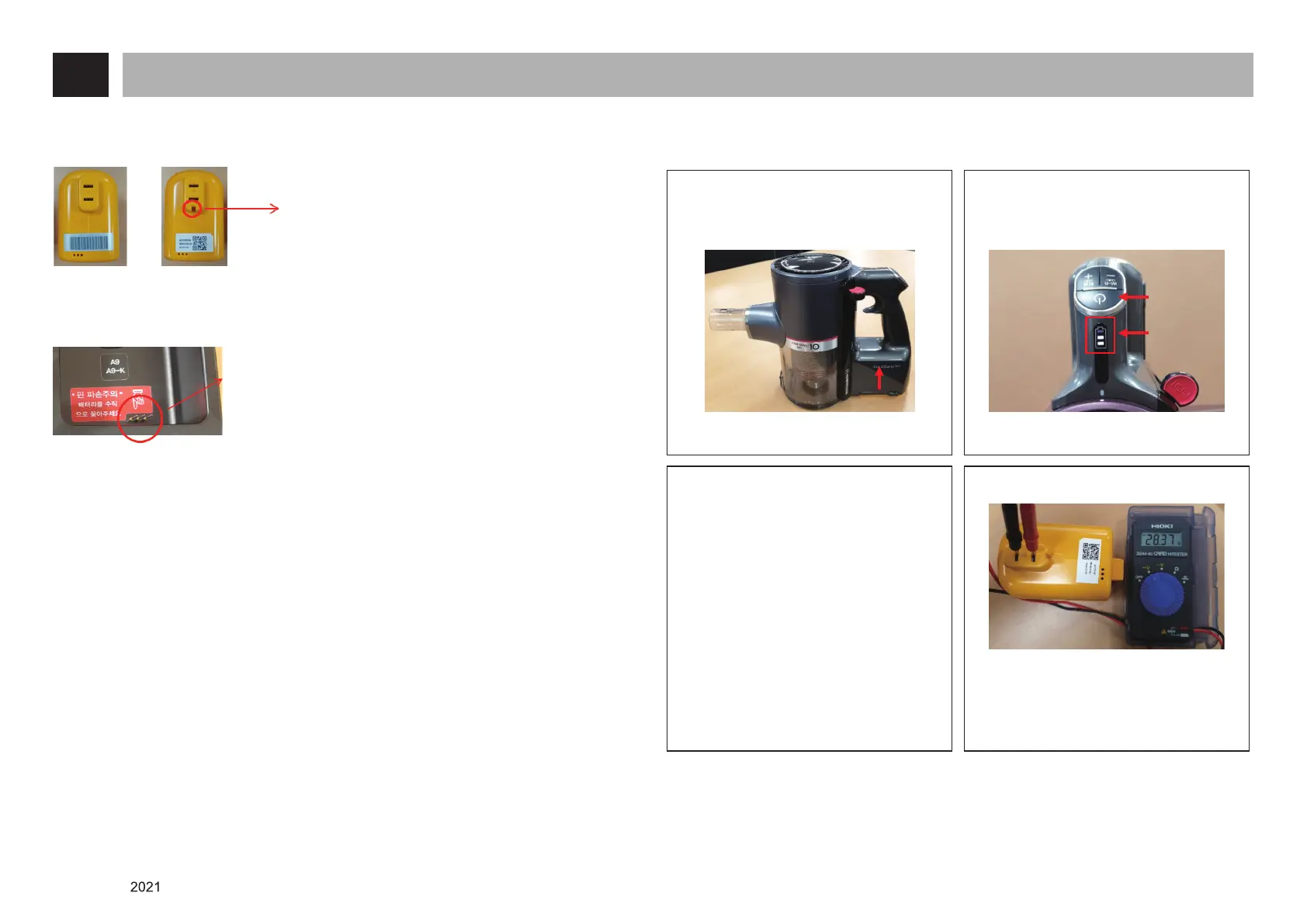
1. How to distinguish batteries
Distinguish
A9 / A9 –K by whether
there is a groove
A9 Battery A9 –K Battery
2. Be careful not to damage the communication pin when using a jig
Always mount the jig vertically
to avoid damaging the
communication pin.
13. How to Check If the Battery is Faulty without a Battery Jig
Insert the battery and confirm that
vaccume cleaner works properly
Insert the battery
1) Cleaner operation (O) → normal
battery
- LED lights 1 bar →
battery normal (requires charging)
- LED lights 2 bar →
battery normal (requires charging)
- LED lights 3 bar → battery normal
2) Cleaner operation (X) →
Measure the voltage of battery
- LED lights on (X) →
Measure the voltage of batter
Check the LED lights are on and the
vacuum cleaner is working properly.
Power
button
LED lights
<Battery voltage measuring>
1) 20.3 ~ 29.4 V : accepatable
2) 0 ~ 10.0V : defected
→ Replace the battery













 To Next Page