-83-
Copyright © LG Electronics Inc. All rights reserved.
Only training and service purposes
Failures and measures
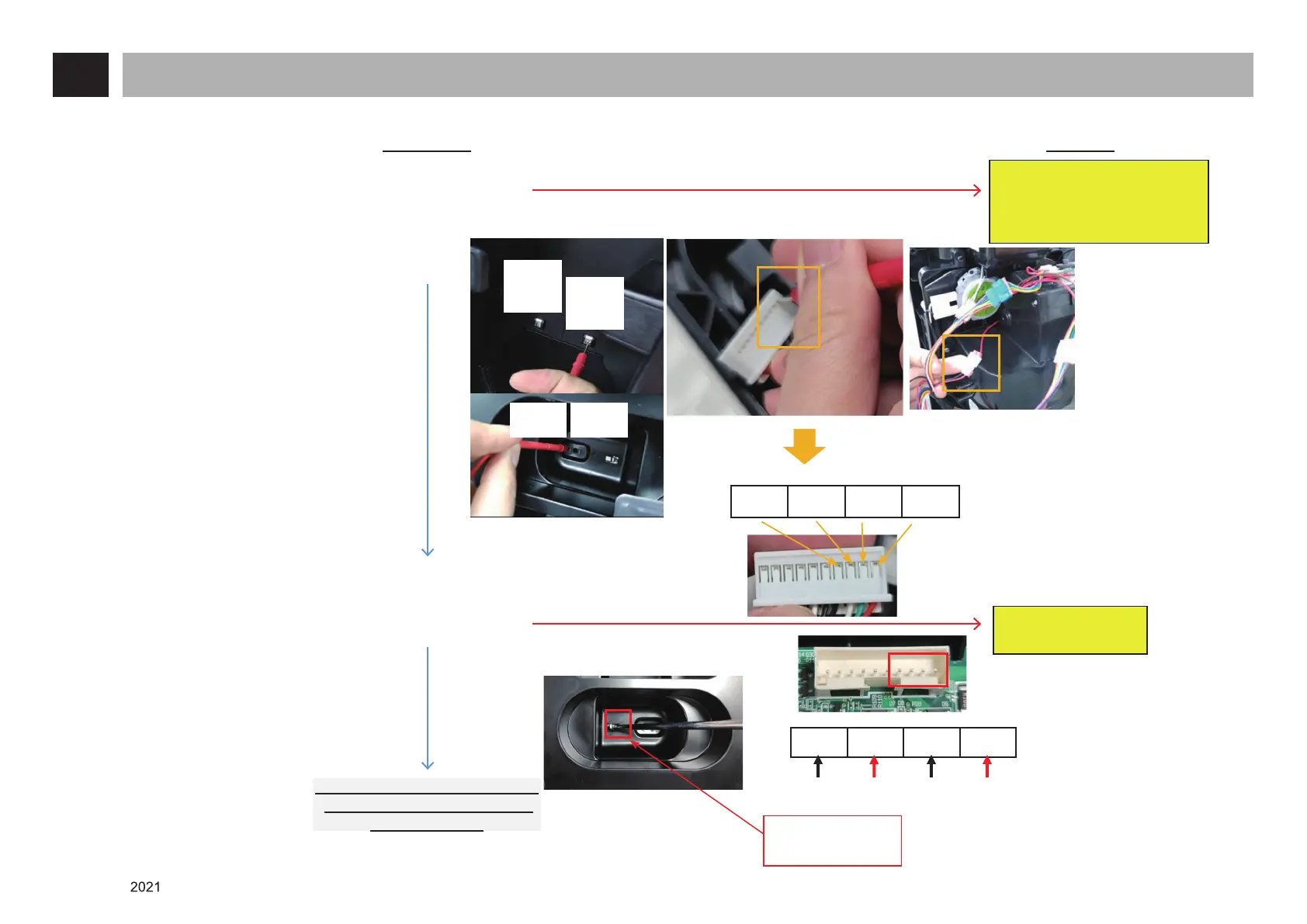
1. Charging failure (2/2)
Checkpoints Measures
Check the
PCBA
power.
Is the terminal harness in the
charging station normal?
(Check the end of the terminal
and the connector for short)
Is the output voltage
(28.1V or higher)
normal?
Check the product body of A9S.
(The battery for the A9 model
cannot be used)
Check the intermediate
connector and replace it if
it is abnormal.
Based on the opposite side of the
No. CN28 Connector hook
A voltage of between 4V and 6V is
normal when the product body is
not attached and a voltage of
28.1V or higher is normal when
the product body is attached.
A voltage of 28.1V
or higher is normal
when the Micro Switch on
the Auxiliary battery is
pressed.
Replace the harness.
(EAD65906902,
EAD65896510 (Auxiliary)
EAD65896507 (Product body)
Replace the Main
PCBA.
Product
body
+
Product
body
-
Auxiliary
-
Auxiliary
+
No
No
Yes
Yes
Auxiliary
-
Auxiliary
+
Product body
-
Product body
+
Auxiliary
-
Auxiliary
+
Product body
-
Product body
+













 To Next Page