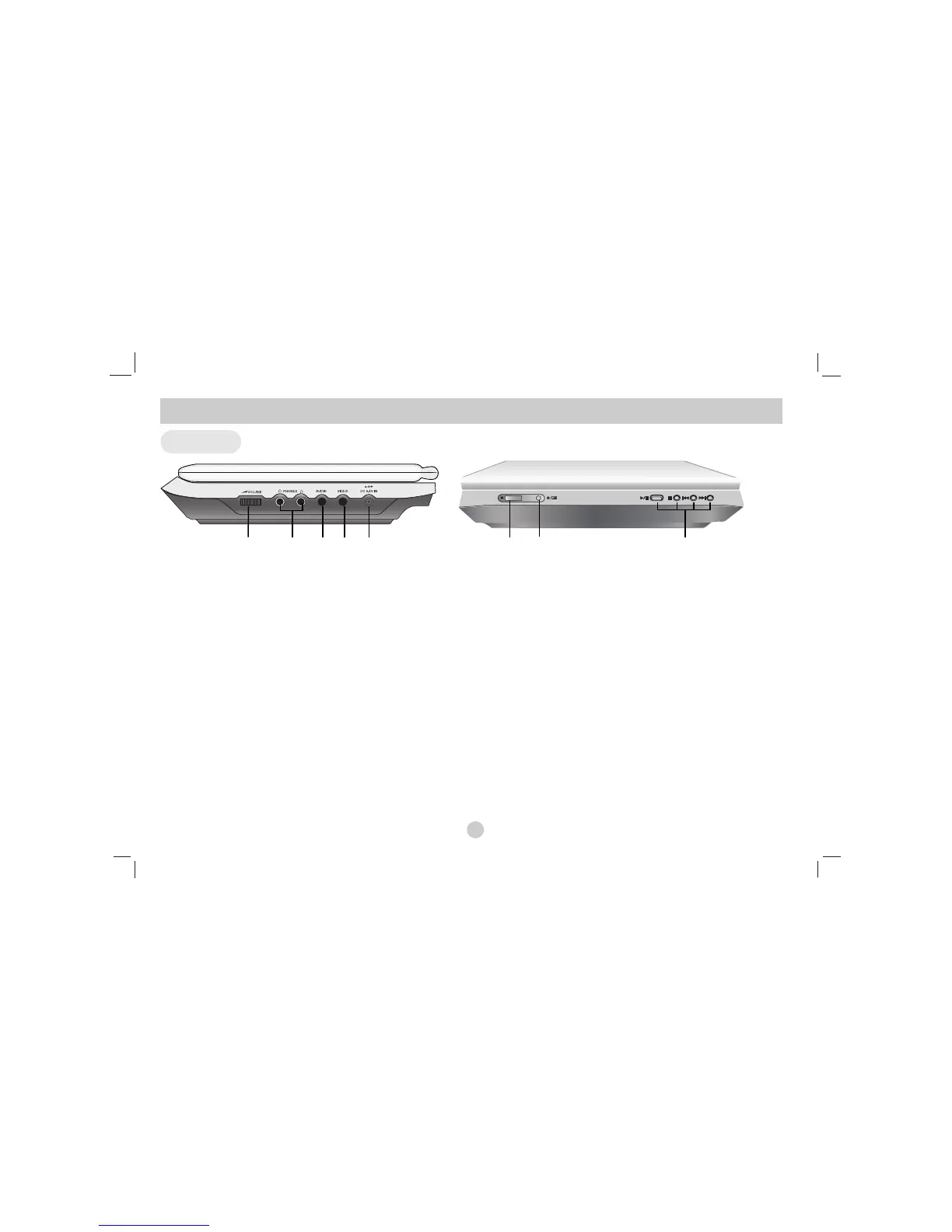
a Volume Control
b Earphone jack
c AUDIO In/Out jack (OPTICAL OUT)
d VIDEO In/Out jack
Note
If the VIDEO IN signal is not connected in AV IN mode, this unit
will automatically power off in 10 minutes to prevent battery dis-
charge.
e DC 9.5V IN
Connect the AC adapter.
f Remote sensor
Receive the signal from the Remote Control for operation.
g Battery charge indicator
Light turns red when the battery is in charging; turns green
when the battery is fully charged.
h • PLAY ( B/X ): Starts playback/ Pauses playback temporarily.
• STOP ( x ) : Stops playback.
• Reverse SKIP/SEARCH ( .)
Search backward*/ go to beginning of current chapter or
track or go to previous chapter or track.
• Forward SKIP/SEARCH ( >)
Search forward*/ go to next chapter or track.
* Press and hold button for about two seconds.
Main Unit
Identification of Controls (Continued)
8
abcde
fg h



 To Next Page