Connecting12
Connecting
2
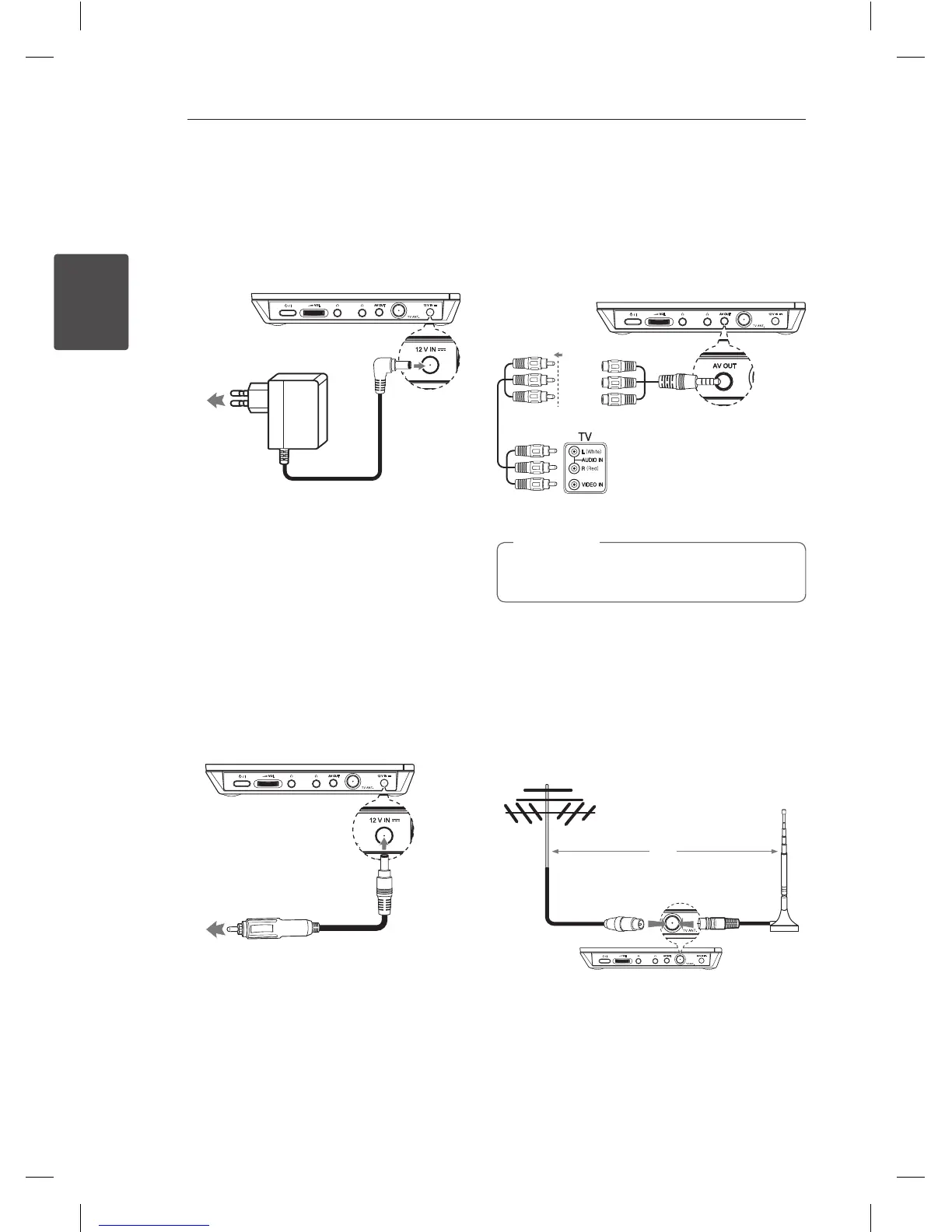
Connecting the AC
Adaptor
Connect the unit to the power supply with the
supplied AC Adaptor.
Plug into a
power source.
y
Contact an electrical parts distributor for
assistance in selecting a suitable AC plug adaptor
or AC cord set.
y
This AC adaptor is manufactured by I-MAG
ELECTRONICS(DONG GUAN) CO., LTD
Connecting the
Automotive Adaptor
Connect the unit to the Cigarette lighter socket
with the supplied Automotive Adaptor.
Plug into the car’s
cigarette lighter socket.
y
Contact an electrical parts distributor for
assistance in selecting a suitable Automotive
Adaptor.
y
This Automotive Adaptor is manufactured by
GRAND POWER ELECTRONIC TECHNOLOGY
(SHENZHEN) CO., LTD.
Connecting Audio and
Video cable
Connect the AV OUT on the unit to AV cable
connected from TV with the supplied AV Adaptor.
(White)
(Red)
(Yellow)
Audio/Video
Cable
(not supplied)
The signal does not come out from AV OUT
jack when the unit is set to [TV] mode.
,
Note
Connecting the TV
Antenna
For TV viewing, connect the TV antenna to the TV
ANT jack on the unit as shown below.
OR


 To Next Page