Operating20
Operating
4
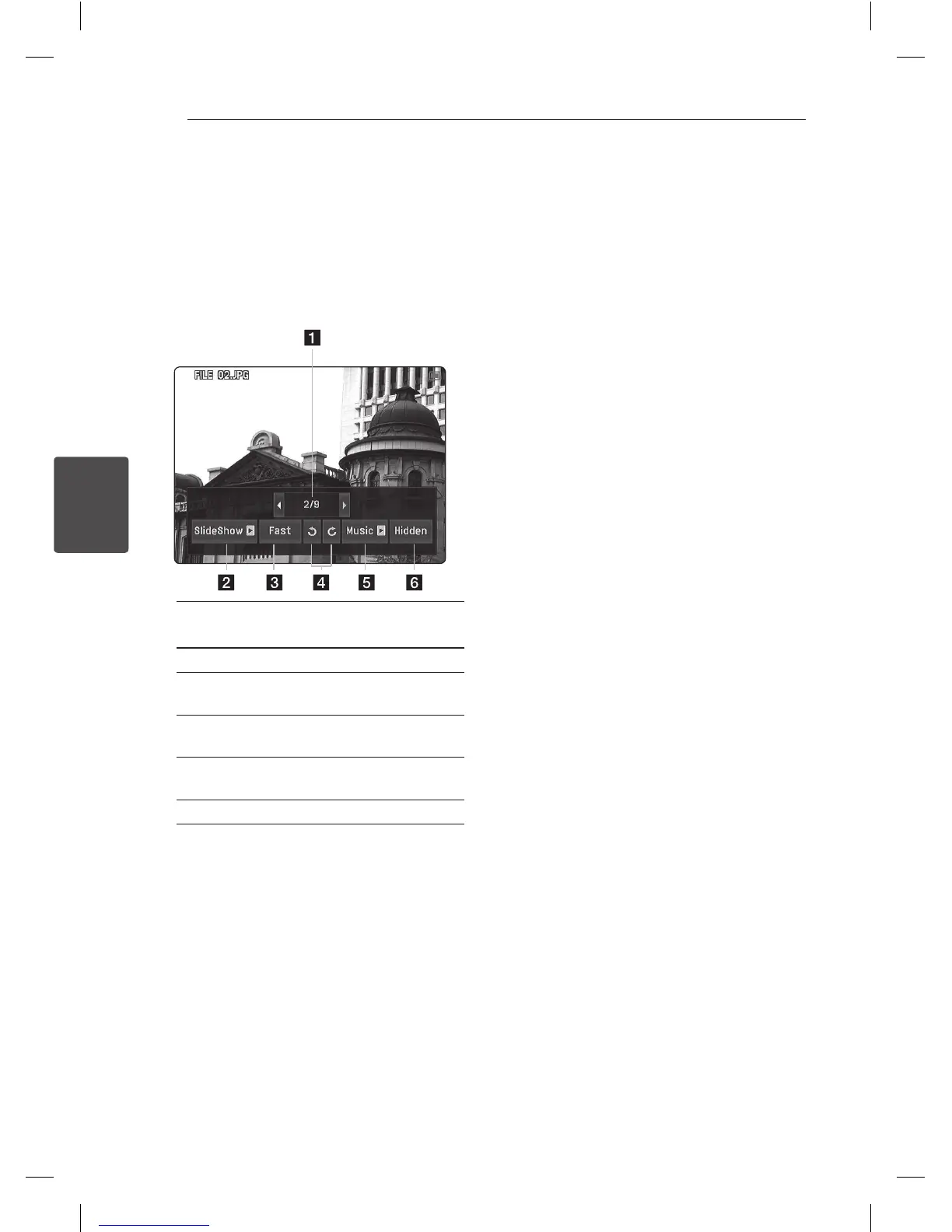
Options while viewing a photo
i
You can use various options during viewing a
photo in full screen.
1. While viewing a photo in full screen.
2. Select an option using
a/d
then press ENTER
(
b
).
a Select [
a
] or [
d
] then press ENTER (
b
) to
view previous or next photo.
b Starts or pauses the slide show.
c Selects a delaying speed between photos
in a slide show. (Fast / Slow / Normal)
d Rotates the photo clockwise or
counterclockwise.
e Starts or pauses the background music for
the slide show.
f The option menu disappears.
3. You can display or disappear the option menu
by pressing Q.MENU(
m
).
Options on the [MUSIC] menu
u
y
During playback a MP3 le, it displays the le
information. [Song, Album, Artist, Time progress
bar]
Depending on the MP3 les, information may
not be displayed on the screen.
y
Use
a/d
to move previous or the next page.
y
To go directly to any track or le and play, enter
the track/le number using the numbered
buttons (0-9).
y
During playback, it can toggle between music
list and playing mode with RETURN (
x
).



 To Next Page