DISASSEMBLY
- 9 -
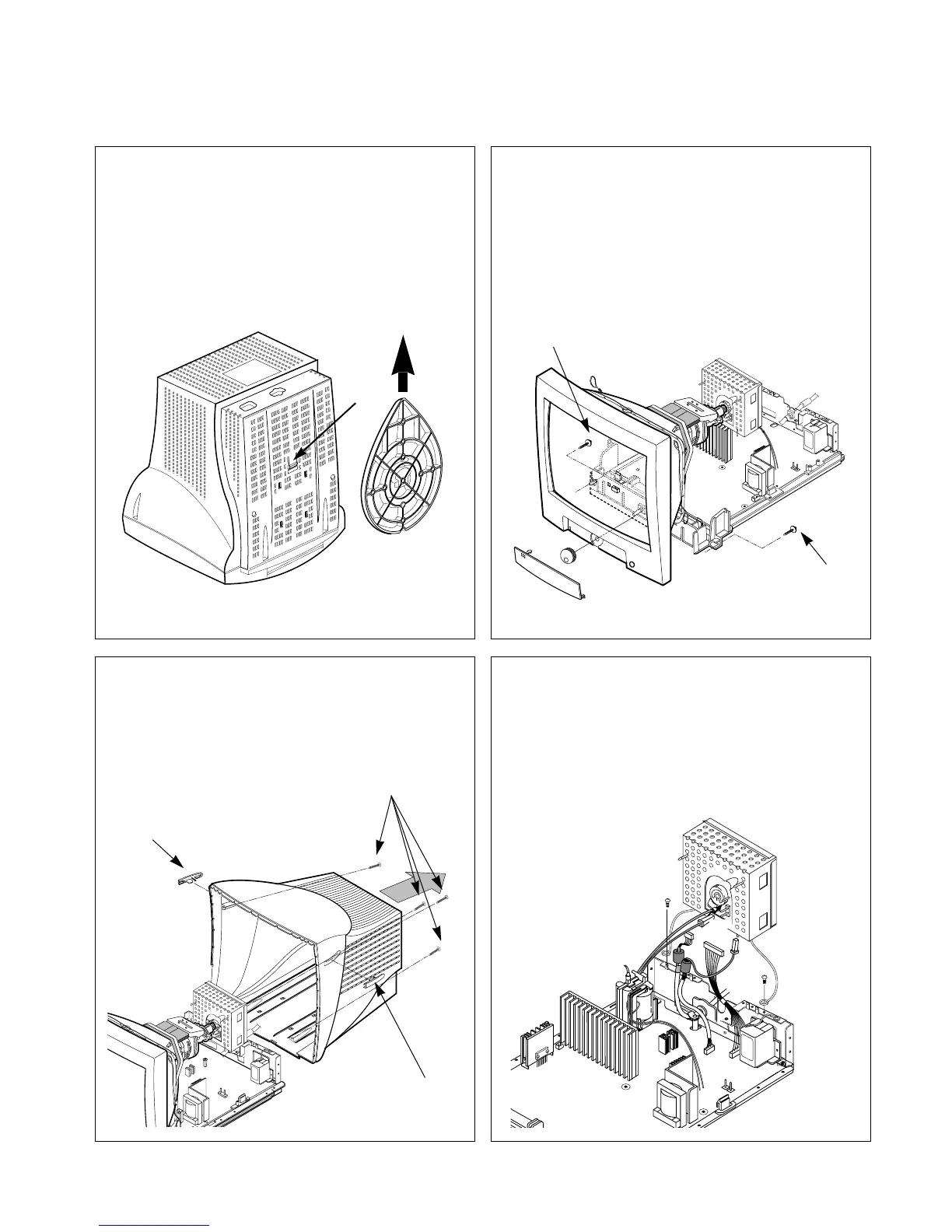
1. TILT/SWIVEL REMOVAL
1) Set the monitor face downward.
2) Pressing the latch (a), carefully remove the
Tilt/Swivel
by pulling it upward.
2. BACK COVER REMOVAL
1) Remove two screw caps (a).
2) Remove four screws (b).
3) Slide the Back Cover away from the Front
Cabinet of the monitor.
(a)
(a)
(b)
(a)
(a)
(a)
4. VIDEO PCB ASSEMBLY REMOVAL
1)
Disconnect P301, P302, P304 from the Video PCB.
2) Remove two screws (a) from the Total Chassis
Assembly.
3) Remove the Total Chassis Assembly.
(a)
(a)
3. TOTAL CHASSIS ASSEMBLY REMOVAL
1) Disconnect P902 (Degaussing pin), P701, P601
(DY pin), and P501(Tilt pin).
2) Remove two screws (a) from the Total Chassis
Assembly.
3) Remove the Total Chassis Assembly.



 To Next Page