41
PROGRAMMING MODE - SETUP MODE
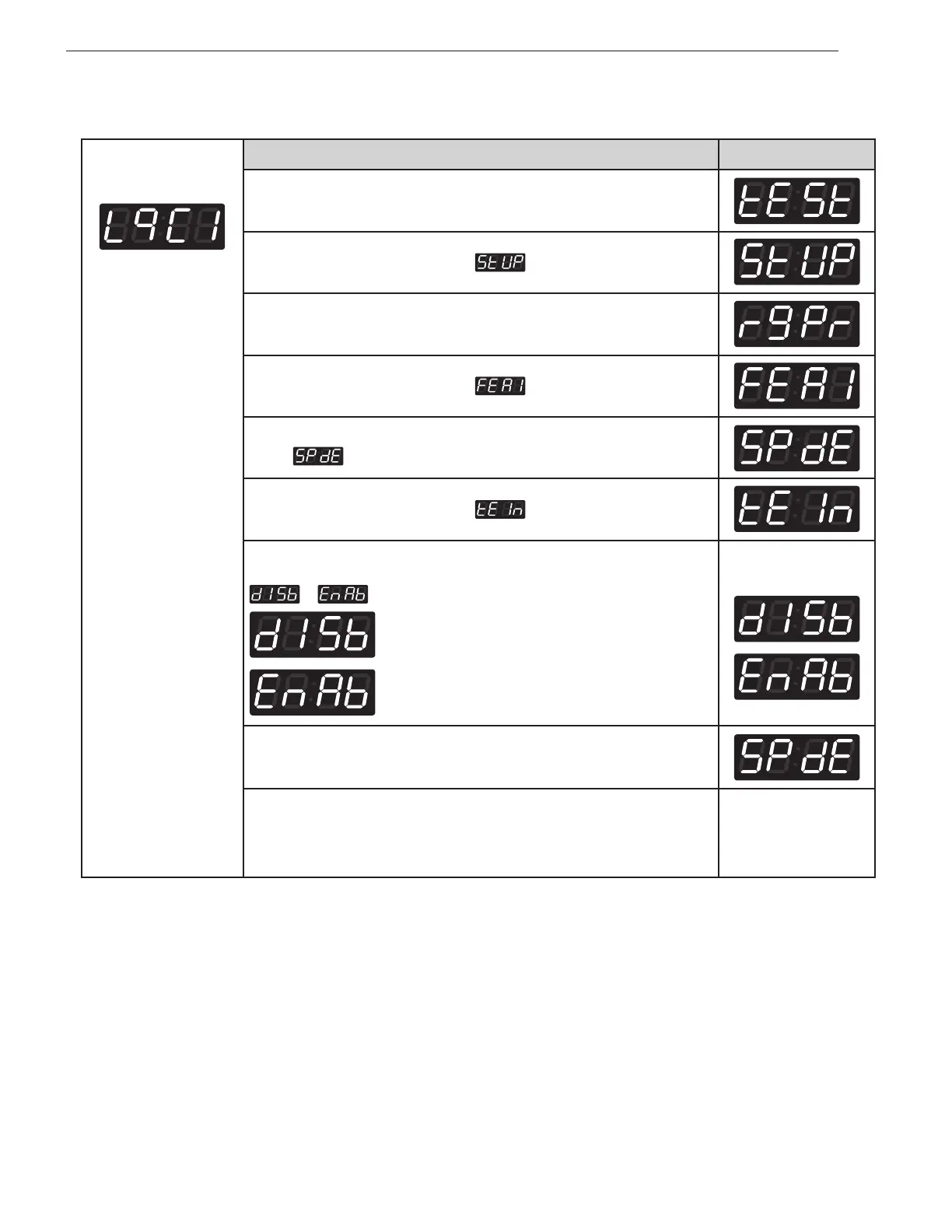
Entering set up mode.
You will see LqC1
Button Display
Press the
Hot
button.
Press the
Warm
or the
Cold
button until
appears in the display.
Press the
Start
button.
Press the
Warm
or the
Cold
button until
appears in the display.
Press the
Start
button.
Display
.
Press the
Warm
or the
Cold
button until
appears in the display.
Press the
Start
button.
Press
Warm
or
Cold
button and then select
or
.
Disable
Enable
One or the other will
display.
Press the
Start
button.
The machine sets up the pre-wash, then advances to the next process
automatically.
1. Continue to set up the next mode.
2. Stop the change of setup value and go back to ready mode.
• Coin type - Turn on/off toggle switch.
• Card type - Pull the service card.
• OPL type - Push the Hot button twice.
11-6. Twin spray set up



 To Next Page